Table of Contents
Copilot can turn a portrait into an ID-style image with a plain background and formal composition. That does not make the result valid for a passport, visa, driver's license, residence permit, or other government document. Official photo rules vary, and many authorities prohibit AI alteration or require an unchanged, true likeness.
For example, the U.S. Department of State explicitly says not to change a passport photo with software, apps, filters, or artificial intelligence. The safest choice for an official application is to follow the issuing authority's current instructions and use an original photo or approved professional service.
Use Copilot only for informal ID-style portraits
Appropriate uses can include a private profile mockup, internal directory image where policy permits, non-official badge concept, or a draft professional headshot. Confirm the recipient's rules before uploading an AI-edited portrait.
1. Open the image tool
In Copilot, select Imagine or the current image-creation area.
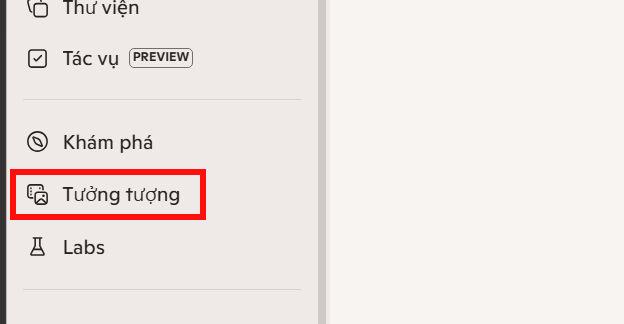
If an ID photo template appears, open it and select Upload image. Templates are product shortcuts, not certification that an output satisfies a government standard.
Choose a source photo with:
- a sharp, unobstructed face looking toward the camera;
- even lighting without harsh shadows;
- enough space around the head and shoulders to crop;
- no beauty filter, portrait blur, or wide-angle distortion;
- only the person whose image you have permission to upload.
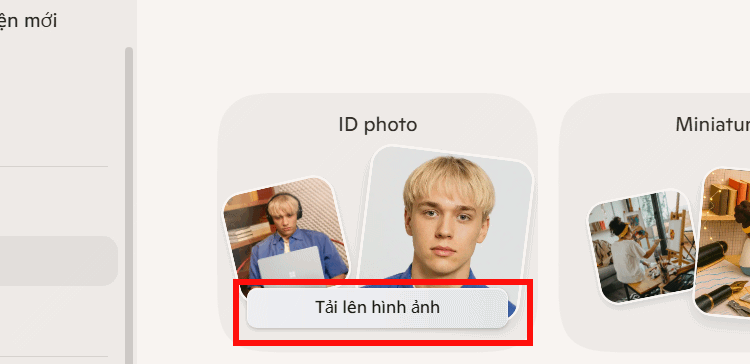
2. Compare the result with the original
After generation, inspect the original and edited versions side by side. Look for altered face shape, eyes, teeth, skin texture, hairline, ears, glasses, moles, or other identifying features. Generative tools may change details even when the prompt only requests a background or lighting adjustment.


If the image will identify a person, do not accept a version that changes their appearance. Use a conventional crop or background tool allowed by the recipient instead.
3. Create a profile headshot with a prompt
Copilot also lets you upload a portrait in its general image editor and describe the desired look. Use language that clearly limits the edit to an informal headshot:
Create an ID-style profile portrait for a non-government staff directory. Preserve the person's facial features, skin texture, hair, and expression. Use a plain light background, even neutral lighting, a centered head-and-shoulders crop, and no beauty retouching. Do not claim compliance with passport or legal ID standards.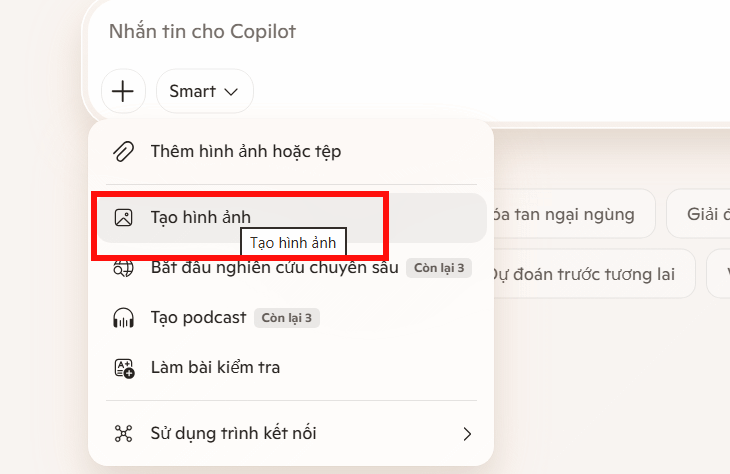
For a résumé or professional profile, state the intended use and avoid specifying a legal document size unless the recipient actually requires it:
Create a professional profile-photo draft from this image. Preserve the person's identity and expression. Use a simple neutral background, natural lighting, and a centered head-and-shoulders composition. Do not change clothing, facial structure, age, hair, or skin details.Even with these constraints, review the output closely; a prompt cannot guarantee faithful editing.

For a real passport or visa photo
- Open the official website of the issuing authority.
- Check the current dimensions, background, head position, expression, clothing, glasses, recency, and digital-editing rules.
- Take a new photo that meets those rules instead of transforming an older portrait.
- Use only the authority's approved crop or validation tool when one is provided.
- Keep the original file unchanged and submit the required version.
The U.S. rules require an original, unchanged image; see the official passport photo guidance. UK requirements likewise require a true likeness and reject facial enhancement; consult the UK passport photo standards. These examples do not replace the rules for another country or document.
Privacy and identity risks
A face photo is sensitive personal data. Before using Copilot, consider whether the employer, school, or issuing authority permits a cloud AI service, and review how uploaded files are retained. Do not upload another person's portrait without permission. Do not use the workflow to impersonate someone, create identity documents, defeat verification, or misrepresent an AI-generated image as an official photograph.
Better tools for professional portraits
For a non-official headshot, compare dedicated options in TipsMake's guide to AI portrait tools. For edits where fidelity matters, the AI photo editor comparison explains which tools focus on controlled retouching rather than full regeneration.
Bottom line
Copilot is suitable for experimenting with an ID-style profile image, not for certifying compliance. For any official ID, use a new, unaltered photo and the exact requirements of the authority that will review it.
Related Articles
 TOP AI Tools for Creating Professional Portrait Photos11 minutes read
 How to Take Portrait Photos on Android4 minutes read
 How to Take Portrait Mode Selfie Photos on iPhone X5 minutes read
 What Is Portrait Mode? What Is Portrait Lighting?5 minutes read
 How to Take a Photo in Portrait and Portrait Lighting Mode on7 minutes read
 Template for Creating Caricatures in Copilot8 minutes read
Reader Comments 0
Sign in with email or Google to join the discussion.