One useful feature that Nero offers is the ability to copy CDs/DVDs; however, not everyone knows how to copy CDs/DVDs properly and reliably. Refer to the following article from tipsmake to learn how.
Video Nero 2017 Platinum - Award-winning all-rounder
Instructions for copying CDs/DVDs using Nero
Prepare:
- Download and install Nero on your computer.
- Use a blank CD/DVD.
- Your computer must have a CD/DVD drive.
Step 1 : Download and install the software on your computer. If you don't have it yet, you can download the latest version here: Download Nero
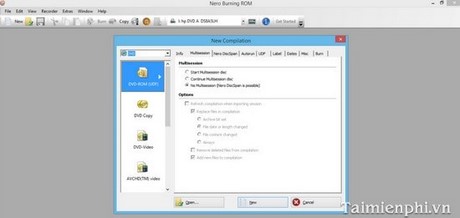
Step 2 : Open the Nero program. The interface will look like the image below.
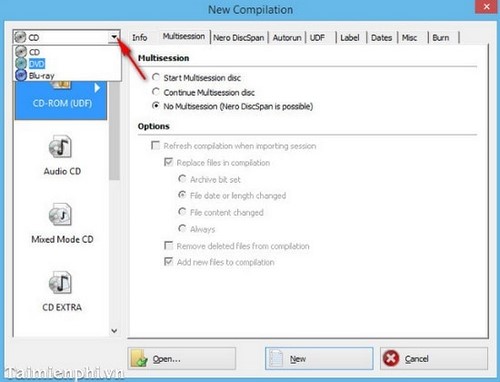
Step 3 : Look at the options in the upper left corner and select the type of disc you are using and want to copy, such as CD/DVD.
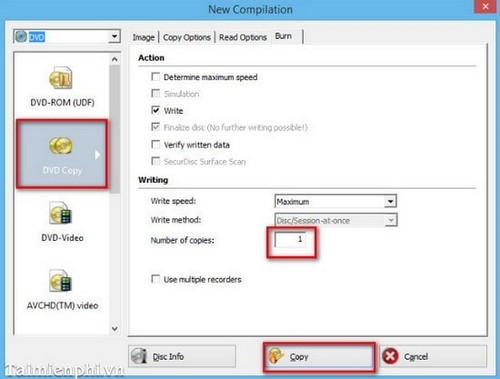
Step 4 : Once you've selected the disc type, look down and choose DVD copy (If you're using a DVD, select CD copy; the following steps are similar). Under Number of Copies, choose the number of CDs/DVDs you want to copy. There's also a Write Speed option that allows you to change the copy speed. It's best to leave it at the default setting. Then click and select Copy.
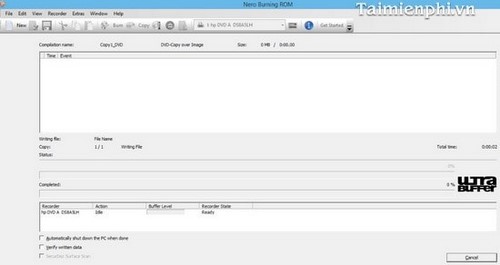
Step 5 : The process is starting, please wait a moment for the process to complete.

In this article, we have guided you on how to copy CDs/DVDs using Nero software. With these steps, you can quickly create copies for convenient sharing, learning, and entertainment. Additionally, if you want to burn discs using Nero, you can refer to our other article.
Related Articles
 How to Write Address in Nero3 minutes read
 How to Open Nrg Files5 minutes read
 How to Use Teracopy to Speed up File Copying5 minutes read
 How to Speed up the Process of Copying and Moving Data on USB3 minutes read
 Character Analysis Nero in Free Fire OB51: Complete Guide5 minutes read
 How to Fix Font Errors When Copying from PDF to Word4 minutes read
Reader Comments 0
Sign in with email or Google to join the discussion.