Table of Contents
This article examines Installing Windows XP in 2018 Is Like This. It presents the main facts, practical implications, and key points in a clearer, easier-to-follow format.
Understanding Installing Windows XP in 2018 Is Like This
Windows XP is obviously old and after it is no longer supported in April 2014, it is recommended to upgrade the OS to a newer version to receive security updates and patches.
But that doesn't mean everyone has to give up XP. Data from NetMarketShare in September said there are still 3.19% of computers in the world currently running Windows XP, which is quite impressive for an operating system that was killed four years ago.
Maybe you and the character in the article, for some reason, people still use Windows XP and finally realize the reason for installing this OS on an old computer for a 17-year-old daughter to use.
His laptop is a Fujitsu-Siemens Amilo Pro V2010, which uses an Intel Pentium M 725 processor with 1.6Ghz speed and DDR SDRAM of 512MB. Needless to say, choosing new operating systems like Windows 10 is not the best option because the configuration is too low. So, installing Windows XP is a test.
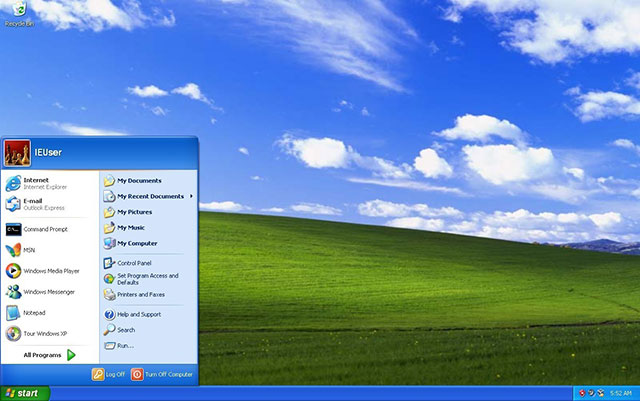 The old space of the operating system was more than 17 years old.
After more than 17 years in the market, Windows XP still installs and runs. Follow his personal experience, the responsiveness of the device as well as Windows 10 on the Surface Book despite the differences in features.
The device runs pretty fast, the application opens in seconds, what is needed can still be found and used. For example, Firefox has released ESR that still works on Windows XP, or you can try Vivaldi 1.0 even if it is no longer supported for updates. There are also media player software, email, security software.
However, it must be said that in addition to the benefits of being used in such a closed and simple environment, Windows XP is not suitable for other purposes. Because it is not updated, security patch, this OS is easy to be targeted by hackers and it is very easy to hack. Perhaps it is more appropriate to use offline, text editing or watching music videos, not to the internet.
 Basic software can still be used
Perhaps Windows XP doesn't have as many features as the new version of Microsoft, but for many people, the new and old simplicity is essential. Do you have an old computer that is missing? Try bringing it out and installing Windows XP to use it.
- 2018 already, using Windows 7 should I upgrade to Windows 10?
- Microsoft launched a video reminding Windows 7 "death" and advised users to upgrade to Windows 10.
- Unable to handle "dead blue screen", Microsoft stopped supporting Windows 7 running on some outdated CPUs.
FAQ
What is the main point of Installing Windows XP in 2018 Is Like This?
Windows XP is obviously old and after it is no longer supported in April 2014, it is recommended to upgrade the OS to a newer version to receive security updates and patches. But that doesn't mean everyone has to give up XP.
Why is Installing Windows XP in 2018 Is Like This important?
Installing Windows XP in 2018 Is Like This matters because it can affect how readers understand, choose, use, or respond to the subject discussed in the article.
What should readers verify about Installing Windows XP in 2018 Is Like This?
Check the date, product or software version, compatibility, and any current guidance before acting, especially when technology, security, health, or pricing is involved.
Related Articles
 What Are Screensavers: How to Installing Screensavers on Windows6 minutes read
 6 Things to Do After Installing Windows 107 minutes read
 Steps to Bypass TPM 2.0 Requirement When Installing Windows4 minutes read
 Installing Node.js Internally: Instructions for Installing4 minutes read
 How to Fix Utorrent Error Not Installing on Windows8 minutes read
 How to Install Windows 7 Codec Pack Without Errors4 minutes read
Reader Comments 0
Sign in with email or Google to join the discussion.