Table of Contents
This guide provides a clear, practical overview of free tool to help you install Windows 11 without TPM, with useful context, important details, and straightforward takeaways for everyday readers.
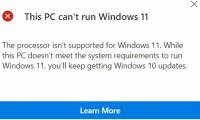
Recently, GitHub developer AveYo has created a tool that allows you to install Windows 11 without regard to minimum hardware requirements and TPM. In fact, Universal MediaCreation is the tool that AveYo created a long time ago. However, he recently added a script to help it support Windows 11 and bypass the hardware requirements of the new operating system.

According to AveYo's update, the new version of Universal MediaCreation can:
- Bypass TPM Check on the installer via winpeshl.ini file.
- Bypass TPM Check on dynamic update
When executed, the new script added to Universal MediaCreation will create a value named "AllowUpgradesWithUnsupportedTPMOrCPU" in the Registry key "HKEY_LOCAL_MACHINE/SYSTEM/Setup/MoSetup" and set it to 1 or true. The script also deletes the evaliserres.dll file.
BleepingComputer's testing shows that running the script makes it possible for an unsupported computer to upgrade to the Dev channel buld 22463 from build 22449. Previously, this computer was refused to upgrade because it did not meet the hardware requirements. minimum.
Currently, the Universal MediaCreation tool is being provided by AveYo for free on GitHub.
Before downloading and using Universal MediaCreation you need to be aware that this is a third party tool. Use it on your computer at your own risk. To be on the safe side, you should test it on a virtual machine first.
Good luck!
Key Takeaways
Use the information above as a practical reference for free tool to help you install Windows 11 without TPM. Review each step carefully, confirm any requirements, and choose the option that best fits your situation.
FAQ
What does this guide explain about Free Tool to Help You Install Windows 11 Without TPM?
It explains the main concepts, practical considerations, and useful steps related to free tool to help you install Windows 11 without TPM without requiring advanced knowledge.
Who can benefit from learning about Free Tool to Help You Install Windows 11 Without TPM?
This information is useful for readers who want a clear overview, practical guidance, and reliable steps related to free tool to help you install Windows 11 without TPM.
What should I check before applying this information?
Review the requirements, confirm that your device, software, or situation matches the instructions, and back up important data before making major changes.
Related Articles
 Minimum Hardware Requirements for Installing Freebsd4 minutes read
 Bypass Windows 11 Minimum Installation Requirements: Step-by-Step Guide8 minutes read
 How to Create Windows 11 Installation USB for Computers That6 minutes read
 Microsoft Details Hardware Requirements After Upgrading Unsupported3 minutes read
 Microsoft Continues to Raise Hardware Requirements Windows4 minutes read
 How to Get Windows 11 Dev Builds in Case Your PC Doesn't4 minutes read
Reader Comments 0
Sign in with email or Google to join the discussion.