Table of Contents
The Gboard app is getting a lot of new features. One of the latest features Google has added is the ability to use AI on your phone to help you compose text. All processing is done on your device using the Gemini Nano, so you don't have to worry about privacy. Here's how to use the Gboard AI writing tool.
How to use AI writing tool on Gboard
Open the Gboard keyboard, then type as usual and highlight the content. Next, tap the AI icon as shown.
You will now see options to rewrite your content in different styles. You select the writing style you want to use and the AI tool will change the writing to that style.
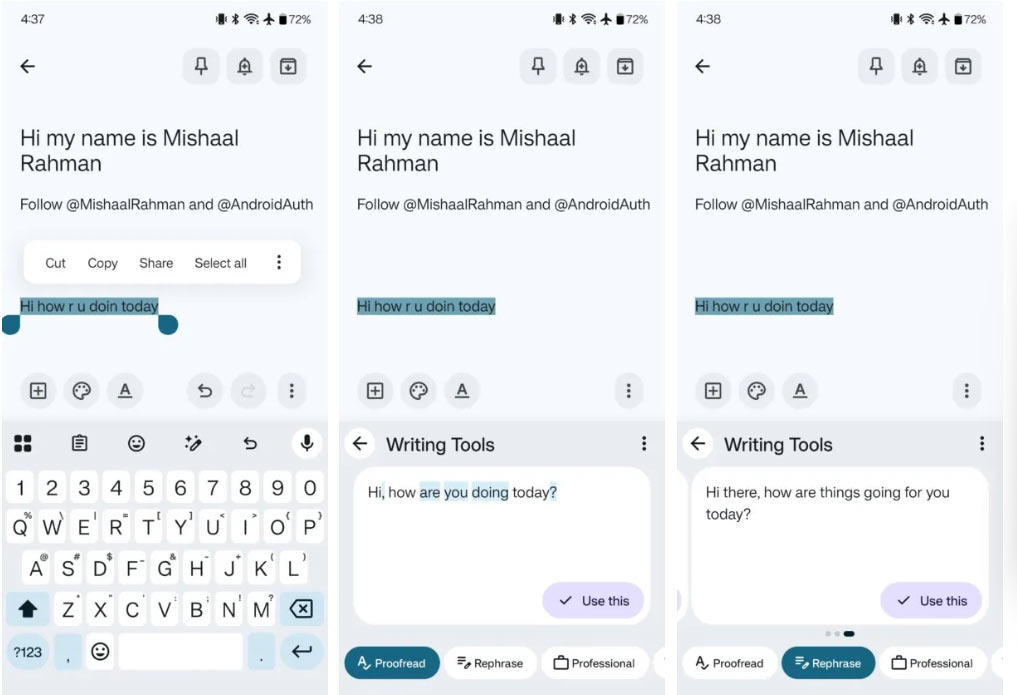
Ai writing tool on Gboard is currently available on Pixel 9 and later and supports English, Chinese, French, Italian, Japanese, Korean, Portuguese, and Spanish.
Final Thoughts
Following the steps in order and checking version-specific settings should make it easier to Use Gboard AI Writing Tool. If an option looks different, verify the device, app, or operating-system version before changing additional settings.
FAQ
What is the best way to Use Gboard AI Writing Tool?
Start with the requirements described in the article and follow the steps in order. The Gboard app is getting a lot of new features. One of the latest features Google has added is the ability to use AI on your phone to help you compose text. All processing is done on your device using the Gemini Nano, so you don't have to worry about privacy.
What should you know about How to use AI writing tool on Gboard?
Open the Gboard keyboard, then type as usual and highlight the content. Next, tap the AI icon as shown.
What should you do if the instructions do not match your screen?
Check the device, software version, account permissions, and regional settings. Interfaces can change after updates, so use the closest matching option and consult the official support documentation when necessary.
Related Articles
 4 Useful Gboard Tips to Make Typing on Android More Enjoyable8 minutes read
 You Can Draw Your Own Emoji on Gboard Right Now5 minutes read
 Complete How to Use Google Gboard Keyboard on iPhone, iPad5 minutes read
 How to Create Sticker from Selfie Image with Gboard7 minutes read
 How to Use AI Writing Tools on TeraBox3 minutes read
 How to Create GIFs Using Gboard Keyboard on iPhone: Step-by-Step Guide4 minutes read
Reader Comments 0
Sign in with email or Google to join the discussion.