Table of Contents
This practical guide walks through how to unlock 90 FPS and 120FPS on speed war, explains the main requirements, and highlights common issues that may appear along the way.
1. Prepare
Android devices with high screen refresh rates (phones, tablets) with a frequency of 90Hz or 120 Hz.
- EZ File Explorer or X-plore File Manager file explorer application. In the article I used the tool X-plore File Manager.
Download link at here
2. How to do it
Step 1: Open the X-plore application. Next, you access the Shared Internal Storage (1) => Android (2) => Data (3) => com.riotgames.league.wildriftvn (4).

Next, you go to SaveData (5) => Local (6) => 3952562052072283726 (7) => Setting (8).
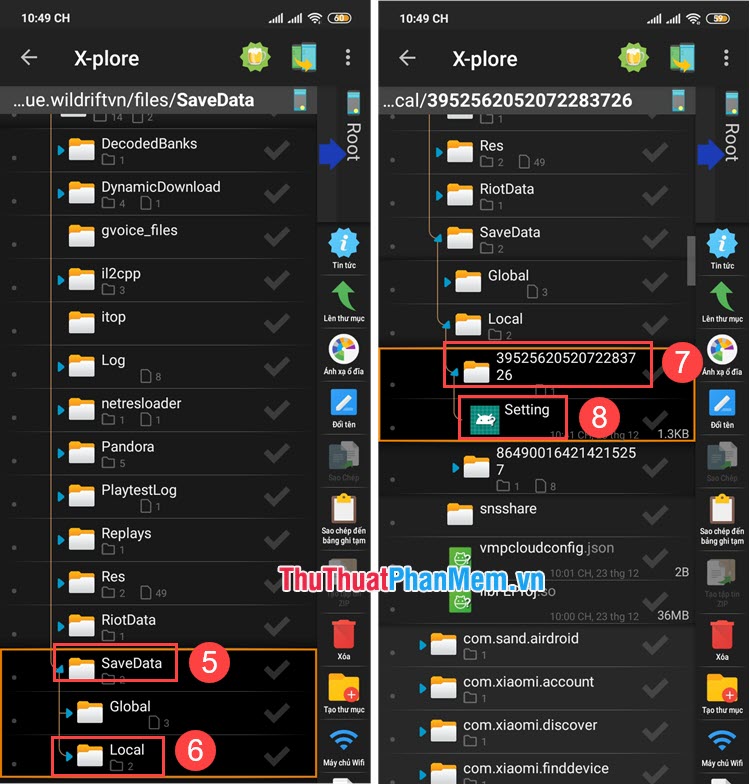
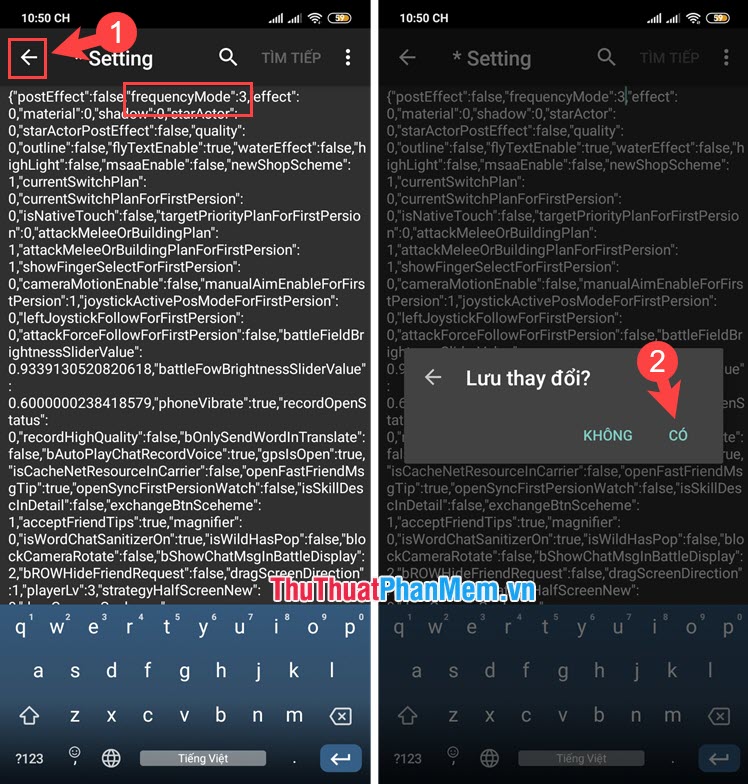
Step 2: You choose Open as Text (1) => find the line 'frequencyMode': false / true (2) and change to the values in the following table:
Value: Corresponding FPS level
- 0: 30
- 1: 60
- 2: 90
- 3: 120

Step 3: After changing to the corresponding value, touch the Back button (1) => click Yes (2) in Save changes.
Step 4: Then, open the game and experience. Depending on the machine configuration and graphics settings, the FPS will increase - decrease differently.

By accessing the settings file in the system, it may make the system misunderstand you using cheat / hack so you can temporarily lock your account, you should use the secondary account to play, experience and wait for the update Unlock official FPS in the future. Good luck!
Key Takeaways
Use the information above as a practical reference for how to unlock 90 FPS and 120FPS on speed war. Review each step carefully, confirm any requirements, and choose the option that best fits your situation.
FAQ
What does this guide explain about Unlock 90 FPS and 120FPS on Speed War?
It explains the main concepts, practical considerations, and useful steps related to unlock 90 FPS and 120FPS on speed war without requiring advanced knowledge.
Who can benefit from learning about Unlock 90 FPS and 120FPS on Speed War?
This information is useful for readers who want a clear overview, practical guidance, and reliable steps related to unlock 90 FPS and 120FPS on speed war.
What should I check before applying this information?
Review the requirements, confirm that your device, software, or situation matches the instructions, and back up important data before making major changes.
Related Articles
 Unlock iOS 10 Screen Is Much Simpler with 3 Ways6 minutes read
 Instructions to Unlock Character Skins in Sonic Speed Simulator6 minutes read
 Instructions for Enabling 'Slide to Unlock' Feature on iOS 104 minutes read
 How to Unlock LG Phone: Practical Guide8 minutes read
 6 Ways to Unlock iPhone Without Password8 minutes read
 US Police Scramble to Buy Tools to Unlock All IPhones Despite the Price of up to $30,0004 minutes read
Reader Comments 0
Sign in with email or Google to join the discussion.