Table of Contents
Quick Overview
Finger : Follow this practical guide to type 10 Fingers Professionally Like Office Workers, including How to place your hands properly on a computer keyboard and 10-finger typing on computer.
Typing with 10 fingers is a great advantage for those who work in the office, when they often have to edit documents on the computer. Knowing how to type with 10 fingers will help work faster and show more professionalism in the working process. So how to know how to type with 10 fingers? Read on to learn in the article below!
How to place your hands properly on a computer keyboard
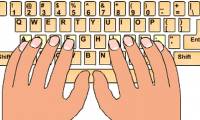
To type with 10 fingers on the keyboard, you must first know how to place your hands on the keyboard. With 10 fingers, we will divide our fingers evenly on the keyboards such as:
With the left hand : little finger ( key A ), ring finger ( key S ), middle finger ( key D ), index finger ( key F ).
With the right hand : little finger (key: ), ring finger ( key L ), middle finger ( key K ), index finger ( key J ).
The remaining two thumbs we will place on the Space key. And the task of these two thumbs is just to take turns typing on this keyboard.
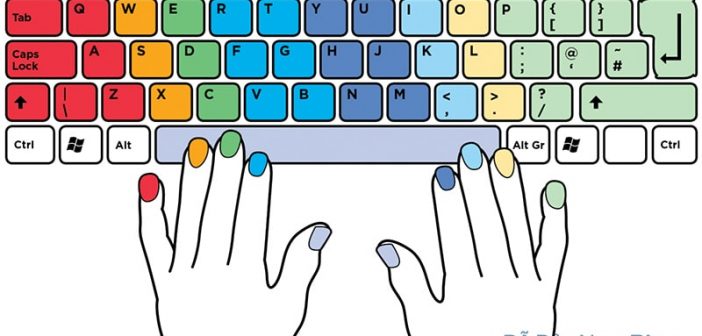
10-finger typing on computer
How to type with 10 fingers
With left hand
- With your index finger, you will control the keys: R, F, V, 4, T, G, B, 5.
- With your middle finger, you control the keys: E, D, C, 3.
- With your ring finger, you control the keys: W, S, X, 2.
- As for the little finger, you use it to press the keys: Q, A, Z, 1, ' and function keys such as Tab, Caps lock, Shift.
For the right hand:
- Index finger controls keys: H, Y, N, 6, 7, U, J, M.
- Middle fingers: 8, I, K, <.
- Ring finger: 9, O, L, >.
- And pinky: 0, P,:,?, ", [, ], -, +,, Enter, Backspace.
Video tutorial on how to type with 10 fingers, watch here:
Pay attention to your sitting posture when typing.
Another important thing that helps you type quickly with 10 fingers is your sitting posture. Many people have very bad habits such as sitting sideways, leaning on the chair, sitting crookedly or sitting too high or too low.
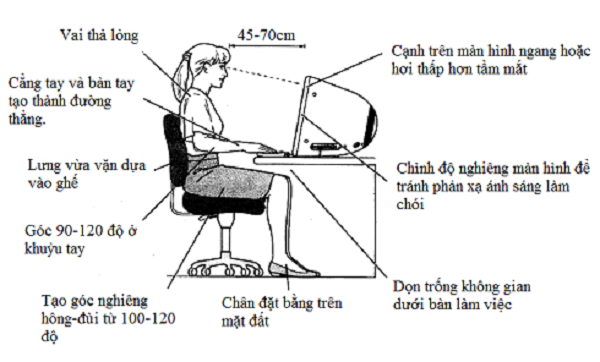
This affects your typing quite a lot. So what is the most standard, comfortable and unconstrained sitting position? You can learn how to sit as follows:
- Sit with your back straight and face the computer.
- Elbow bent at right angle
- Keep a distance of 45 to 75 cm from the computer screen.
- The wrist touches the edge of the computer right in front of the keyboard.
FAQ About Finger
What should you prepare before you type 10 Fingers Professionally Like Office Workers?
Another important thing that helps you type quickly with 10 fingers is your sitting posture
What should you do if type 10 Fingers Professionally Like Office Workers does not work?
Another important thing that helps you type quickly with 10 fingers is your sitting posture
How can you get better results when working with Finger?
You can learn how to sit as follows: Sit with your back straight and face the computer
Related Articles
 How to Practicing Fast and Efficient 10-Finger Typing for Beginners7 minutes read
 Typing with 10 Fingers, Practice Typing with 10 Fingers6 minutes read
 'Secret' Typing 'Super Speed' Computer for Office People5 minutes read
 How to Luyen Go 10 Delicious12 minutes read
 Typing 10 Fingers, Practice Typing with 10 Fingers Fastest4 minutes read
 Practice Typing 10 Fingers to Speed up Typing: Office Computing4 minutes read
Reader Comments 0
Sign in with email or Google to join the discussion.