Table of Contents
This updated guide explains how to Turn Off Adblock on Chrome, Coc Coc through clear steps, practical examples, and important checks that help prevent common errors.
The way Adblock on Chrome browser and Coc Coc is completely identical so you can follow the steps below:
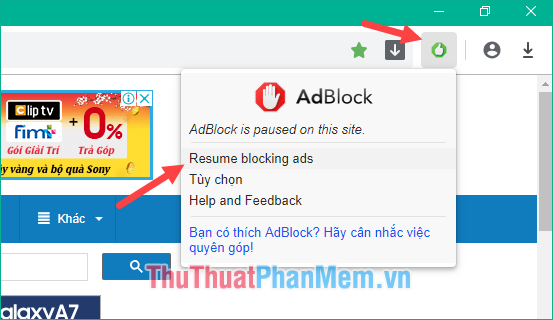
You click the icon Adblock shaped hands on the right corner of the screen and choose one of two options that are:
Pause on this site : Pause blocking ads on the page you are opening
Pause on all site : Pause ad blocking on every page.

If you just want to pause blocking ads on the open page, select Pause on this site , when you visit another page, adblock will still block ads normally.
After pausing the ad, you need to reload the page for the changes to take effect.
In the future, if you may need to turn on Adblock again, click the blue hand icon and select Resume blocking ads then reload the page.
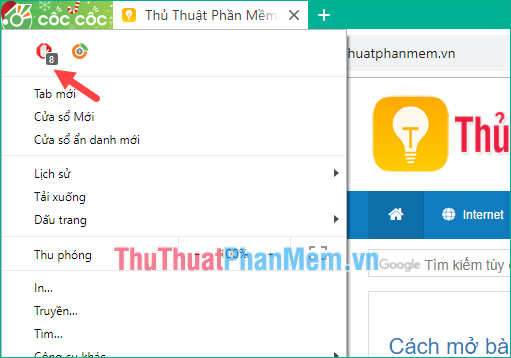
If you do not see the hand icon, then press the 3 dots button on Chrome browser or click Coc Coc button on Coc Coc browser and you will see the icon appear on the window.
Chrome:

Cup Cup:
Thank you for watching the article!
FAQ
What is the easiest way to Turn Off Adblock on Chrome, Coc Coc?
Start with the requirements in this guide, then follow each step in order. Check the result after every major change so problems are easier to identify.
Can beginners follow these instructions?
Yes. The process is organized into practical steps, and you can repeat any step before moving forward.
What should I check if the method does not work?
Confirm your software or device version, permissions, settings, file format, and internet connection when the task depends on online services.
Related Articles
 How to Turn Off Adblock: Complete Guide6 minutes read
 What Is the Difference Between Adblock and Adblock Plus?5 minutes read
 How to Block Ads on Google Chrome: Step-by-Step Guide9 minutes read
 Adblock Download Link 4.16.09 minutes read
 How to Turn Off, Disable, or Hide Adblock4 minutes read
 Install Adblock, an Add-on to Block Ads on Google Chrome and Firefox Browsers4 minutes read
Reader Comments 0
Sign in with email or Google to join the discussion.