Table of Contents
Brisk Teaching can turn the content on a Gemini response page into a draft quiz, then export it to Google Forms or another supported format. The useful part is speed; the essential part is teacher review. Gemini and Brisk can both produce inaccurate, ambiguous, or poorly leveled questions, so the generated quiz should never be assigned without checking every item and answer.
Before using Gemini content for a quiz
- Verify the Gemini response against the lesson's approved sources.
- Remove unsupported claims, invented examples, and unnecessary personal data.
- Decide the learning objective and grade level before generating questions.
- Use a school-approved Google account and extension policy.
A polished Gemini answer is not a source by itself. Whenever possible, open Brisk on the original article, document, PDF, or video rather than on an AI-generated summary.
1. Install and open Brisk Teaching
Install the official Brisk extension from the Chrome Web Store or the supported Microsoft Edge add-on, then pin it to the browser toolbar. Sign in through the method approved by your school or district.
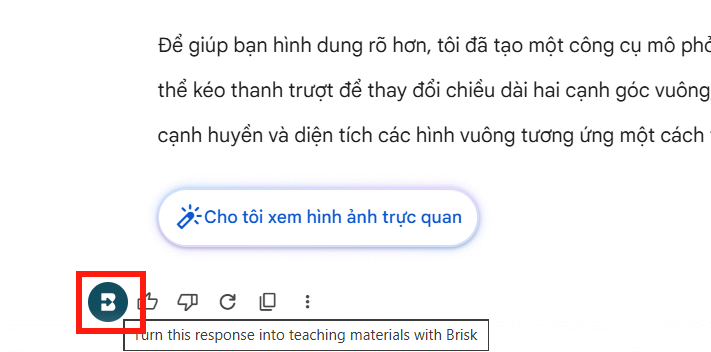
Browser extensions can request broad page access because they need to read the material you choose to transform. Review the permissions, Brisk's current privacy information, and your institution's requirements before exposing student or confidential content.
2. Prepare the source in Gemini
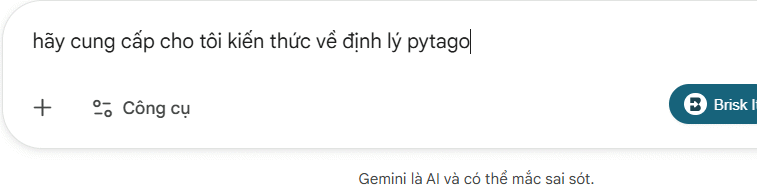
Ask Gemini for an explanation based on material you have already checked. A prompt should identify the audience, objective, source limitations, and any terms that must remain unchanged. TipsMake's CREATE prompt framework provides a practical structure.
Read the full response before opening Brisk. Correct factual errors and remove anything the quiz should not assess. If Gemini cites sources, open those sources rather than assuming the citations support the wording.
3. Create a quiz from the current page
- With the reviewed response open, click the Brisk icon in the toolbar or the Brisk control on the page.
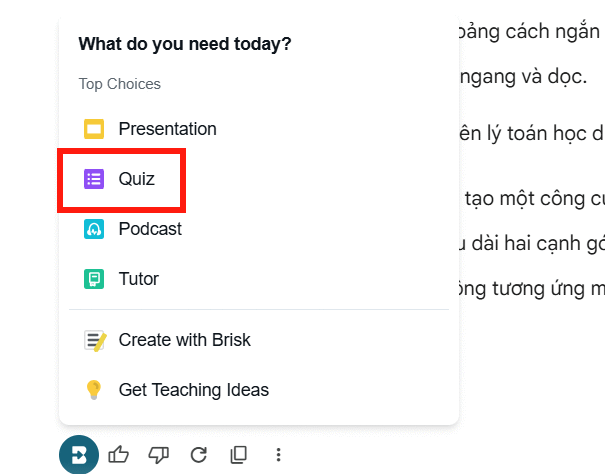
- Select Create.
- Choose Quiz from the resource options.
- Confirm that Brisk is using the current page as the source.
Brisk's interface changes over time. Its current Create documentation says the extension can generate a quiz from a webpage, document, YouTube video, and other supported pages.
4. Configure the quiz deliberately
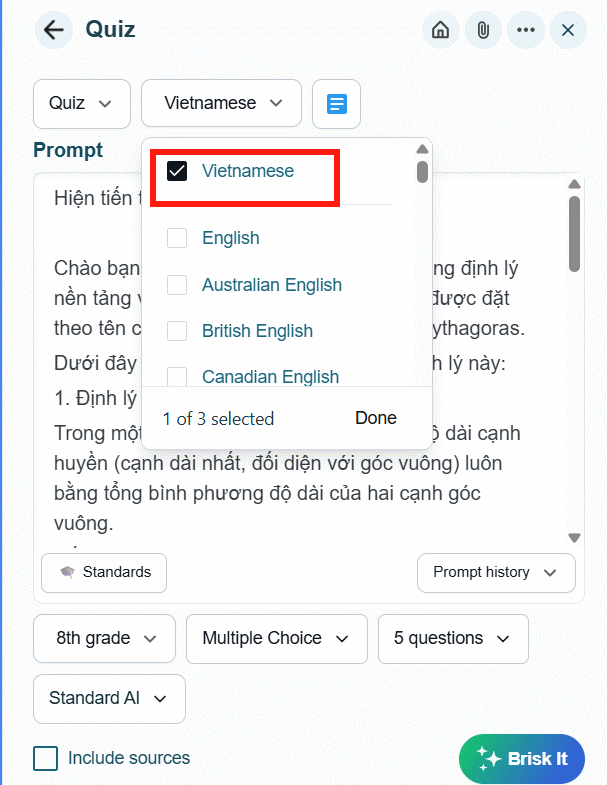
Set the language, grade level, question count, and output format. Depending on the current plan and integration, formats may include a document, Google Forms, Kahoot, or Canvas QTI.
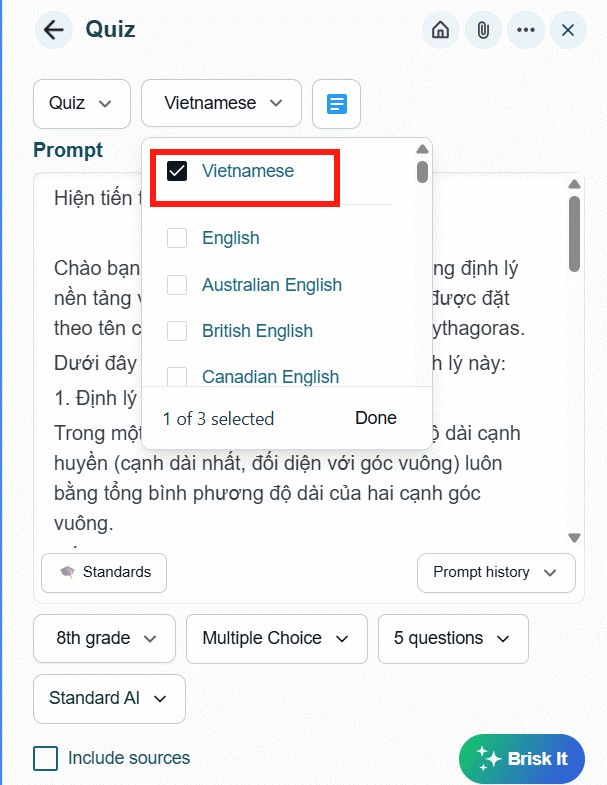
Use question types that match the objective:
| Objective | Useful question type | Common problem |
|---|---|---|
| Recall a definition | Multiple choice or short answer | Distractors are obviously wrong. |
| Explain a relationship | Open response | Rubric is too vague. |
| Apply a procedure | Scenario or ordered steps | Question tests wording instead of application. |
| Analyze evidence | Source-based response | Source does not contain enough evidence. |
A shorter quiz with aligned items is usually better than many repetitive questions. Specify whether students may use the source and whether more than one answer can be acceptable.
5. Choose Google Forms or another output
Select Google Forms when you want a shareable form and automatic collection of responses. Brisk may request access needed to create the form in your Google Drive. Read the OAuth screen, confirm the account, and grant only permissions you understand and are authorized to provide.
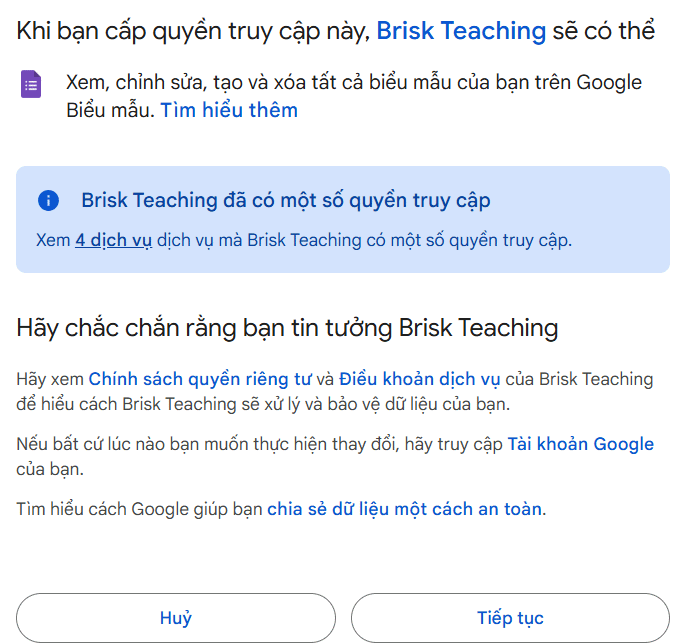
According to Brisk's current documentation, Google resources created by Brisk live in the user's Google Drive. Locate the new form there if it does not open automatically.
6. Review every generated question
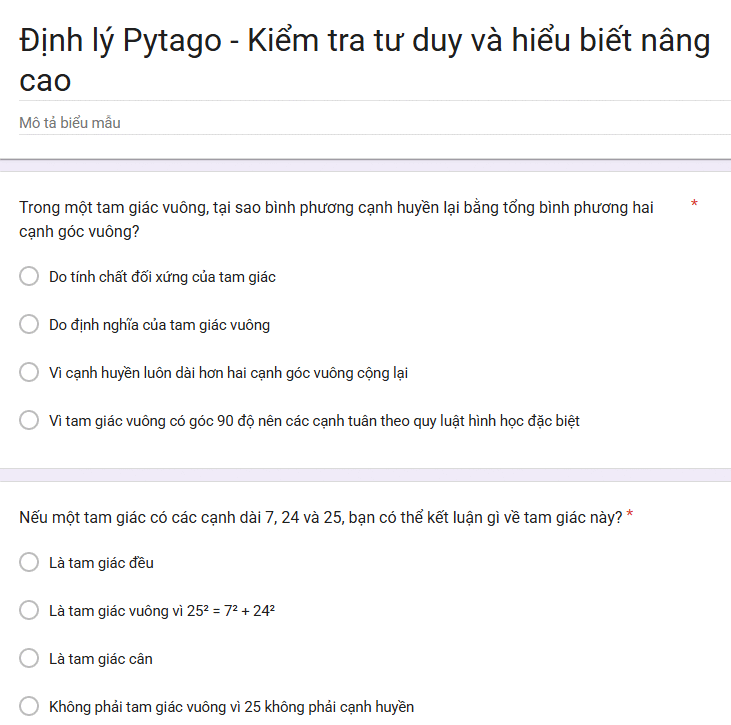
Before sharing the form:
- answer each question yourself using only the assigned source;
- verify the answer key and point value;
- remove duplicate, trivial, or trick questions;
- rewrite ambiguous negatives such as “Which is not incorrect?”;
- check that distractors are plausible but clearly wrong;
- remove cultural assumptions and unnecessary reading complexity;
- confirm that images have alt text and media is accessible;
- preview the form as a student on both desktop and mobile.
AI-generated open-response rubrics also need review. Include observable criteria rather than subjective labels such as “excellent understanding.”
Protect student privacy
- Do not paste identifiable student work, disability information, grades, or disciplinary records into a consumer AI account unless policy explicitly permits it.
- Use institution-managed accounts and administrator-approved tools.
- Limit form collection to information the assessment actually needs.
- Check retention, sharing, and deletion settings for Gemini, Brisk, Google Forms, and any learning-management system involved.
- Do not ask students to submit passwords, health information, or unrelated personal details.
Improve the quiz after generation
Use the first draft as a starting point. Replace some recall items with scenarios, add one question that reveals a common misconception, and order items from accessible to demanding. If a result matters for grading, pilot the form or ask another teacher to review it.
Troubleshooting
- Brisk does not appear: Pin the extension, refresh the page, highlight the relevant text, or open the source in a supported document viewer.
- The wrong content is used: Return to the exact page or document and select the source again.
- Google Forms is missing: Confirm the output settings, account permissions, plan limits, and school administrator policy.
- Questions are too easy: Specify the learning objective, grade level, and an application or analysis requirement.
- The answer key is wrong: Correct it manually and revisit the source; do not regenerate blindly until a desired answer appears.
Bottom line
Brisk can quickly convert reviewed Gemini content into a draft quiz, but the workflow is not complete when the form is generated. Accuracy, alignment, accessibility, privacy, and answer-key review remain the teacher's responsibility.
Related Articles
 How to Quickly Creating Multiple-Choice Questions Using Brisk3 minutes read
 How to Improving Prompt Quality Using Brisk2 minutes read
 Guide to Creating Lecture Slides Using Brisk AI5 minutes read
 Guide to Creating the Brisk AI Learning Assistant for Students5 minutes read
 Instructions on Creating Multiple-choice Questions on Gemini3 minutes read
 How to Create Lesson Podcasts Using Brisk AI4 minutes read
Reader Comments 0
Sign in with email or Google to join the discussion.