Table of Contents
Quick answer
There are many ways to open PowerPoint on a computer, such as opening it via the Desktop, using the Run command, right-clicking, or using the Start Menu. If you don't know how, please see the detailed instructions on how to open ppt and pptx files in the following article.
PowerPoint, a presentation and lecture slide creation tool in the Microsoft Office suite, is highly regarded by users for its professionalism. To make using PowerPoint more convenient , you need to know how to open PowerPoint on your computer and quickly open ppt and pptx files.
How to open PowerPoint on your computer, open ppt, pptx files.
How to open PowerPoint on your computer, open ppt, pptx files.
Method 1: Open on Desktop
When you install PowerPoint or Office on your computer, the system will automatically create a shortcut icon for these tools. Simply double-click the PowerPoint icon to launch them.

Method 2: Open with Run
This is a quick and professional way; we'll use the Run function with a command. When opening a software program, we only need to remember the full name of the program.
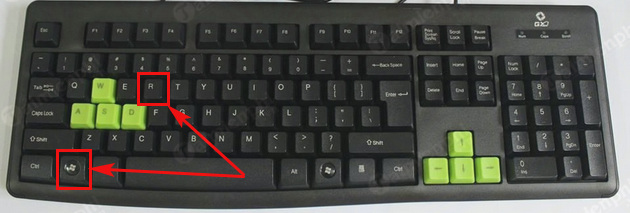
Step 1: Use the Windows + R keyboard shortcut to launch the Run dialog box.
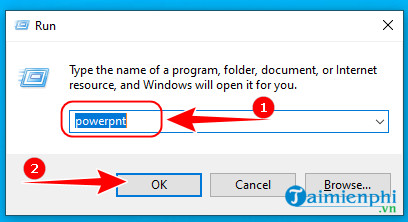
Step 2: Type the command `powerpnt` and then press Enter or OK to launch PowerPoint.
Method 3: Using the right mouse button
Similar to method 1, when you install Office, all the tools are installed in the "New" folder . When you right-click on the desktop or on folders, you will see this folder.
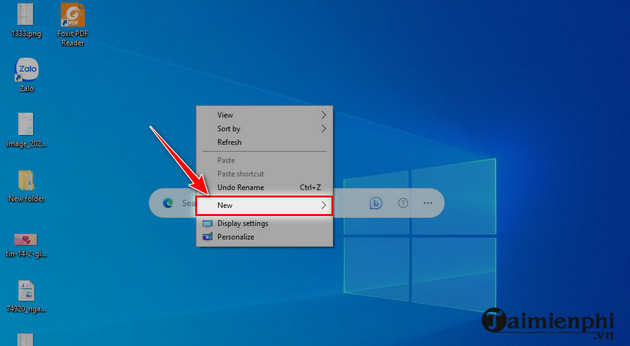
Step 1: On your computer screen, right-click. Then, click " New " as shown below.
Step 2 : Next, click " Microsoft PowerPoint. " to open PowerPoint.
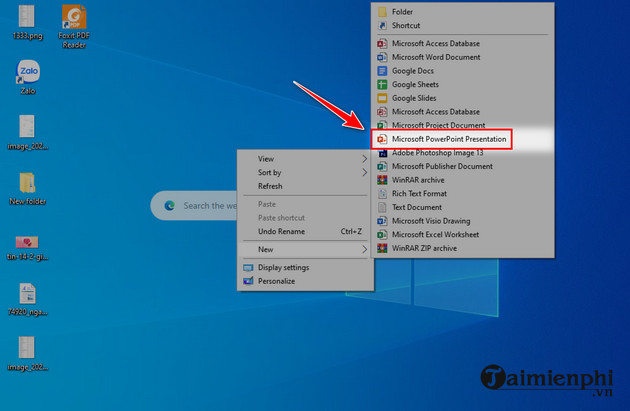
You can also refer to the guide on inserting backgrounds into PowerPoint to create beautiful and complete slides with impressive backgrounds.
Method 4: Use the search box on your computer (effective on Windows 10)
Windows provides users with a powerful search tool; you simply type in the keyword for the software you want to search for, and the software's icon will appear immediately. For example, if you type " PowerPoint ," the Microsoft PowerPoint icon will appear.
Step 1 : Click the Windows icon on your keyboard or on your computer.
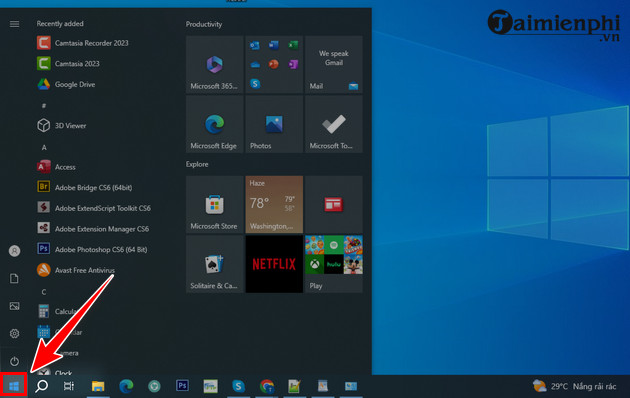
Step 2 : Type " PowerPoint " and then click on the PowerPoint software indicated by arrow 1 or 2.
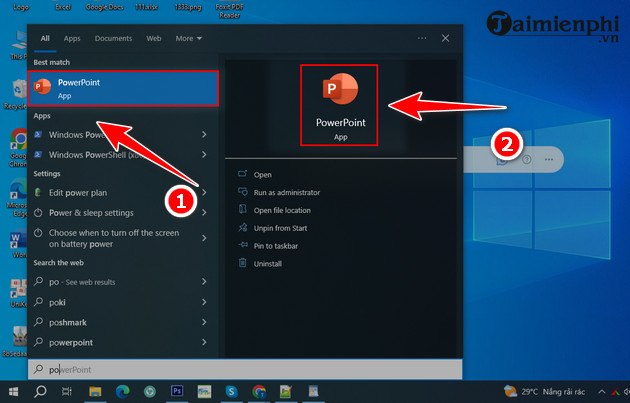
Method 5: Using the Start Menu
If you are using Windows XP or Windows 7, you can use the Start Menu to launch PowerPoint because when the software is installed, a folder containing icons to launch the Office tools is also installed.
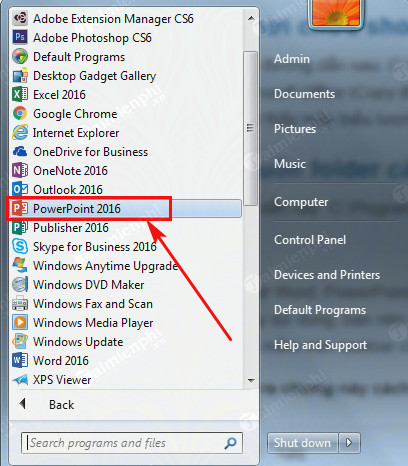
Hopefully, with this article summarizing 5 ways to open PowerPoint on your computer, quickly opening ppt and pptx files, you have a better understanding of this operation and can apply it in practice when using PowerPoint. If you don't know how to open Excel, the spreadsheet tool on your computer, don't worry, refer to how to open Excel here. Good luck!
To make your PowerPoint presentation more engaging, you need beautiful and unique PowerPoint templates or backgrounds that match your topic. You can view and download beautiful PowerPoint backgrounds here.
Related Articles
 What File Is PPTX? How to Open, Edit and Convert PPTX Files8 minutes read
 Tap: How to Open a Pptx File on Iphone or Ipad12 minutes read
 How to Open Files Docx, Xlsx, Pptx on Office 20034 minutes read
 What Are PPT, PPTX, PPS, PPSX Files and the Differences Between These File3 minutes read
 Differences Between PPT and PPS Files (PPTX and PPSX): Ppt File3 minutes read
 What File Is XLSX? How to Open XLSX Files3 minutes read
Reader Comments 0
Sign in with email or Google to join the discussion.