Table of Contents
The storage in Perplexity AI can also manage and delete the memory details that you do not want to save according to the instructions below.
When you chat with Perplexity AI, this AI chatbot will also remember details between your conversations, making your interactions more personalized and effective. And the memory stored in Perplexity AI can also manage and delete memory details that you do not want to save according to the instructions below.
How to access storage in Perplexity AI
Step 1:
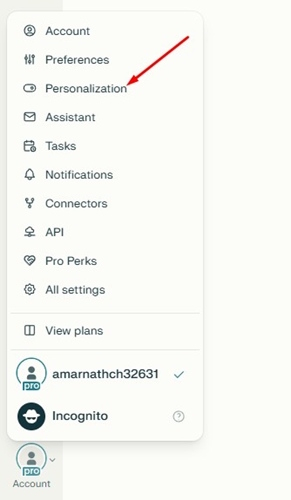
First, click on Account , both free and paid versions. Then, click on Personalization As shown below.
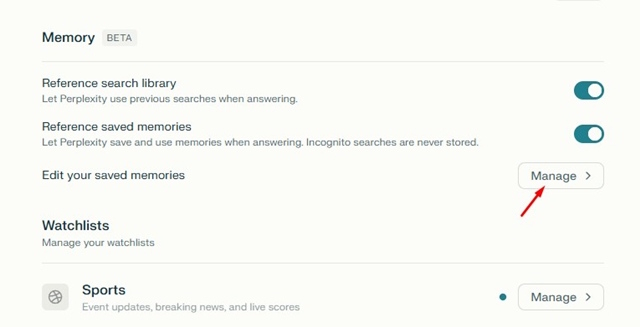
Next, check If Reference search library and Reference saved memories are enabled . If not, enable them because these are the two settings that enable Perplexity AI's storage.
If enabled, Click Manage To access storage.
Step 2:
To delete Perplexity AI storage if you don't want to use that information for future AI chatbot responses, just tap the trash can icon.
FAQ
How do you manage storage in perplexity AI: step-by-step guide?
In practical terms, the storage in Perplexity AI can also manage and delete the memory details that you do not want to save according to the instructions below.
What should you check before getting started?
Review the requirements, compatible device or software version, and any warnings described in the guide before making changes.
What should you do if the steps do not work?
Repeat the steps in order, confirm that your app or system is up to date, and review the troubleshooting details provided above.
Related Articles
 Perplexity Personal Computer7 minutes read
 How to Create API Key Perplexity8 minutes read
 Why Is a Perplexity Pro Subscription Worth It: Causes and Fixes6 minutes read
 A Comprehensive Guide to Academic Knowledge on Perplexity AI3 minutes read
 How to Integrate Gemini with Perplexity AI: Step-by-Step Guide6 minutes read
 How to Get the Most Out of Your New Perplexity Pro Subscription6 minutes read
Reader Comments 0
Sign in with email or Google to join the discussion.