Table of Contents
This practical guide explains how to get the fastest internet connection from your router. Follow the steps in order, review the requirements first, and use the troubleshooting notes when a setting or option does not work as expected.
6. Always keep your router software up to date
Just like your phone or computer, your router runs on software that needs to be updated regularly. These updates are important because they address a variety of issues. Software updates can add new features, fix bugs, patch security holes, and improve performance and stability. Many people skip this step until they realize that outdated firmware can be the cause of random disconnections and slow speeds.
5. Restart your router occasionally
It may sound simple, but restarting your router can solve a surprising number of Internet problems. Just like restarting your phone can fix a variety of problems, restarting your router can fix temporary problems.
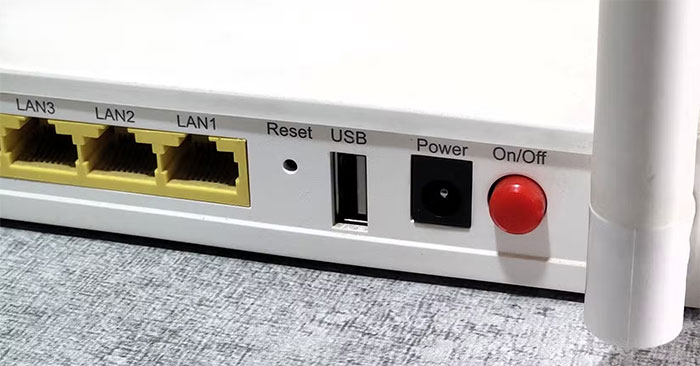
You don't need to reboot your router every day, but rebooting every few weeks—or when your Internet connection is slow—can help keep things running smoothly.
4. Limit connected devices
Your Wi-Fi may be fast on paper, but every device connected to it shares the same limited bandwidth — and that's where things can slow down. Think of bandwidth as a pie — more connected devices mean each device gets a smaller slice of the available bandwidth. If too many devices are streaming, downloading, or updating at the same time, each device gets a smaller slice of the available bandwidth.
Whenever the Internet is slow, disconnect unused devices to free up bandwidth for active devices. However, you don't need to disconnect all other devices if your router has a Quality of Service (QoS) setting, which allows you to prioritize network traffic on the router.
3. Reduce the distance between the device and the router
One of the easiest ways to get faster, more reliable internet is to reduce the distance between your device and your router. Wi-Fi signals weaken as they pass through walls, ceilings, furniture, and even people. This is especially true of the faster 5GHz and 6GHz bands, which have a shorter range than the 2.4GHz band. The further away you are, the lower your speed and signal strength.

2. Use the right Wi-Fi band
Modern routers broadcast on up to three different frequency bands: 2.4GHz, 5GHz, and 6GHz (available in newer routers). Each band has its own strengths, and choosing the right one can make a big difference in your internet speed and reliability.
The 2.4 GHz band offers longer range and better wall penetration, making it ideal for devices that are far away from the router or in areas with thick walls. However, it is slower and more prone to interference, as many household appliances—such as microwaves, baby monitors, and Bluetooth devices—also operate on this band. The 5 GHz band, on the other hand, offers faster speeds and less interference, but has a shorter range. The 6 GHz band is faster and less congested, resulting in less interference.
1. Use a wired connection whenever possible
While Wi-Fi is convenient, it's not always the fastest or most reliable option—especially if you're gaming, streaming 4K, or working with large file uploads. That's why it's best to use an Ethernet connection whenever possible. A wired Ethernet connection provides a direct path from your device to your router, eliminating the interference, dropouts, and congestion that can plague wireless networks.
Wired connections typically offer lower latency and a more stable connection for heavy tasks than Wi-Fi. This can be the difference between smooth video calls and dropped calls, or winning a game versus experiencing lag at the decisive moment. That's why it's a good idea to switch your Smart TV to an Ethernet connection.

Good luck!
See also:
- Set up Linksys router with static IP address
FAQ
What should you know about 6. Always keep your router software up to date?
Just like your phone or computer, your router runs on software that needs to be updated regularly. These updates are important because they address a variety of issues. Software updates can add new features, fix bugs, patch security holes, and improve performance and stability. Many people skip this step until they realize that.
What should you know about 5. Restart your router occasionally?
It may sound simple, but restarting your router can solve a surprising number of Internet problems. Just like restarting your phone can fix a variety of problems, restarting your router can fix temporary problems.
What should you know about 4. Limit connected devices?
Your Wi-Fi may be fast on paper, but every device connected to it shares the same limited bandwidth — and that's where things can slow down. Think of bandwidth as a pie — more connected devices mean each device gets a smaller slice of the available bandwidth. If too many devices are streaming, downloading, or updating at the.
What should you know about 3. Reduce the distance between the device and the router?
One of the easiest ways to get faster, more reliable internet is to reduce the distance between your device and your router. Wi-Fi signals weaken as they pass through walls, ceilings, furniture, and even people. This is especially true of the faster 5GHz and 6GHz bands, which have a shorter range than the 2.4GHz band. The.
Related Articles
 8 Instant Router Tweaks for a More Stable Internet Connection: Key Takeaways7 minutes read
 How to Configure Pppoe Connection on Tp-link Wi-Fi 6 Router8 minutes read
 Internet: Why Should You Restart the Router Regularly?5 minutes read
 3 Best Wireless Routers 20216 minutes read
 10 Cities with the Fastest Internet Speeds in the World4 minutes read
 How to Share an Internet Connection14 minutes read
Reader Comments 0
Sign in with email or Google to join the discussion.