Table of Contents
If swiping does not change the volume on AirPods Pro 2 or AirPods Pro 3, first confirm that you are touching the correct part of the stem and that Volume Swipe is enabled. If the setting is correct, charge and reconnect the AirPods before moving on to unpairing or a factory reset.
This swipe gesture applies to AirPods Pro 2 and AirPods Pro 3. Other models use different controls: for example, AirPods Max adjusts volume with the Digital Crown, not a swipe on an earcup.
1. Test the swipe gesture correctly
Place your thumb behind the stem to steady the AirPod. Lightly swipe up or down on the Touch control with your index finger. Use a deliberate, short stroke rather than tapping or sliding along the outer edge.
Try both earbuds. Remove moisture, oil, or debris with a soft, dry, lint-free cloth, and make sure a glove or other object is not blocking contact. If the gesture works on one side only, the problem is more likely related to the affected earbud than to the phone’s volume setting.
2. Check the Volume Swipe accessibility setting
The control is normally enabled, but it can be turned off:
- Connect the AirPods to an iPhone or iPad.
- Open Settings.
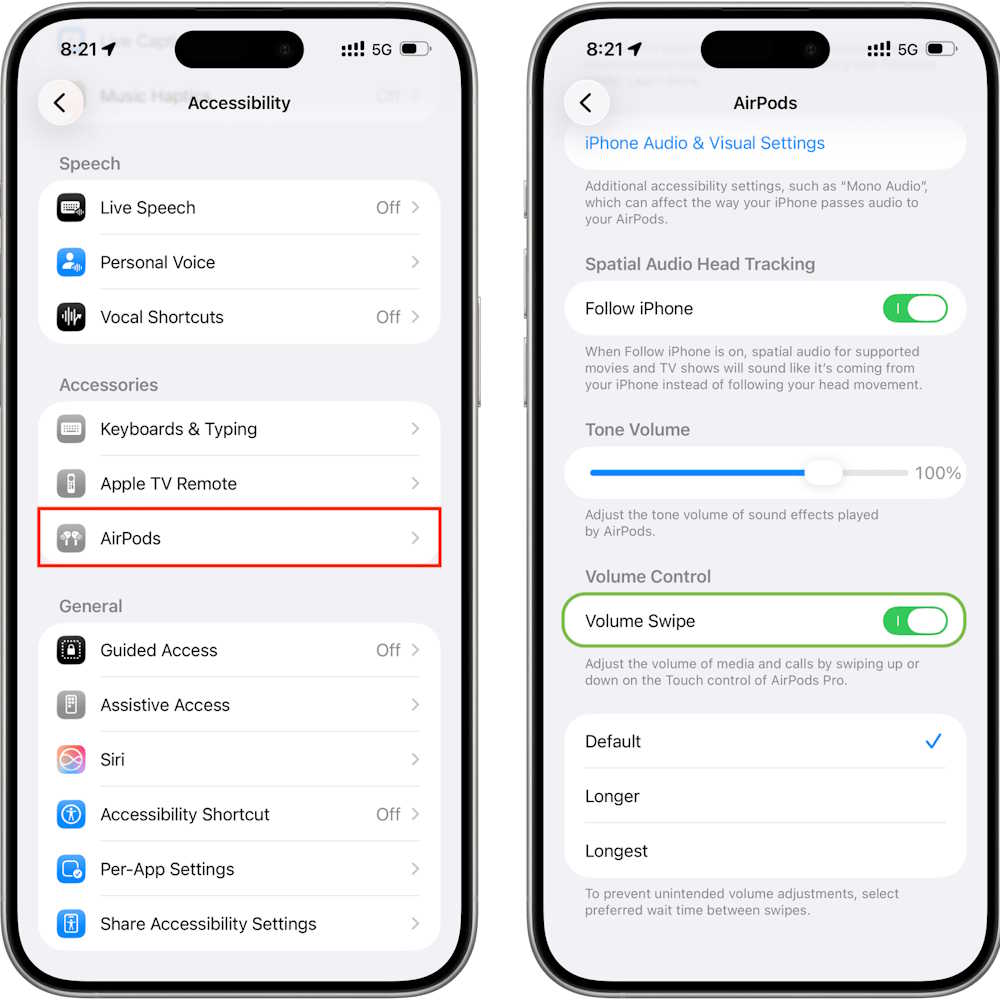
- Tap Accessibility, then AirPods.
- Select the connected AirPods if prompted.
- Under Volume Control, turn on Volume Swipe.
You can also adjust the amount of movement required for the gesture using the options shown below Volume Swipe. The wording may differ slightly by software version.
3. Charge and restart the connection
Place both earbuds in their charging case, close the lid, and wait about 30 seconds. Confirm that the case and both earbuds have enough charge, then open the lid and reconnect them.
Restart the connected iPhone, iPad, Mac, or other device as well. A fresh Bluetooth session can clear a temporary control or connection problem without changing saved settings.
AirPods firmware installs automatically while the earbuds are charging and within Bluetooth range of a Wi-Fi-connected Apple device. Updating the iPhone, iPad, or Mac also ensures that current AirPods features are recognized.
4. Forget the AirPods and pair them again
If the swipe still does not respond, remove the pairing and reconnect:
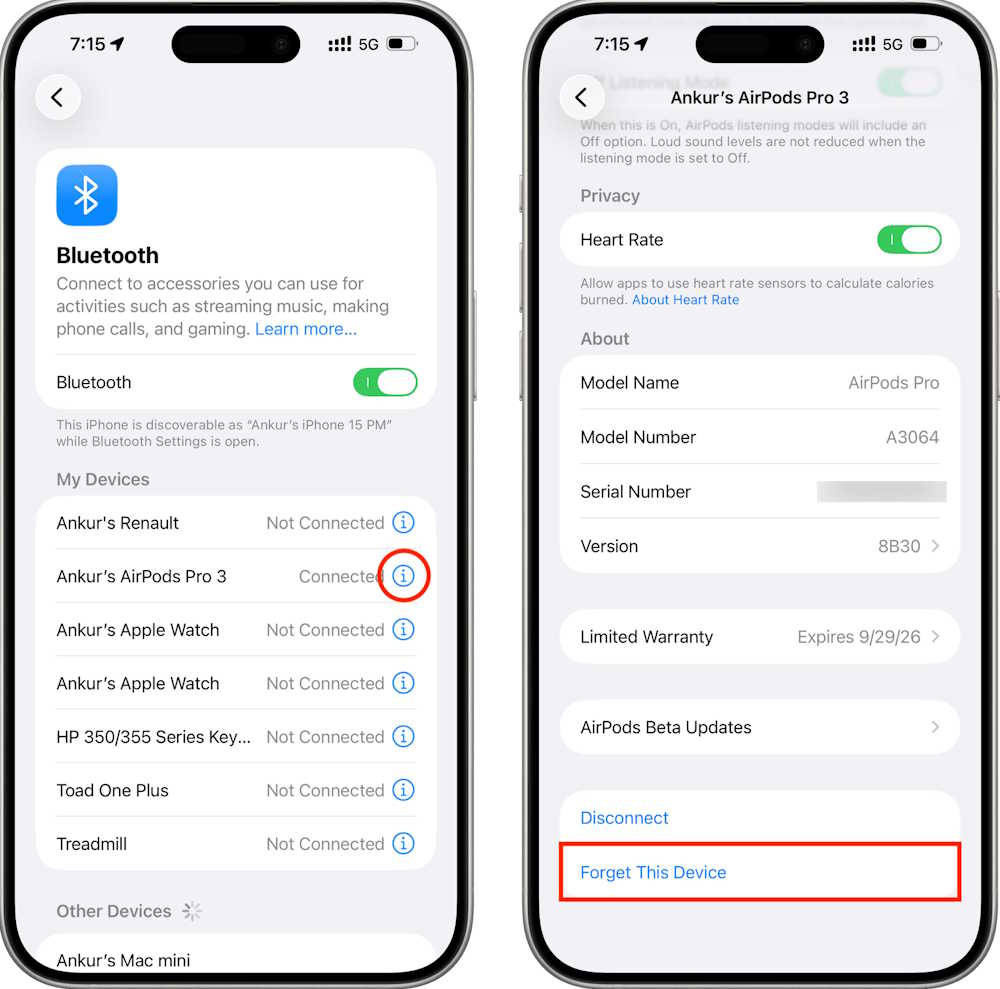
- On an iPhone or iPad, open Settings > Bluetooth.
- Tap the information button beside the AirPods.
- Select Forget This Device and confirm.
- Put the earbuds in the case, then follow the pairing prompt for your model.
Forgetting AirPods on one device may remove them from other devices signed in to the same Apple Account. If your wider problem is device handoff, see these steps for fixing AirPods that do not switch automatically.
5. Reset the AirPods only as a final software step
A factory reset removes the saved pairing and returns the AirPods to their initial connection state. Reset methods differ between AirPods Pro 2 and AirPods Pro 3 because their charging cases use different controls. Follow Apple’s model-specific AirPods reset instructions rather than assuming the rear-button procedure applies to every case.
After the status light shows that the reset is complete, pair the AirPods again and test volume control before changing other settings.
If the swipe still does not work
Check Settings > Bluetooth to confirm the exact AirPods model. AirPods Pro 1, standard AirPods 3, and standard AirPods 4 do not provide the same stem-swipe volume control described here. You can use Siri or the connected device’s volume buttons with models that lack the gesture.
If the correct model fails on both earbuds after re-pairing and resetting, contact Apple Support or an authorized service provider for a hardware assessment. Avoid repeated resets if the Touch control is physically damaged. Buyers comparing alternatives may also find this AirPods Pro 2 and Galaxy Buds2 Pro comparison useful.
Related Articles
 YouTube Vanced Can Swipe to Change Brightness and Volume, Invite Download and Experience5 minutes read
 How to Customize the Control for 2 Touches Left and Right on3 minutes read
 How to Fix Airpods with Only One Ear Heard4 minutes read
 How to Control the Transparency Feature on Airpods Pro4 minutes read
 How to Adjust Airpods on iOS 114 minutes read
 Detailed Comparison of Airpods Pro 3 vs Airpods Pro 2: Should You: Key Facts6 minutes read
Reader Comments 0
Sign in with email or Google to join the discussion.