Table of Contents
This practical guide walks through how to download and Play Age of Empires IV for Free on PC. It organizes the required steps, settings, and checks so you can complete the task with fewer mistakes.
The gaming configuration for Age of Empires IV And AOE 4 on PC is not light at all.
Configuration to Play Age of Empires IV Anniversary Edition on PC
Minimum Configuration to Play AOE 4 Anniversary Edition on PC
*Requires 64-bit Processor and Operating System
OS: Windows 10 64bit | Windows 11 64bit
CPU: Intel Core i5-6300U | AMD Ryzen 5 2400G | Or higher
RAM: 8 GB RAM
VGA: Intel HD 520 | AMD Radeon RX Vega 11
DirectX: Version 12
Free memory: 50 GB
Recommended Configuration to Play AOE 4 Anniversary Edition on Computer
*Requires 64-bit Processor and Operating System
OS: Windows 10 64bit | Windows 11 64bit
CPU: 3.6 GHz 6-core (Intel i5) | AMD Ryzen 5 1600 | Or higher
RAM: 16 GB RAM
VGA: NVIDIA GeForce 970 GPU | AMD Radeon RX 570 GPU with 4GB of VRAM
DirectX: Version 12
Free memory: 50 GB
Step 1: Download and Install A newer version of Steam from the official provider. - Link to download the current Steam version. Step 2: Open Steam And Log in to Your account.
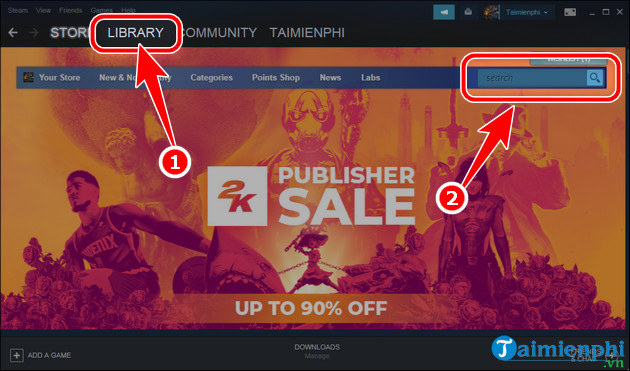
Step 3: Select the Store Tab, enter Age of Empires IV Anniversary Edition In the search box on the right side of the screen.
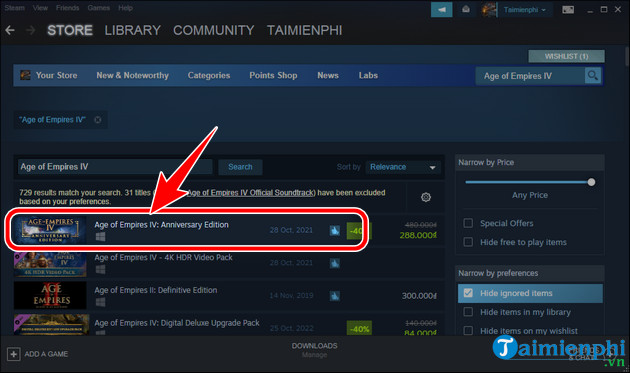
Step 4: Select the game Age of Empires IV Anniversary Edition .
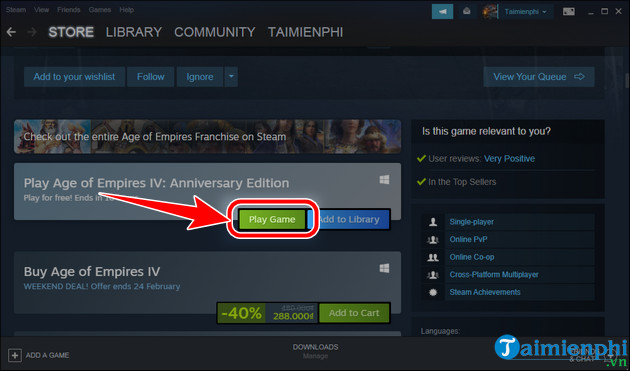
Step 5: Scroll down, select Play Game .
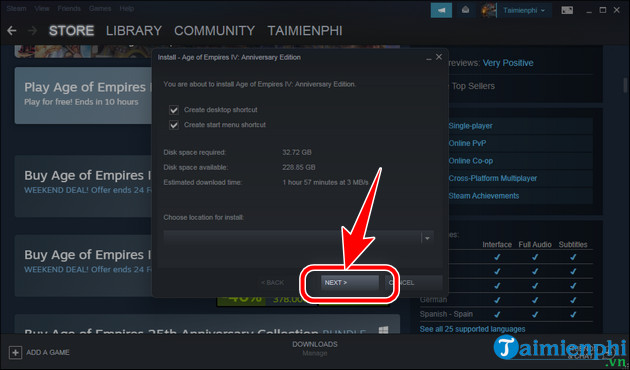
Step 6: Select Next => Finish , download and install Age of Empires IV Anniversary Edition on your PC.
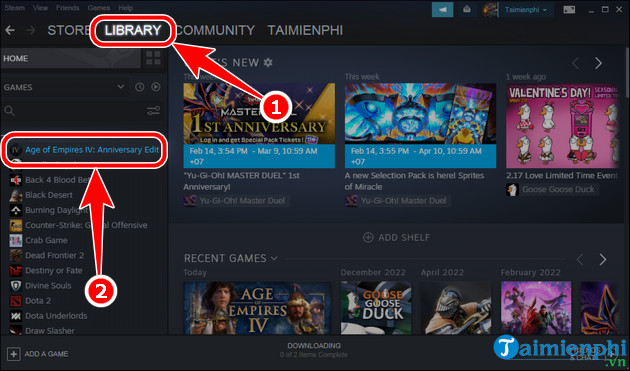
Step 7: Switch to the Library Tab, select the game Age of Empires IV Anniversary Edition In the list below.
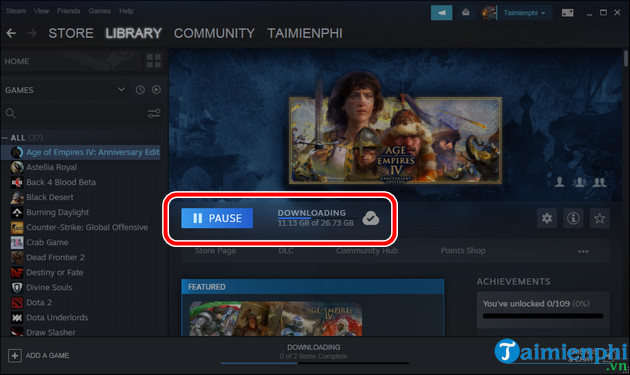
- See the progress of downloading and installing Age of Empires IV Anniversary Edition on your computer at the Downloading tab. When the word PAUSE Changes to PLAY , select the PLAY Button to play AOE 4 Anniversary Edition on PC.
Currently, Age of Empires IV versions are being sold for more than 500K VND on copyrighted game platforms such as Steam, Epic Games Store , GOG Galaxy. and you have to buy it to experience the masterpiece. With this real-time technique, you don't always have the opportunity to play Age of Empires IV for free like now.
FAQ
What do I need before I download and Play Age of Empires IV for Free on PC?
Prepare the required device, software, account access, and any files mentioned in the steps. Back up important data before changing system settings.
Why does the process look different on my device?
Menus and options can vary by operating system, app version, device model, or region. Use the closest matching setting and check the official documentation when needed.
What should I do if a step does not work?
Restart the app or device, confirm permissions and connectivity, update the software, and repeat the step carefully. Avoid unofficial downloads or tools.
Related Articles
 How to Download and Play Age of Empires II (AOE2)4 minutes read
 Download and Play Age of Empires Mobile on Android, iOS: Step-by-Step Guide5 minutes read
 How to Buy Vietnamese Empire Empire 4K Only 115, 000 VND5 minutes read
 Plant Empires - Merge Defense Monsters6 minutes read
 Quickly Register to Play Age of Empires 4K Upgrade Version of the Graphic5 minutes read
 How to Get Free Gems in Empires & Puzzles4 minutes read
Reader Comments 0
Sign in with email or Google to join the discussion.