The double-tap to wake screen feature on Android phones is included by many manufacturers in their products. However, depending on the phone model, users will need to use different methods to activate it.
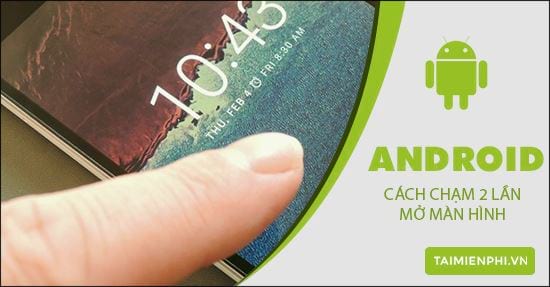
Double-tap to unlock your Android phone screen.
In this article, tipsmake will compile and share with you how to double-tap to unlock the screen on most popular Android phone models currently available.
With most current Android phones, users can activate the double-tap to wake screen feature by following these steps.
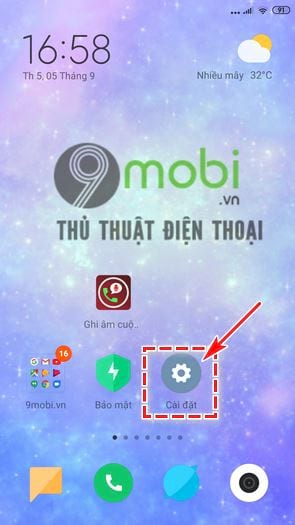
Step 1: First, go to Settings from your device's home screen;
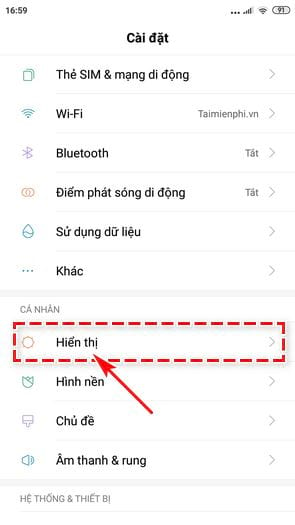
Step 2: In the Settings screenthat appears, select Display ;
Step 3: You will now see the "Double tap to wake device" feature ; right-click to activate it.
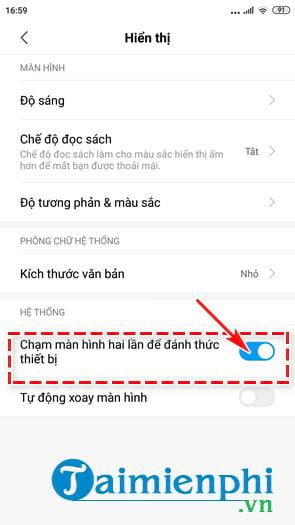
The instructions were performed by tipsmake on a Redmi Note 4 phone . The process may differ slightly for other Android devices; for more detailed information, please refer to the following content.
Asus phones: Go to Settings, select Zenmotion , then activate the Screen On/Off feature .
Oppo phones: Users go to Settings , then select Gestures & motion . Continue by tapping Gestures when screen is off and set up Double tap to wake screen ;
Lenovo phones: To activate the double-tap to wake screen feature , you need to go to Settings , tap the Personal folder , and then select Double tap to turn screen on/off .
HTC phones: In the device's Settings , select Display & gestures . Then turn on Smart Activation .
Sony phones: On the Settings screen, select the Display folder. In the new window that appears, enable Tap to turn on ;
Note: For LG phone models specifically, this feature is already enabled by default; users do not need to activate it themselves.
In summary, tipsmake has guided you through two simple steps to quickly and conveniently activate the double-tap to unlock feature on your Android phone. For Android phones that don't support this feature, users can download and install applications from Google Play, which tipsmake will introduce in a future article. If you use an iPhone, you can refer to how to double-tap to unlock your iPhone here.
I wish you success!
Related Articles
 Unlock the Phone by Typing the Screen to the Beat with Tap Locker5 minutes read
 Guide to Unlock Smart Screen Like iPhone for Android Device7 minutes read
 How to Unlock the Screen of an Android Phone Without a Power8 minutes read
 How to Double Tap to Turn Off Android Phone Screen3 minutes read
 How to Unlock LG Phone: Practical Guide8 minutes read
 Tips for Unlocking a Mac with an Android Phone6 minutes read
Reader Comments 0
Sign in with email or Google to join the discussion.