Table of Contents
Learning how to Convert.EXE to video (MKV, AVI, MP4,.) doesn't have to be complicated. This updated guide presents a clear workflow, practical checks, and troubleshooting advice you can use while completing the process.
Key Takeaways
- Follow the steps to convert *.EXE to video (MKV, AVI,.).
- Follow the recommended steps in order to avoid common mistakes with Convert.EXE to video (MKV, AVI, MP4,.).
- Review compatibility, settings, or requirements before making changes.
How to Convert *.EXE to Video (MKV, AVI,.)
Step 1: Like other software, you download Format Factory, then install it to use the program.
Step 2: Start the program
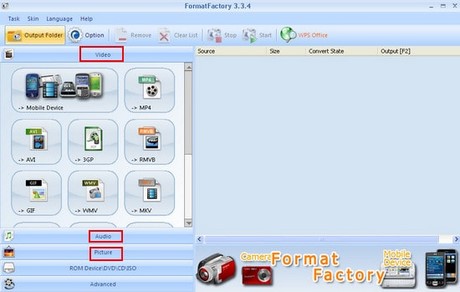
I want to say a little more about this software: in addition to the ability to convert all music formats, Format Factory is also friendly and powerful enough to convert all image files of different formats.
Video: Convert video formats to music extensions such as:mp4,.avi,.3gp,.
Audio: This is similar to the Video section.
Picture: Convert any image file to different file formats.
Step 3: Select Video and choose the file extension you want to export. Here I will export my *.exe movie file to.avi format. You can choose the format you want.
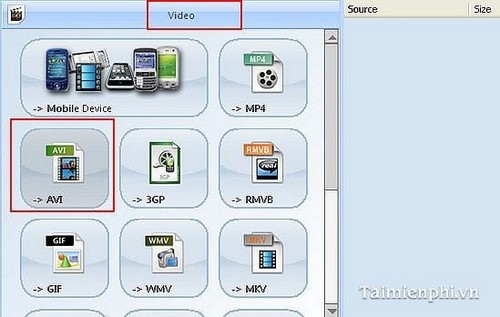
Step 4: Then AddFile and select OK.
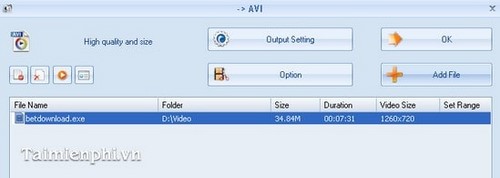
You see the file with the extension.exe has been selected.
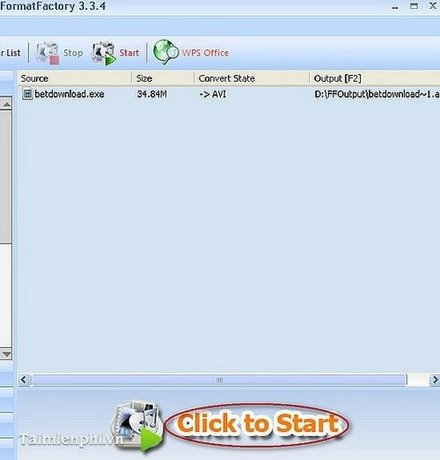
Finally, you just need to Click to Start to run the program and complete the program.
Convert EXE files to video with Format Factory to easily play videos on any media player, instead of being limited by uncommon formats.
Alternatively, you can use online tools to convert formats without installing software. These platforms often support a variety of file export options, making it possible to convert EXE to video to suit your individual needs.
Final Thoughts
The most reliable way to handle Convert.EXE to video (MKV, AVI, MP4,.) is to follow the process in order, verify each important setting, and test the result before moving on. Use the guidance above as a practical reference, then adjust the details for your device, software version, or specific goal.
FAQ
What should I check before I Convert.EXE to video (MKV, AVI, MP4,.)?
Use the latest available software, confirm that your device meets the requirements, and make sure you have the necessary permissions, account access, or backup before changing anything.
Why might I be unable to Convert.EXE to video (MKV, AVI, MP4,.)?
Common causes include outdated software, missing permissions, incompatible settings, incomplete setup steps, or a temporary network problem. Recheck the process from the beginning and restart the app or device if needed.
Is it safe to Convert.EXE to video (MKV, AVI, MP4,.)?
It is generally safe when you use official tools, review every permission, and back up important data before making system-level or account-level changes.
Related Articles
 How to Convert Video to Mp3 Using Free Video to MP3 WMA Converter8 minutes read
 Guide to Convert Video to MP4 by Total Video Converter3 minutes read
 How to Convert Video to Audio for Free: Download Mp3 on YouTube4 minutes read
 How to Convert Online Video Format with Zamzar5 minutes read
 How to Convert Video Format for Smartphones with Qtlmovie5 minutes read
 How to Rip Music from Video on Computer with AV Video Converter6 minutes read
Reader Comments 0
Sign in with email or Google to join the discussion.