Table of Contents
When the notification to continue using the Android application appears on the computer, users just need to click on the Continue button.
From Windows 11 build 26120.5761 (Beta 24H2), Microsoft introduced a feature that lets you continue using Android apps right on Windows 11 when we connect Android phones to Windows 11 PCs. When the notification to continue using Android apps on the computer is displayed, users just need to click on the Continue button. Below are instructions for adding a button to continue using Android apps on the Windows 11 Taskbar.
How to add a button to continue using Android apps on the Taskbar
Step 1:
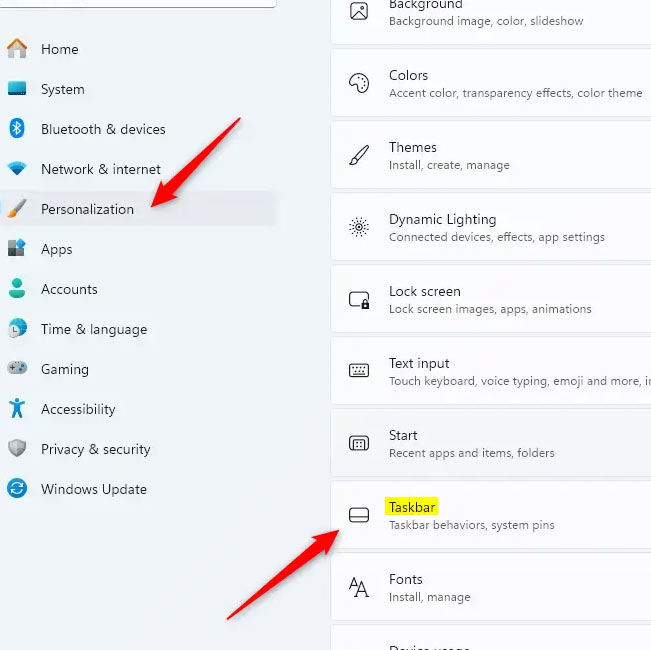
Open Settings and click on Personalization , then look to the side And select Taskbar To make adjustments.
Step 2:
Switch to the new application, you will see The Resume button displayed. We need to Activate this Resume button To display the button to continue using the Android app on the Windows 11 Taskbar.
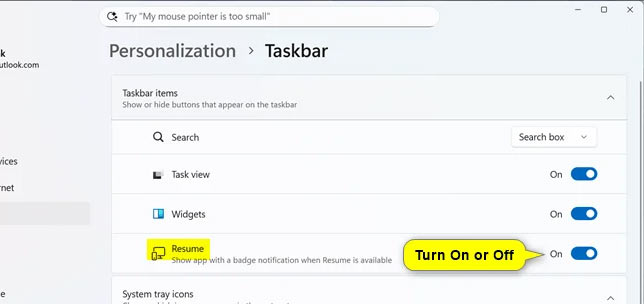
Enabling or disabling the Resume button on the Windows 11 taskbar is a simple process, allowing users to immediately access their favorite Android apps. You will need to make sure your mobile device is connected to your computer for full functionality and that Android app resume mode is enabled.
FAQ
What should you know about continue using Android apps from Windows 11 taskbar?
In practical terms, when the notification to continue using the Android application appears on the computer, users just need to click on the Continue button.
Why does continue using Android apps from Windows 11 taskbar matter?
The article highlights that below are instructions for adding a button to continue using Android apps on the Windows 11 Taskbar.
What is the main takeaway?
The main takeaway is that how to add a button to continue using Android apps on the Taskbar Step 1: Open Settings and click on Personalization , then look to the side And select Taskbar to make adjustments.
Related Articles
 How to Enable Android App Resume Mode on Windows 11: Step-by-Step Guide3 minutes read
 The Latest Windows 11 Update Supports Android Apps and Improves the Taskbar3 minutes read
 How to Fix the Windows 10 Taskbar Crashes Error4 minutes read
 Trick to Rearrange Stacking Windows on Windows Taskbar3 minutes read
 5 Useful Hidden Taskbar Features on Windows 11: Practical Guide6 minutes read
 Steps to Recover Lost Taskbar Icon on Windows 106 minutes read
Reader Comments 0
Sign in with email or Google to join the discussion.