Table of Contents
If the AccuWeather plugin is available to your ChatGPT account, install it from the Plugins directory, start a new chat, and ask for weather using a specific place, date, time, and unit. You can also type @ and select the installed plugin when you want ChatGPT to use it explicitly.
Availability can vary by account, platform, region, rollout, and workspace policy. The official OpenAI documentation explains the general plugin workflow but does not guarantee that a particular third-party plugin will always be listed. Check the directory in your own ChatGPT interface before relying on AccuWeather.
What the AccuWeather plugin may provide
A weather plugin can make ChatGPT's answers more useful by supplying structured forecast data instead of relying on general model knowledge. Depending on the plugin's current tools and coverage, a response may include:
- Current conditions for a named city or area
- Hourly or multi-day forecasts
- Temperature, feels-like conditions, wind, humidity, and precipitation probability
- Weather alerts exposed by the provider
- Air-quality information where available
- Links or references to radar and detailed forecast pages
Not every field is available for every location. “Real-time” may describe the latest reported observation rather than a sensor reading from the current second. Always check the observation or forecast timestamp.
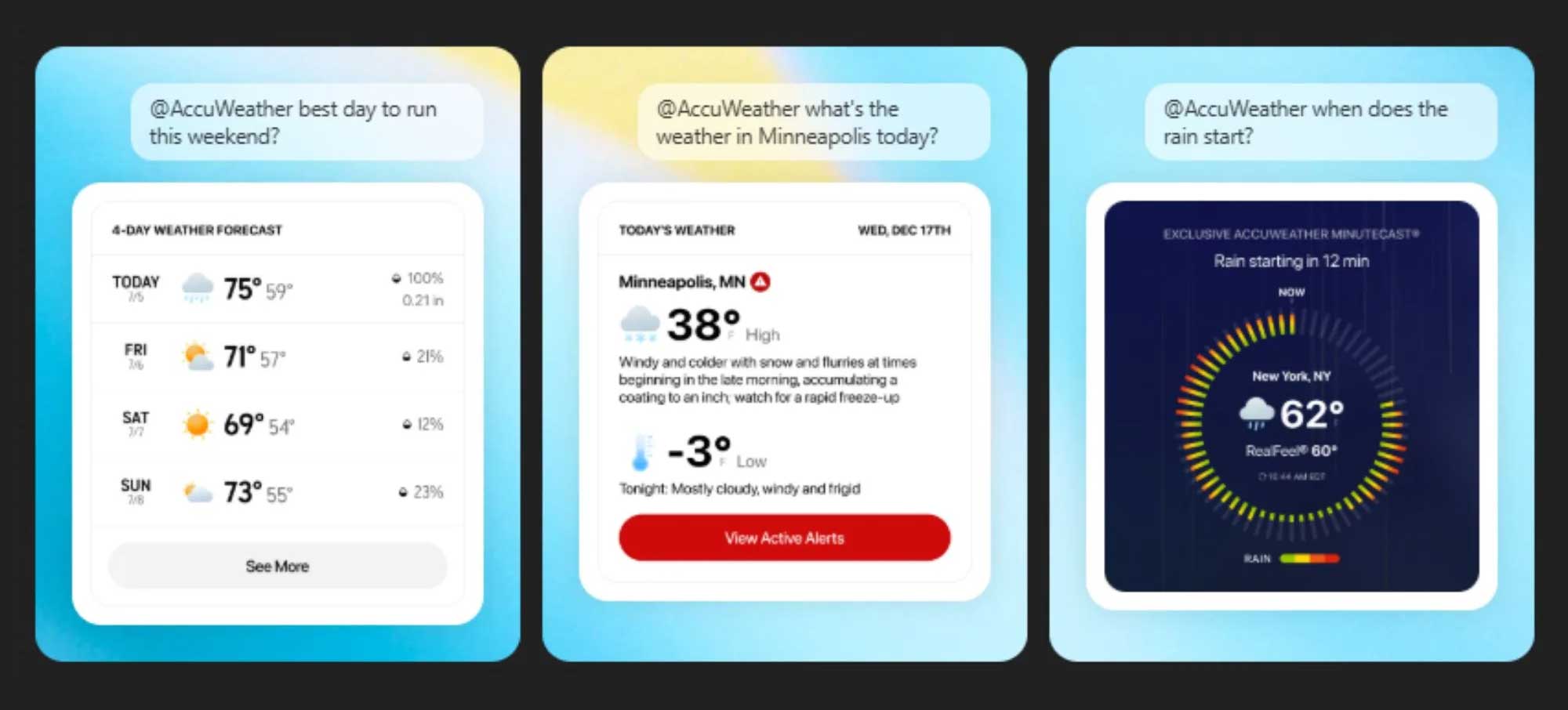
How to install AccuWeather in ChatGPT
OpenAI's current official plugin documentation says plugins are available on supported ChatGPT web, desktop, and mobile surfaces. Follow these steps:
- Open ChatGPT and select the Plugins tab.
- Search the public directory for AccuWeather.
- Open the listing and verify the publisher, description, permissions, and data-handling information.
- Select the plus button to install it.
- If the plugin requests a separate connection or sign-in, review the requested access before continuing.
- Start a new chat after installation so the plugin is available to that conversation.
If AccuWeather does not appear in the directory, do not install a similarly named item from an unverified source. The plugin may be unavailable to your account or may have changed name, rollout status, or supported region.
How to ask AccuWeather about the weather
You can describe the result you want and allow ChatGPT to choose an installed tool, or type @ in the prompt and select the AccuWeather plugin explicitly. OpenAI documents the @ method for choosing a particular installed plugin.
Include four details whenever possible:
- Location: City plus state, province, or country
- Time: Today, a date, or a clear time range
- Metric: Current conditions, rain probability, wind, air quality, or alerts
- Units: Celsius or Fahrenheit; km/h or mph
Useful weather prompts
| Goal | Prompt example | What to verify |
|---|---|---|
| Current conditions | Use AccuWeather to show current conditions in Hanoi, Vietnam, in Celsius. Include the observation time. | Location and local timestamp |
| Rain planning | Show the hourly rain probability in Ho Chi Minh City from 3 p.m. to 9 p.m. today. | Date, timezone, and probability versus amount |
| Trip forecast | Summarize Da Nang's forecast for the next five days with highs, lows, rain, and wind. | Forecast issue time and daily units |
| Outdoor activity | Which two-hour window tomorrow looks best for an outdoor run in Singapore? Explain the tradeoffs. | Heat, humidity, rain, and air quality |
| Air quality | Report the latest air-quality reading for Bangkok and explain the index category in plain language. | Index system, pollutant, and update time |
| Severe weather | List active weather alerts for Miami-Dade County and link to the issuing authority. | Official issuer, area, start, and expiry |
Ask ChatGPT to separate observed conditions from forecasts and to state when data is missing. A confident summary should not hide uncertainty.
How to improve the answer
Disambiguate the location
Many cities share the same name. Write “Springfield, Illinois, United States” rather than “Springfield.” A city or district is usually enough; you do not need to share a home address.
Specify the local time
“This afternoon” can be ambiguous when you are traveling or asking about another country. Include a local time range and timezone when timing matters.
Request a useful format
Ask for a compact table, a packing checklist, or a direct recommendation with assumptions. For example: “Create a table for 8 a.m., noon, 4 p.m., and 8 p.m., then recommend whether to carry rain gear.”
Continue the same conversation
Follow-up questions can refine the forecast: “Now compare that with tomorrow,” “Use Fahrenheit,” or “Focus on wind gusts.” Restate the location if the chat begins discussing several places.
Privacy and third-party data
OpenAI's official documentation states that when ChatGPT sends data through a plugin connector, the connected service's terms and privacy policy apply. Review those terms before using the plugin.
- Share a city or broad area instead of a precise address.
- Do not include travel confirmation numbers, private itineraries, or other unrelated personal data.
- Review permissions during installation and remove the plugin if you no longer use it.
- For a managed work or school account, the administrator may control which plugins are available.
Weather forecast safety checks
- Check the timestamp. Conditions and alerts can change after the response is generated.
- Confirm the place. Verify city, region, country, and timezone.
- Distinguish probability from certainty. A rain percentage is not a guarantee that rain will occur at your exact location.
- Use official emergency sources. For severe storms, floods, heat, wildfire, or evacuation decisions, follow local authorities and the official meteorological service.
- Do not rely on one forecast for high-stakes activity. Aviation, marine, mountain, and industrial operations require specialized approved sources.
For storm season, compare multiple sources and see TipsMake's guide to apps for tracking storm activity. iPhone users can also review the Weather app's detailed forecast features.
If AccuWeather is missing or not working
- Update ChatGPT to the latest version, or try the web interface.
- Open the Plugins directory and confirm the plugin is installed for the current account and workspace.
- Start a new chat after installation.
- Type @ and check whether AccuWeather appears among available plugins.
- Review workspace restrictions if you use a Business, Enterprise, school, or managed account.
- Disconnect and reconnect only after reading any permissions again.
- If the plugin remains unavailable, use ChatGPT's available web-search capability or open a trusted weather provider directly.
Do not assume an ordinary ChatGPT answer contains live weather data. Ask it to identify the source and timestamp, then verify the most important details yourself.
Frequently asked questions
Do I have to type @AccuWeather every time?
Not necessarily. You can ask for the outcome and let ChatGPT choose an installed tool. Use the @ mention when you want to select AccuWeather explicitly.
Can ChatGPT send weather alerts automatically?
A normal weather question returns an answer for that conversation. Do not assume it creates a persistent alert. Use your phone's emergency-alert system or an official weather app for time-sensitive warnings.
Why is my weather answer different from another app?
Providers may use different observation stations, models, update times, and forecast methods. Compare the exact location, timestamp, units, and forecast horizon before deciding that one result is wrong.
Bottom line
Install AccuWeather only if it appears in your official ChatGPT Plugins directory, then start a new chat and ask a precise, time-bound weather question. Use @AccuWeather when you want to select the plugin explicitly. Verify timestamps and severe-weather alerts, and remember that third-party data and privacy terms apply whenever a connected plugin is used.
Related Articles
 Accurate Weather Forecast Applications on the Phone6 minutes read
 Why Use AccuWeather Instead of Android's Weather App?7 minutes read
 10+ Best Weather Forecast Apps for Android13 minutes read
 Download Weather Forecast Pro, the 83,000 VND Real-time Weather3 minutes read
 Please Download Weather NOW, the Weather Forecast Application Costs4 minutes read
 AccuWeather iOS Application Sends Location Information to Advertising Partners3 minutes read
Reader Comments 0
Sign in with email or Google to join the discussion.