Table of Contents
To check a Pokémon's current moves, open its detail page in Pokémon GO and read the Fast Move and Charged Move shown below its stats. To decide whether those moves are good, evaluate them for the intended format—raids and Gym battles or Trainer Battles—because damage, energy, duration, and effects can differ between PvE and PvP.
The move-change table in the original article described an early game version. It is no longer a reliable list of current moves or availability.
Check the moves on an individual Pokémon
- Open the Poké Ball menu and choose Pokémon.
- Select the exact Pokémon you plan to use.
- Scroll to its move section.
- Note the Fast Move and every Charged Move currently unlocked.
- Check the Pokémon's form, because alternate forms can have different move pools.
The displayed power alone does not identify the best move. Fast Moves differ in damage, energy generation, and speed. Charged Moves differ in damage, energy cost, timing, and—in Trainer Battles—possible stat effects.
Move performance depends on the battle format
| Question | Raids and Gyms | Trainer Battles |
|---|---|---|
| What matters most? | Damage output, energy cycle, boss matchup, and battle timer | Energy pressure, shields, coverage, bulk, and stat effects |
| Are move numbers identical? | No; PvE has its own power and timing values | No; PvP uses separate power and energy values |
| Is same-type damage useful? | Often, due to the same-type attack bonus and focused counters | Often, but coverage moves can be equally important |
A move combination rated highly for raids may be mediocre in Great League, and a strong PvP bait move may not be efficient against a raid boss.
How move changes happen
Pokémon GO can change move power, energy, duration, effects, or availability during balance updates. It can also add moves to a species or feature limited-time moves during events. After an update, an old ranking or screenshot may no longer describe the live game.
Check the current in-game values, recent official update notes, and a reputable battle database that clearly separates PvE from PvP and displays an update date.
Legacy and event-exclusive moves
A legacy move is unavailable through an ordinary Fast TM or Charged TM at the time you check. Some moves return during events; others can be selected with an Elite TM if the move is eligible.
- Do not use a regular TM repeatedly when the desired move is not in the ordinary pool.
- Preview the options shown by an Elite TM before confirming.
- Check whether an upcoming event will make the move obtainable through evolution.
- Keep old Pokémon with unusual moves until you verify whether the move has collection or battle value.
Use regular TMs carefully
A Fast TM changes the current Fast Move to another move from the eligible regular pool. A Charged TM does the same for Charged Moves. The result may be random when more than one alternative is available.
Adding a second Charged Move can be better than replacing the first when a Pokémon needs both same-type damage and coverage. Review the Candy and Stardust cost before unlocking it.
About old move-list websites
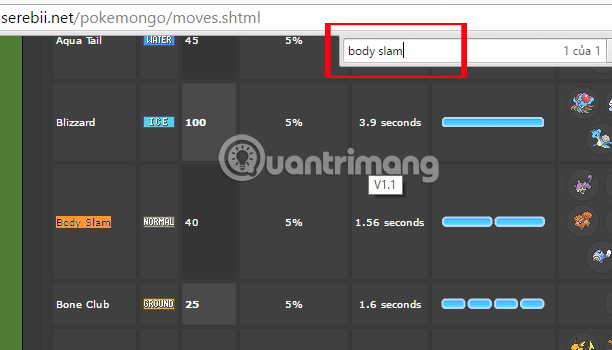
The screenshots below show older reference pages used by the original guide. They may still illustrate the type of data to compare, but their displayed moves and values should not be assumed current.
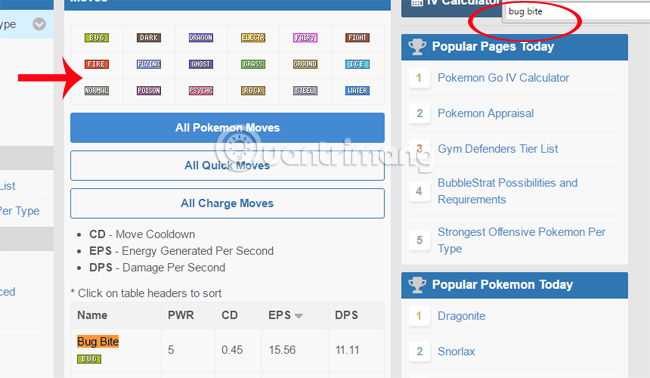
When evaluating any move page, look for:
- a visible last-updated date;
- separate raid/Gym and Trainer Battle values;
- the exact Pokémon form;
- ordinary versus Elite-TM availability;
- event or evolution restrictions.
Before changing a move
- Define the role and battle format.
- Confirm the desired move is currently obtainable.
- Check whether the Pokémon needs a second Charged Move.
- Make sure the existing move is not legacy or event-exclusive.
- Use the appropriate regular or Elite TM only after reviewing the result.
This process avoids the two expensive mistakes common with move changes: removing a valuable limited move and spending multiple TMs chasing a move that is not in the regular pool.
Related Articles
 30 Strongest Fighting Skills and Pokémon Possessed in Pokémon GO5 minutes read
 How to Check IV Potential Indicators for Pokémon on iOS and PC9 minutes read
 Pokémon GO - Trick to Evolve Eevee into Any Kind of Pokémon5 minutes read
 Things to Know to Upgrade Pokémon in Pokémon GO6 minutes read
 The Strongest Pokémon in Pokémon GO: Stats Explained6 minutes read
 How to Own Eggs 10 Km in Pokémon GO?5 minutes read
Reader Comments 0
Sign in with email or Google to join the discussion.