Table of Contents
Quick answer
You're probably familiar with the Sum function in Excel, but do you know how to calculate the sum for a horizontal row? While the Sum function is commonly used to calculate the sum of values in a column, calculating the sum for a horizontal row can be a bit challenging for…
The Sum function in Excel is commonly used to calculate the total of values, especially when working with column-by-column data. However, when you need to calculate the total across rows, applying the Sum function is also easy.
How to calculate the sum horizontally using the Sum function in Excel.
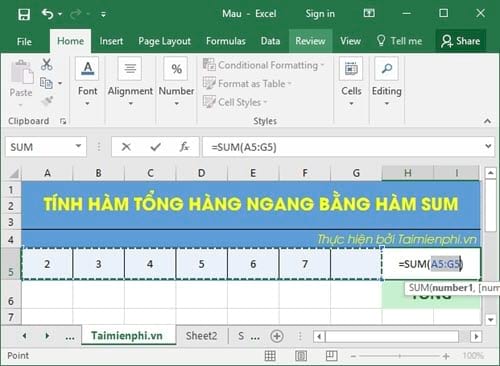
Method 1: To calculate the sum of a row in Excel, you can hold down the Alt key and click on the cell where you want to enter the formula. Then, press the " = " key, and Excel will automatically select all the values horizontally.
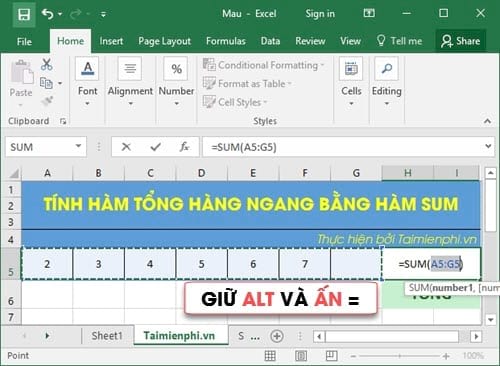
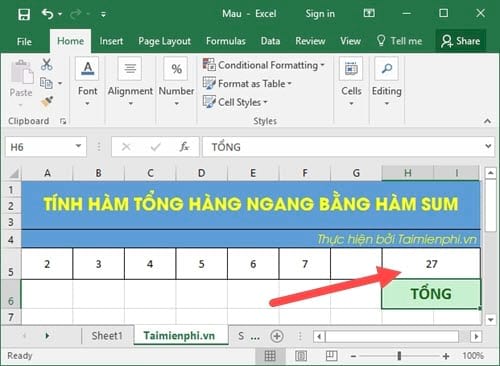
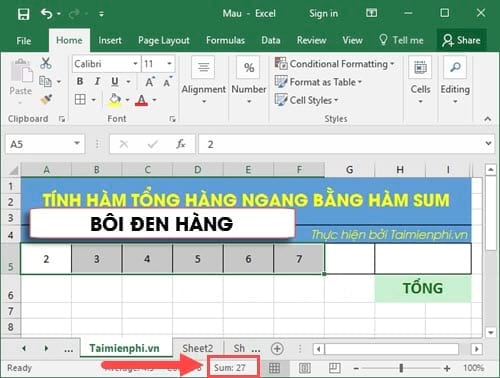
The result will show as 27; you can do some mental calculation to check if it matches.
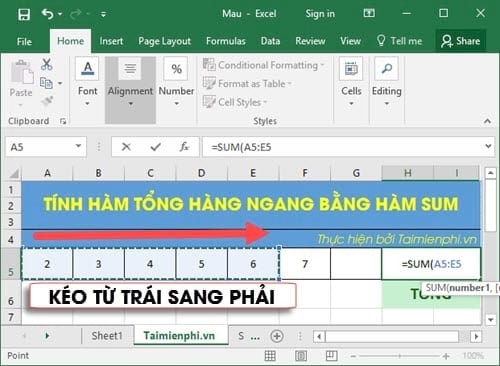
Method 2: The second method is the traditional one: you enter the formula =SUM , then click on the first cell in the row and drag from left to right to select the cells you want to sum.
Method 3: Simply type " = " into the cell where you want to calculate the Sum function, then click the Home tab , go to Editing , and select AutoSUM .
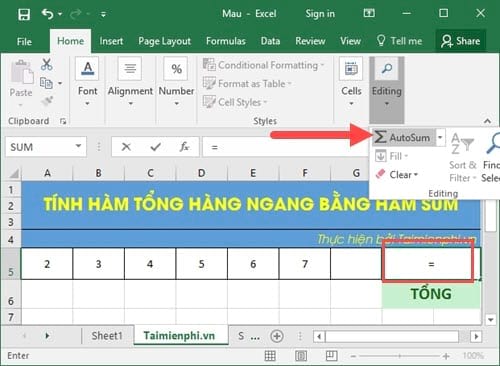
This operation will immediately help you calculate the total for the entire row in Excel. Just press Enter to display the result.
Another way to check the sum of a row is to highlight all the cells in the row. At the bottom, you will see the word " Sum " and the total result. This is a feature in Excel that helps you quickly calculate the sum of a row horizontally.
With the methods that TipsMake has just introduced, you have gained a better understanding of the Sum function and how to calculate the horizontal sum in Excel. Mastering these functions will help you work more efficiently.
In addition, the Vlookup function is also very useful, helping to search for values by column and row in Excel. This is one of the basic, essential functions that you must know when using Excel.
Additionally, the IF function – the conditional function – is also very popular, applicable to many different cases and spreadsheets. TipsMake has also published an article guiding you on how to use the IF function in Excel , which you can refer to.
If you want to learn about how to calculate percentages quickly and efficiently, from percentage ratios to growth percentages, follow the next article for more useful calculation tips.
Related Articles
 The Easiest Way to Calculate the Percentage (%)6 minutes read
 3 Ways to Calculate Totals in Excel: Province Excel Total5 minutes read
 Calculate the Total Value of the Filtered List in Excel4 minutes read
 SUM Function in Excel: How to Use SUM to Calculate Totals in Excel - SUM11 minutes read
 Calculation of Percentages in Excel4 minutes read
 How to Use the SUM Function to Calculate Totals in Excel8 minutes read
Reader Comments 0
Sign in with email or Google to join the discussion.