Table of Contents
Most consumer AI services provide a setting or objection process that can stop future chats or content from being used to improve generative AI models. The control is different for every provider, and turning it off usually does not delete data already stored or remove information from training that has already happened.
Use the service-specific instructions below, then delete old activity separately where that option exists. For confidential, regulated, or client data, the safer rule is not to upload it to a consumer AI account at all. Use an approved business product with contractual data controls instead.
What an AI training opt-out does—and does not do
- Training: using data to build or improve future model versions.
- Service processing: temporarily processing your prompt to generate an answer. An opt-out does not stop this.
- History: saving chats or activity so you can revisit them. This may have a separate switch.
- Safety retention: keeping data for a limited period to detect abuse, investigate failures, or comply with law.
- Personalization: using history to tailor results. Disabling personalization is not automatically a training opt-out.
- Feedback: thumbs-up, thumbs-down, reports, and text feedback can be handled under separate terms and may include the related conversation.
After changing a setting, read the confirmation text displayed for your account and region. Interfaces, defaults, retention periods, and legal objection rights can change.
Quick settings guide
| Service | Control to look for | Important limitation |
|---|---|---|
| ChatGPT personal account | Settings > Data Controls > Improve the model for everyone | Feedback and safety retention are separate; work/API data follows different terms. |
| Gemini personal account | Settings & help > Activity > Keep Activity | Chats can remain with the account for up to 72 hours when activity is off. |
| Claude consumer account | Settings > Privacy > Help Improve Our AI Models | Cannot reverse training already in progress or completed; feedback is separate. |
| Google Search | Search Services History, Save Media, and Personalized Recommendations | History and personalization controls are separate, and neither blocks all Google processing. |
| Figma | Team or organization settings > AI > Content training | An admin controls it; defaults depend on the plan. |
| Adobe Creative Cloud | Content analysis for product improvement | Adobe says ordinary Creative Cloud content is not used to train generative AI unless submitted to Adobe Stock. |
| Settings & Privacy > Data Privacy > Data for Generative AI Improvement | Applies going forward and not to all non-generative AI or feedback uses. | |
| Meta | Privacy Center or region-specific objection form | Availability and legal effect depend on location and account eligibility. |
Google Search: manage saved media, history, and personalization
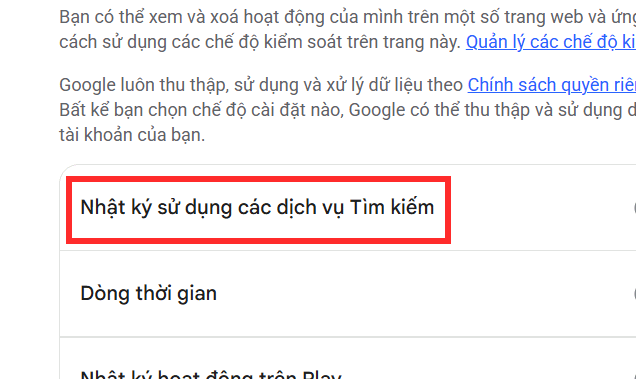
Google’s Search Services History can include queries, results viewed, AI Mode interactions, Google Lens images, voice recordings, file uploads, places viewed, and related information. Three different controls matter:
- Save Media controls whether media from Search interactions is saved to Search Services History.
- Search Services History controls whether new supported activity is saved.
- Personalized Recommendations controls whether saved activity personalizes supported Search experiences.
Turning off one does not automatically turn off the others.
Turn off Save Media
- Open Google My Activity and sign in.
- Select Search Services History.
- Find the Save Media subsetting and turn it off.
- Open View and delete saved history if you also want to remove media saved earlier.
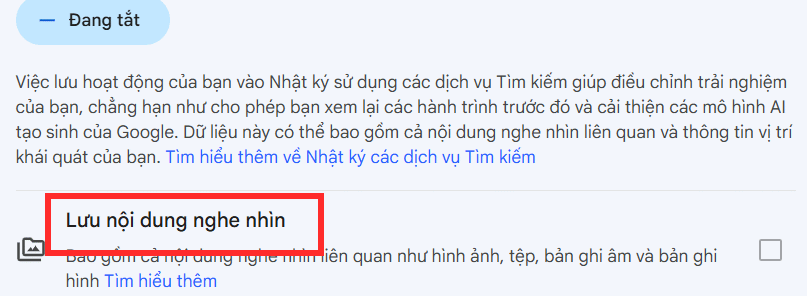
When Save Media is off, new supported media is not saved to this account history. Google’s help page warns that previously saved media is not deleted automatically and may continue to be used to improve Google technologies unless you delete it.
Turn off Search Services History
- On the same Search Services History page, select the status control.
- Choose Turn off, or choose the option that also deletes activity if offered.
- Read the confirmation and complete the change.
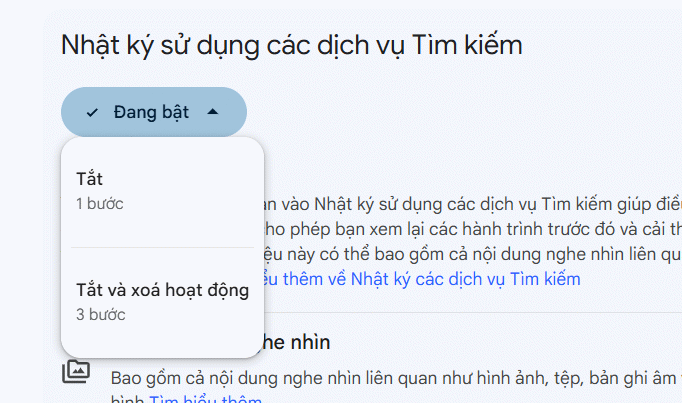
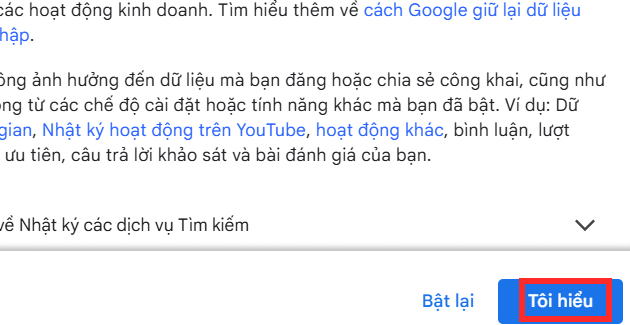
This stops supported new activity from being added to Search Services History. It does not prevent Google from processing a query, file, image, or voice input to provide the requested service, and it does not remove activity held under another Google setting.
Turn off Personalized Recommendations
- Open the Search Services History controls.
- Select Personalized Recommendations.
- Turn the setting off and confirm.
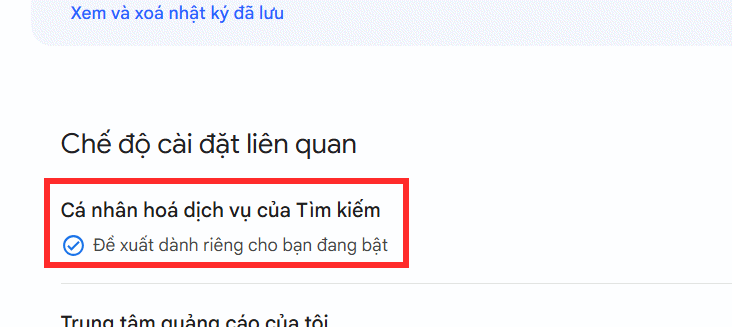
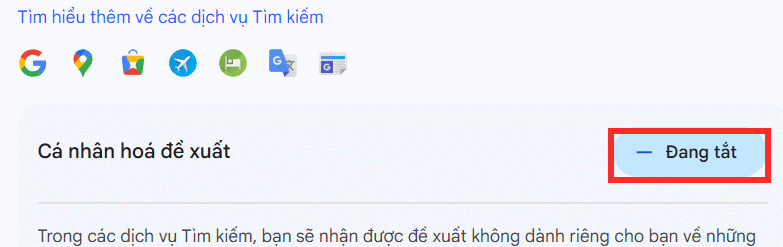
This reduces supported recommendations based on saved Search activity. It is a personalization control, not a universal AI-training switch. Ad personalization is also managed separately in Google’s ad settings.
ChatGPT: turn off model improvement
For a personal ChatGPT account:
- Open your profile menu and choose Settings.
- Open Data Controls.
- Turn off Improve the model for everyone.
The setting prevents new personal-account chats from being used to improve OpenAI’s models. It does not stop the service from processing your prompt to answer, and safety-related retention can still apply.
Use Temporary Chat when you do not want a conversation in normal history or used for training. Temporary chats can still be retained for a limited safety period. If you submit thumbs-up or thumbs-down feedback, the related conversation may be handled as feedback even when general model improvement is off.
Business offerings and the OpenAI API have different defaults. OpenAI states that API data is not used for training unless the organization explicitly opts in.
Gemini: turn off Keep Activity or use Temporary Chat
- In Gemini, open Settings & help.
- Select Activity.
- Open the Keep Activity menu and turn it off.
- Use the delete controls on the activity page to remove earlier Gemini activity if desired.
Google states that when Keep Activity is off and you do not submit feedback, future chats are not used to improve its AI models. Those chats are still retained with your account for up to 72 hours to provide the service and protect users and Google. Temporary chats are also not used for model training but have similar short-term retention.
Work and school accounts are controlled by the organization’s Google Workspace administrator. The consumer setting may not be available or may not govern that data.
Claude: disable model improvement
- Open your name or profile menu.
- Select Settings.
- Open Privacy.
- Turn off Help Improve Our AI Models.
Anthropic says this stops previous stored chats and new consumer chats or coding sessions from being used in future training runs. It does not remove data from models already trained or from a training run already in progress. Deleting a chat also prevents that deleted chat from being used in future training.
Feedback is separate. Anthropic states that submitting thumbs-up or thumbs-down feedback can cause the entire related conversation to be stored for an extended period and used for improvement. Claude for Work and Anthropic’s API use commercial data terms and are not trained on by default unless the customer opts into a program.
Adobe: distinguish content analysis from generative AI training
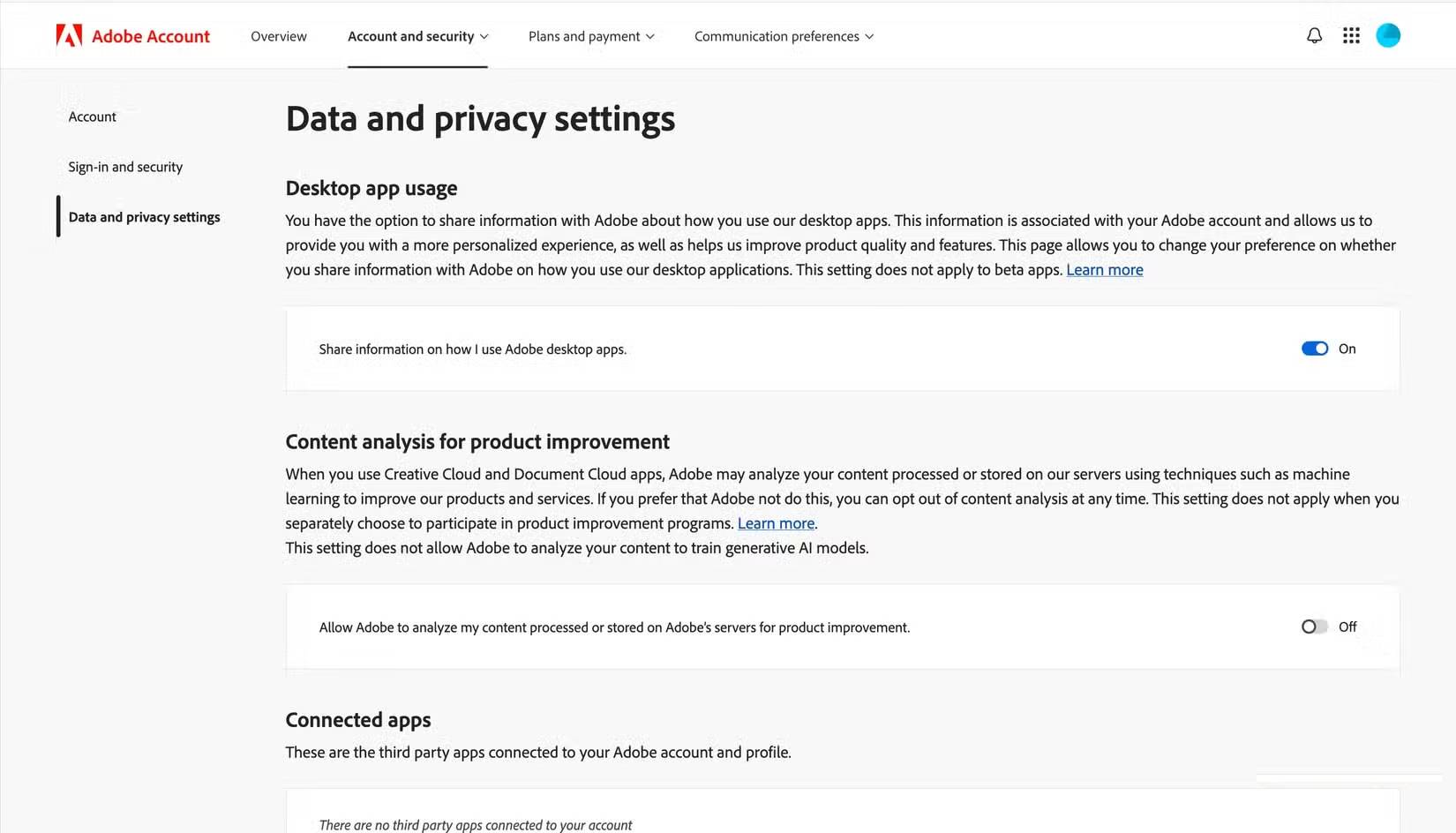
Adobe’s current policy says it does not analyze ordinary Creative Cloud or Document Cloud content to train generative AI models unless you choose to submit content to the Adobe Stock marketplace. Firefly is trained on licensed content such as Adobe Stock and eligible public-domain content.
The Content analysis for product improvement control governs Adobe’s analysis of server-processed or server-stored content for broader product improvement. If you want to disable it:
- Open your Adobe account privacy settings.
- Find Content analysis for product improvement.
- Turn it off and save the change.
This opt-out does not necessarily apply when you voluntarily submit content through feedback, beta programs, user studies, improvement programs, or Adobe Stock. Review the terms before joining any of those programs.
Figma: ask a team admin to disable content training
Figma’s control is managed at the team or organization level:
- An admin opens the team or organization settings.
- Open the Settings area and find the AI section.
- Select Manage AI settings where shown.
- Turn Content training off.
Figma says content training is on by default for Starter and Professional teams, although an admin can turn it off. It is off by default for Organization and Enterprise plans; Figma currently states that it cannot be turned on for those plans. Disabling content training does not itself disable access to AI features.
LinkedIn: turn off Data for Generative AI Improvement
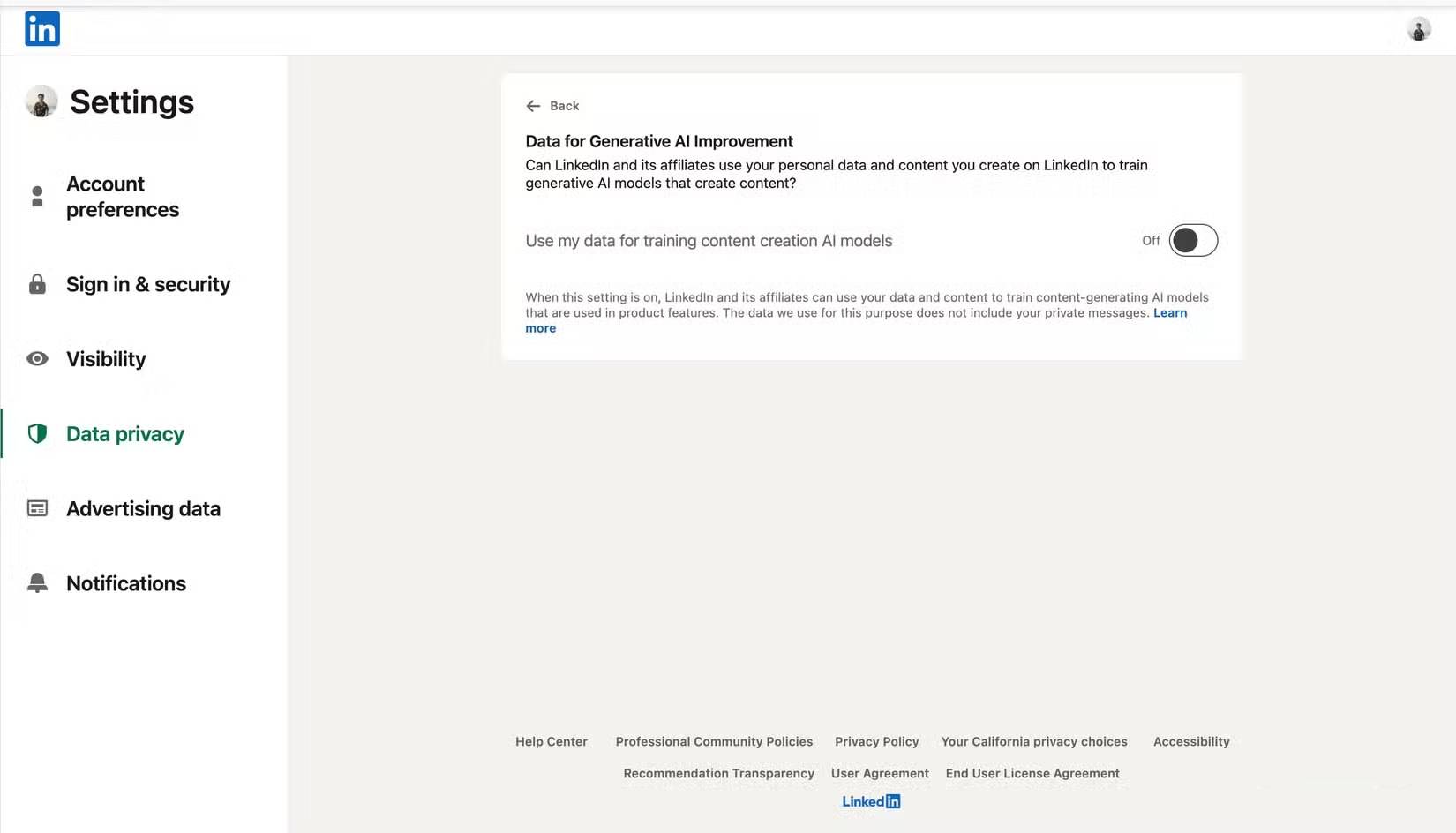
- Open Settings & Privacy.
- Select Data Privacy.
- Open Data for Generative AI Improvement.
- Turn the setting off.
LinkedIn says the setting is on by default where the processing applies. Turning it off stops LinkedIn and its affiliates from using member data and content for future training of content-generating models. It does not undo training already completed, and it does not control models used for personalization, security, safety, or anti-abuse.
Feedback can be used separately, so avoid placing confidential information in a feedback form. Regional options and notices can differ.
Meta: check the Privacy Center and regional objection rights
Meta says it uses public content shared by adults—such as public posts, comments, photos, and captions—and interactions with Meta AI to improve generative AI models in supported regions. It says private messages with friends and family are not used for this purpose.
There is no single worldwide settings toggle with identical effect for every Facebook, Instagram, and Threads user. In the EU and UK, Meta provides notifications and an objection form. Other locations may have different privacy rights or forms.
- Open the Meta Privacy Center from Facebook or Instagram.
- Search for Privacy and generative AI or a notice about AI model training.
- Use the objection link if it is available for your account and region.
- Keep the confirmation of your request.
- Review the audience of old posts and delete content you no longer want public.
Changing a post from public to private is a useful exposure control, but it cannot guarantee removal from a model already trained or a dataset previously collected.
Additional steps that reduce exposure
- Do not enter passwords, API keys, government IDs, medical records, legal strategy, or confidential client material into a consumer AI service.
- Remove names and identifying details before asking for help with a sensitive scenario.
- Use Temporary Chat or equivalent modes when appropriate, while remembering that limited retention can still apply.
- Delete old chat and activity history after changing the future-use setting.
- Avoid submitting sensitive conversations as feedback.
- For work, use only organization-approved accounts and follow the administrator’s retention and connector policy.
- Review settings periodically because providers can change defaults, labels, and regional options.
No opt-out can retrieve information from a model that has already been trained. The most effective protection is to minimize what you upload, then combine training controls, history deletion, private sharing settings, and approved business tools.
Related Articles
 minutes read
 How to Stop Allowing the Use of Personal Data to Train AI8 minutes read
 How to Block Twitter from Tracking and Sharing Personal Data on4 minutes read
 How to Prevent Grok from Collecting Personal Data to Create AI Images4 minutes read
 How Valuable Is the User's Personal Data?4 minutes read
 Backup Personal Data on Facebook, Twitter and Google+4 minutes read
Reader Comments 0
Sign in with email or Google to join the discussion.