Table of Contents
The best Microsoft Power Automate alternative depends on what you are replacing. Zapier is usually the easiest starting point for cross-app SaaS workflows; Make is strong when you want to see and transform a complex data flow; n8n suits technical teams that need code and self-hosting; and Workato targets governed, organization-wide integration. Sintra AI can delegate business tasks to AI helpers, but it is not a like-for-like workflow or robotic process automation platform.
Power Automate may still be the better choice when a process depends on Microsoft 365, Dataverse, Dynamics 365, approvals, or Windows desktop automation. Compare one real workflow before committing to a migration.
Quick comparison
| Platform | Best fit | Main strength | Main tradeoff versus Power Automate |
|---|---|---|---|
| Zapier | Small and midsize teams automating common cloud apps | Large connector catalog and accessible setup | Costs and maintainability need attention as tasks and branching grow |
| Make | Operations teams building visual, data-heavy scenarios | Clear flow diagrams, routers, filters, and transformations | The visual canvas has a learning curve and execution credits require modeling |
| n8n | Developers and technical automation teams | Code-friendly workflows and a self-hosted Community edition | You own more deployment, security, upgrade, and monitoring work when self-hosting |
| Workato | Large organizations with integration and governance programs | Enterprise orchestration across business systems | Usually needs a sales-led evaluation and a more formal implementation |
| Sintra AI | Small teams delegating writing, research, email, and similar tasks | Role-based AI helpers and built-in integrations | Not a direct replacement for deterministic flows, desktop RPA, or detailed process control |
What are you replacing in Power Automate?
Write down the current flow before comparing products:
- Cloud workflow: an event in one service triggers actions in other services.
- Approval process: people review, approve, reject, or add information.
- Desktop RPA: a bot interacts with a Windows application that has no suitable API.
- Business process: a long-running case moves through stages, rules, and owners.
- Data integration: records are synchronized, transformed, deduplicated, or moved at volume.
- AI-assisted task: a model classifies, drafts, extracts, or summarizes information.
A platform that is excellent at cloud app triggers may not replace Power Automate Desktop. An AI assistant that writes an email does not provide the auditability of a deterministic approval flow.
Zapier: easiest for broad SaaS connectivity
Zapier connects triggers and actions into Zaps and provides a large library of templates. Its official catalog currently advertises more than 9,000 app integrations, making it a practical option when the workflow spans popular cloud services outside Microsoft's ecosystem.
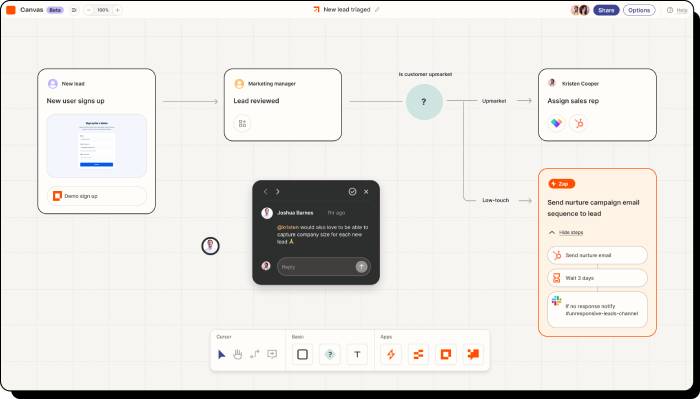
Where Zapier fits
- form-to-CRM lead capture;
- notifications and task creation;
- marketing and support handoffs;
- simple scheduled synchronization;
- teams that need nondevelopers to launch a workflow quickly.
Points to evaluate
Count every billable task in a representative month, including loops, retries, filters, and paths. Test how the workflow handles duplicates, rate limits, expired credentials, and partial failure. A short Zap can be simple; a large collection of cross-dependent Zaps can be difficult to govern.
Choose Zapier over Power Automate when connector breadth and speed for common SaaS apps matter more than Windows desktop automation or deep Microsoft governance.
Make: visual control for branching and data transformation
Make displays modules and connections on a visual canvas. Routers, filters, iterators, and mapping tools make it easier to inspect how data moves through a multi-step scenario. Make currently lists more than 3,000 prebuilt apps.
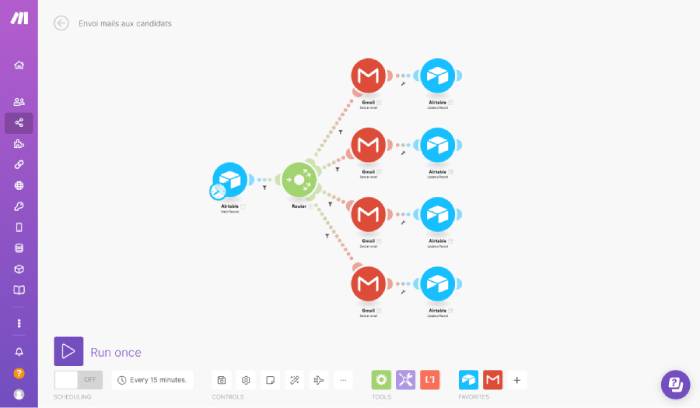
Where Make fits
- workflows with several branches and transformations;
- operations teams that need to inspect bundles and mappings visually;
- API and webhook scenarios that outgrow simple trigger-action recipes;
- automations that combine structured data from several SaaS tools.
Points to evaluate
Make uses an execution-credit model, so model the number of modules that run for each record and error path. A visually impressive scenario can still be brittle if it lacks idempotency, clear error handlers, and alerting.
Choose Make over Power Automate when a visual map of complex cross-app logic and data transformation is more valuable than Microsoft-native integration or desktop RPA.
n8n: code-friendly automation and self-hosting
n8n combines a node-based workflow editor with code, expressions, webhooks, and API access. It offers n8n Cloud and self-hosted editions. Current cloud pricing is based on workflow executions rather than the number of steps in an execution.
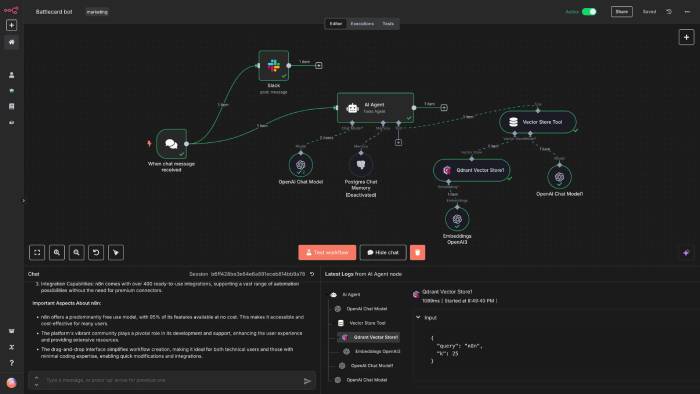
Where n8n fits
- technical teams comfortable with APIs, JSON, credentials, and deployment;
- custom nodes or code inside a workflow;
- internal automation where self-hosting is a documented requirement;
- workflows that need detailed data manipulation and versioned engineering practices.
License and operations matter
n8n's source is available under its Sustainable Use License; it should not be described simply as unrestricted open source. The free self-hosted Community edition can be used indefinitely for supported uses, while some collaboration, security, and enterprise features require paid editions. Review the current license for embedded, hosted-for-customers, or commercial redistribution scenarios.
Self-hosting does not automatically provide security or compliance. Your team must patch the service, protect credentials, encrypt traffic, back up state, monitor jobs, control access, and test upgrades.
Choose n8n over Power Automate when technical control, code extensibility, and a self-managed deployment outweigh the convenience of a Microsoft-managed service.
Workato: enterprise integration and orchestration
Workato is positioned for cross-department automation, application integration, API work, governance, and orchestration across enterprise systems. It is a closer comparison for an organization-wide automation program than for one person's email-to-spreadsheet flow.
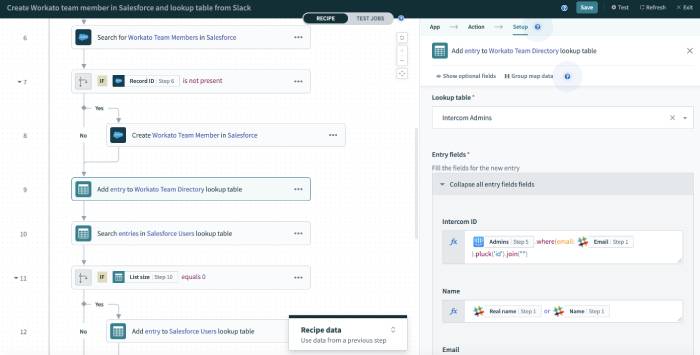
Where Workato fits
- integrations spanning CRM, ERP, HR, finance, and data systems;
- central governance with distributed builders;
- reusable connectors, recipes, and business actions;
- large deployment programs that need formal lifecycle controls and support.
Points to evaluate
Workato pricing and packaging often require a sales conversation. Ask for a written estimate based on connections, usage, environments, support, and planned growth. Validate connector depth, not just the presence of a connector: required triggers, objects, bulk operations, custom fields, and API limits can differ.
Choose Workato over Power Automate when the main requirement is governed enterprise orchestration across many vendor systems and the organization can support a formal platform program.
Sintra AI: adjacent to workflow automation, not a direct substitute
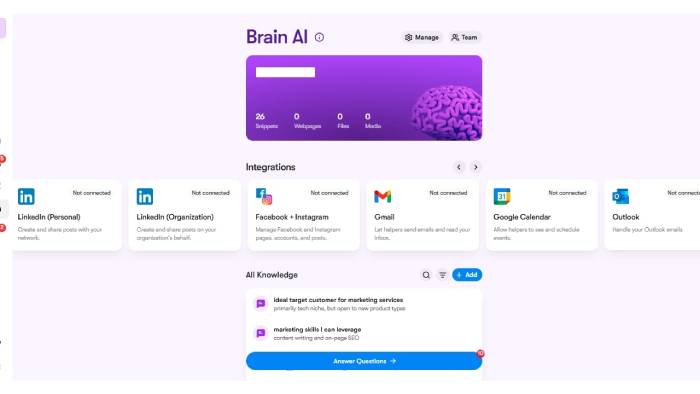
Sintra AI offers specialized “Helpers” for tasks such as content, research, email, scheduling, and business support. Its current help documentation says integrations are built into the service and that it does not provide a public API. That differs from a workflow engine where a builder defines every trigger, condition, data mapping, retry, and action.
Where Sintra can fit
- drafting and organizing recurring business content;
- assisting a small team with research or communication tasks;
- using role-oriented AI interactions without designing a large flow diagram.
Where it does not replace Power Automate
- deterministic approval and compliance workflows;
- desktop RPA;
- deep API orchestration with custom error handling;
- auditable record synchronization where every transformation must be explicit;
- use cases that require a public platform API or unsupported connectors.
Treat AI output as untrusted until reviewed. Define which actions require confirmation and which data the helper may access.
When Power Automate remains the better option
Staying with Power Automate can reduce integration and migration work when you rely on:
- Microsoft 365, Teams, SharePoint, Dynamics 365, or Dataverse;
- Power Apps and Power Platform governance;
- attended or unattended Windows desktop flows;
- existing Microsoft licensing, identity, environments, and administration;
- flows already supported by internal staff or a partner.
Power Automate's licensing can be complex, but a replacement also has connector, usage, implementation, support, and migration costs. Compare total cost, not the advertised entry plan.
Run a proof of concept before choosing
- Select one frequent, high-value workflow with realistic data volume.
- Document triggers, actions, branches, identities, data residency, and recovery requirements.
- Build the same workflow in two shortlisted platforms.
- Test duplicate events, expired credentials, API rate limits, malformed data, and partial outages.
- Measure build time, monthly usage units, execution latency, failure recovery, and support effort.
- Review permissions, logs, retention, environment separation, export options, and vendor lock-in.
- Estimate migration and three-year operating cost before standardizing.
Check current capabilities and pricing on the vendors' official pages: Zapier integrations, Make product, n8n pricing, Workato, Sintra integrations, and Power Automate pricing.
Related Articles
 Microsoft Power Automate Is Officially Launched to Users3 minutes read
 Clean up Your Desktop Using Power Automate Workflow: How-To Guide6 minutes read
 How to Use Power Automate on Windows 11 to Automate Tasks7 minutes read
 Power Automate Explained8 minutes read
 3 Little-Known Microsoft Apps You Should Use Every Day: Practical Guide5 minutes read
 TOP best n8n alternatives in 202618 minutes read
Reader Comments 0
Sign in with email or Google to join the discussion.