Table of Contents
iOS 27 adds Image Playground to the iPhone wallpaper workflow, letting a compatible Apple Intelligence device generate a Lock Screen image from a text description. You can start from the Lock Screen gallery or create the image in the Image Playground app, where you have more control over its aspect ratio and style.
Availability: iOS 27 is prerelease software at the time of writing, so menu labels can change before the public release. Apple Intelligence must be available for your device, language, and region. Supported iPhones include iPhone 15 Pro and 15 Pro Max and iPhone 16 models or later.
Create an AI wallpaper from the Lock Screen
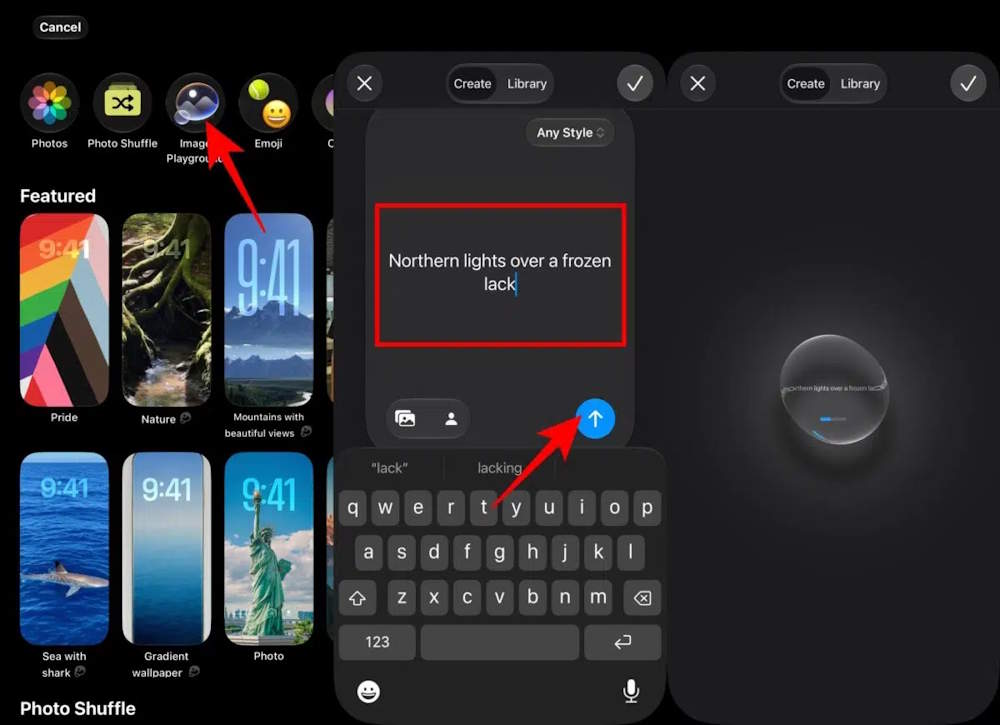
- Wake and unlock the iPhone, then touch and hold the Lock Screen.
- Tap the Add New button to open the wallpaper gallery.
- Select Image Playground.
- Describe the image you want. Add a subject, setting, colors, lighting, and style, then submit the prompt.
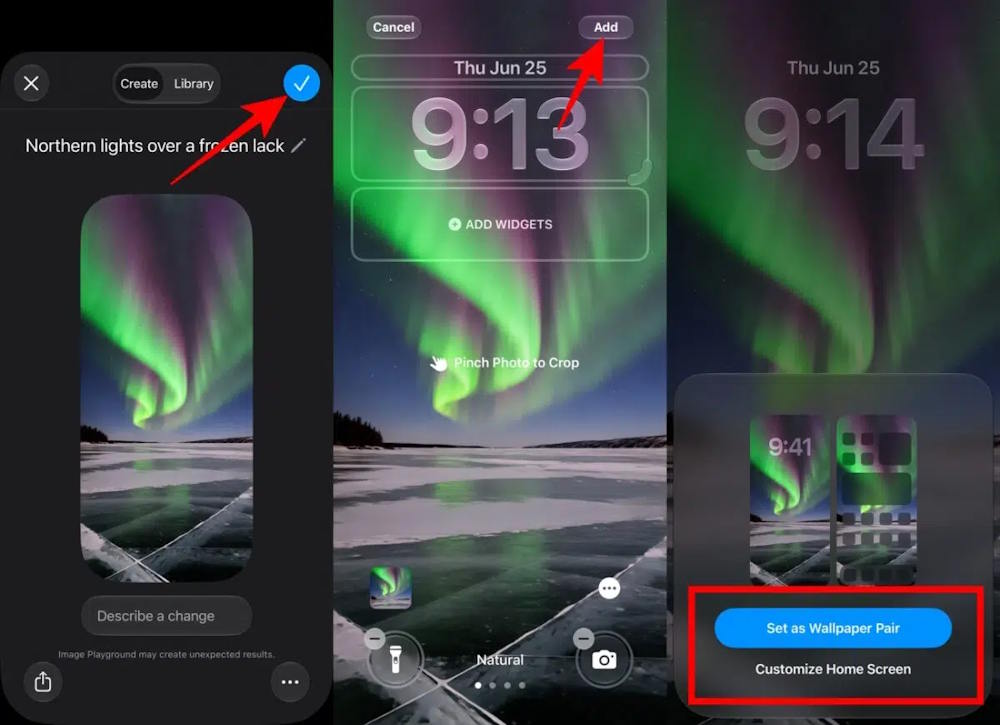
- Review the generated options and select the one you prefer.
- Adjust the clock and widgets if needed, tap Add, then choose Set as Wallpaper Pair or customize the Home Screen separately.
If Image Playground is absent from the gallery, check that the phone is running a current iOS 27 beta, Apple Intelligence is enabled, and its device language and Siri language are supported.
Create a wallpaper in the Image Playground app
This route is useful when you want to experiment before opening the wallpaper editor.
- Open Image Playground and tap New Image or the plus button.
- Open the aspect-ratio control and choose Wallpaper where available.
- Enter a description, choose a style, and optionally add concepts or a person from your photo library.
- Refine the prompt until the composition leaves enough clear space for the clock and widgets.
- Use Set Wallpaper if shown. Otherwise, save the image, then open Settings > Wallpaper > Add New Wallpaper > Photos.
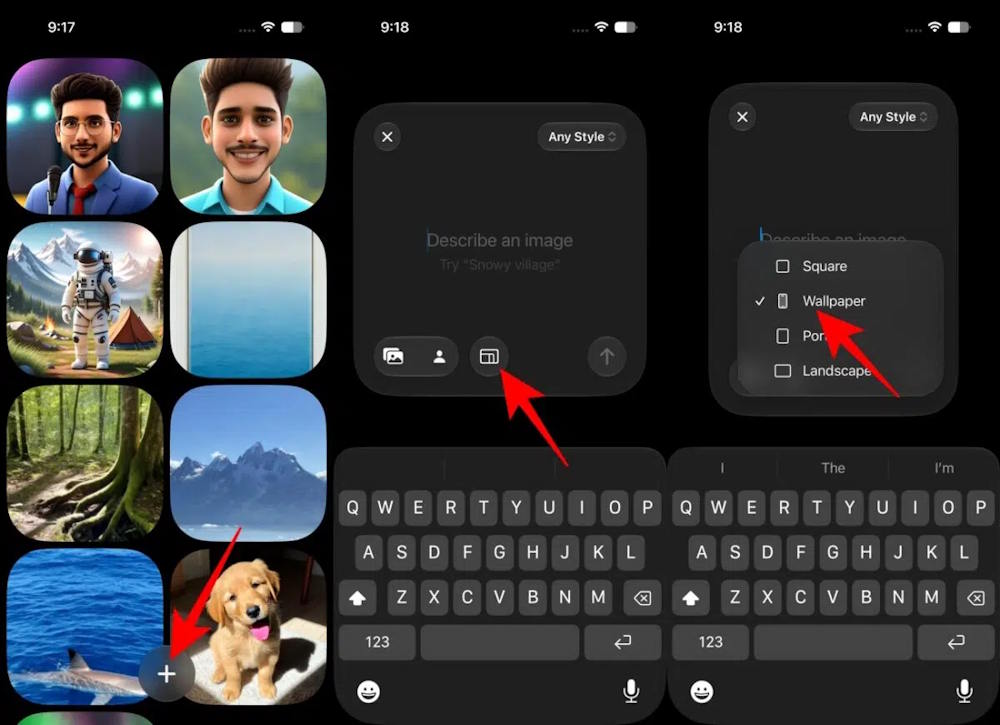
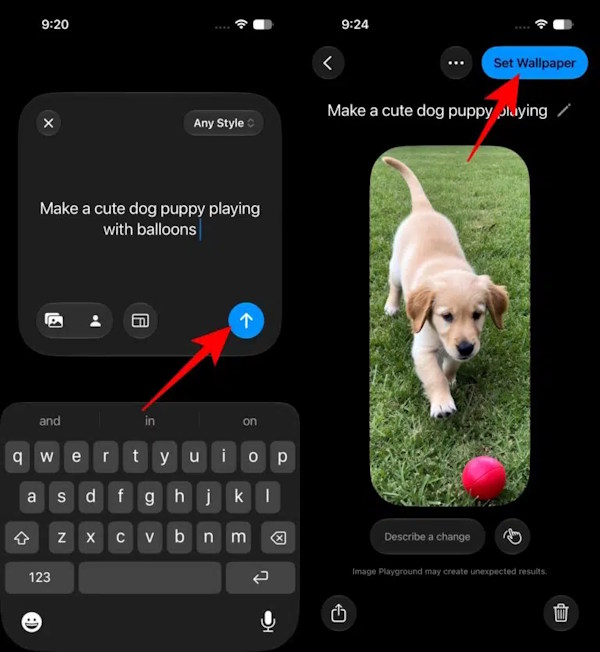
Image Playground can combine a text description with concepts and people from Photos. Apple allows up to seven elements in a creation, but fewer well-chosen elements usually produce a clearer wallpaper.
Extend a photo to fit the screen
The Extend tool in iOS 27 can generate content beyond the edges of a photo. It is useful when a landscape image is too short for a portrait Lock Screen or a subject is cropped too tightly.
- Open the photo in Photos and enter Edit mode.
- Choose the crop or reframing controls, then select Extend when available.
- Let Apple Intelligence generate the missing edges and inspect details around faces, hands, text, and straight lines.
- Save the edited image, then set it as a wallpaper from Photos or the wallpaper gallery.
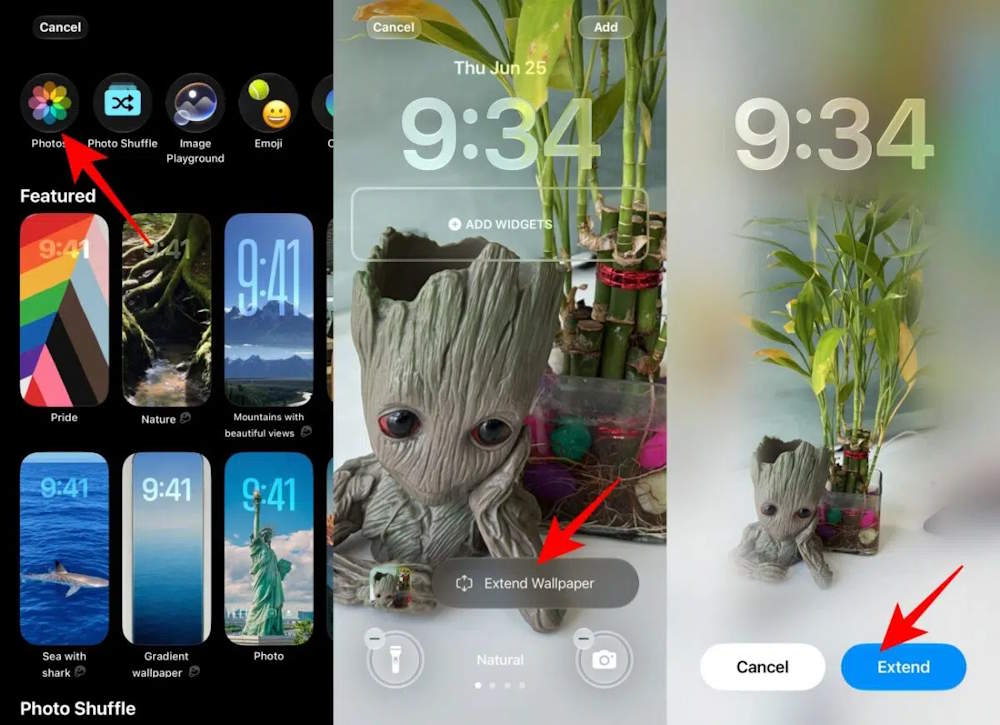
Keep the original photo or duplicate it before editing if you may want to revert. Generated extensions can look plausible while introducing small errors, so zoom in before using the result.
Write a better wallpaper prompt
- Describe a single focal subject and where it should appear: “small sailboat near the lower third” is more useful than “beautiful ocean.”
- Name two or three colors that work with your icons and clock.
- Request open or low-detail space near the top for the time.
- Specify lighting and mood, such as “soft dawn light” or “deep blue night.”
- Choose a clear visual treatment, such as illustration, watercolor, or photorealistic.
- Avoid asking the generator to render important text; generated lettering may be inaccurate.
Example prompt:
A quiet alpine lake at blue hour, snow-covered mountains in the lower half, dark navy and violet palette, realistic photography, uncluttered sky with space for the clock, vertical iPhone wallpaper.
What to know before generating
- Some image-generation features use server models and can have daily usage limits. Increased access may depend on an eligible iCloud+ plan.
- Generated output varies, even when you reuse a prompt. Save a strong result before trying more variations.
- Image Playground can use people from your photo library only when the necessary Photos access and Apple Intelligence features are available.
- Apple Intelligence availability varies by region, language, model, and software release.
- A generated image is not guaranteed to be factually accurate or free of visual artifacts.
If direct wallpaper generation is unavailable, create and save a portrait image in Image Playground, then select it through the standard Photos wallpaper option. That fallback preserves the main workflow without requiring the new Lock Screen integration.
Related Articles
 How to Download High-quality Background Images Instantly for iPhone Xs4 minutes read
 Invite to Download the Space Theme Wallpapers on the NASA XS Inspired4 minutes read
 Latest iOS 17 Wallpapers, Stunning iOS 17 Wallpapers4 minutes read
 How to Download Free Stock Wallpapers of Apple Devices3 minutes read
 Download the Best Set of iPhone Wallpapers in 20225 minutes read
 How to Installing Different Wallpapers on Each Windows 10 Screen8 minutes read
Reader Comments 0
Sign in with email or Google to join the discussion.