Table of Contents
Meta using your data for advertising isn't new. Here are some tips to prevent ads from Meta AI chats.
Meta using your data for ads is nothing new. But now your AI chats are also used for ads, and using Meta AI costs you free. Here are some tips to prevent ads from Meta AI chats.
How to Block Meta AI from Using Chat for Ads
Deleting your chats now may still prevent Meta from using your chats for annoying personalized ads.
Go to Settings and select Data & privacy > Manage your information > Delete all chats and media .
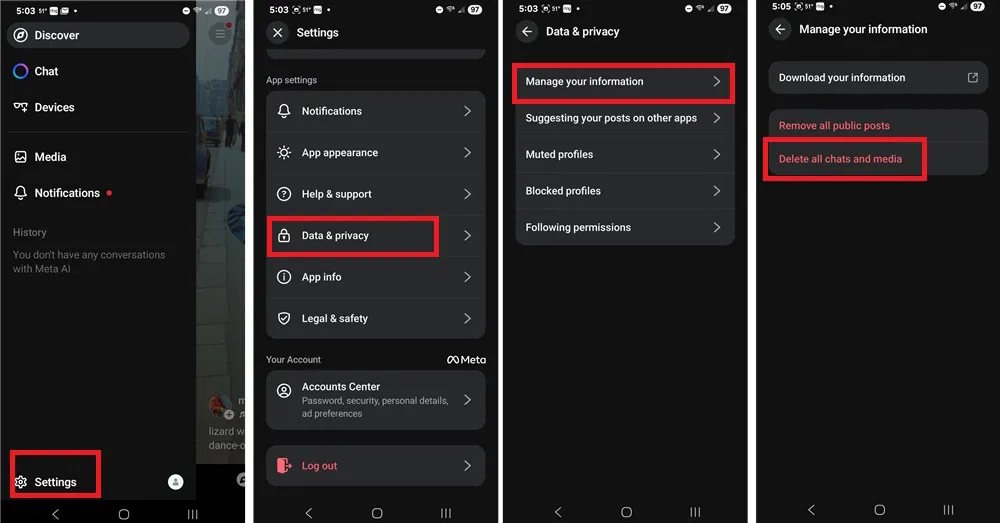
This will not delete your Facebook, Instagram, or WhatsApp data used to log in to Meta AI. However, if you have shared Meta AI content on any of those platforms, it will be deleted.
Like other Meta services, there is no way to completely stop targeted advertising and data collection. The only way is to completely delete the account you are logged into Meta AI and create a new one.
FAQ
How do you block meta AI from using chat for ads: step-by-step guide?
In practical terms, meta using your data for advertising isn't new. Here are some tips to prevent ads from Meta AI chats.
What should you check before getting started?
Review the requirements, compatible device or software version, and any warnings described in the guide before making changes.
What should you do if the steps do not work?
Repeat the steps in order, confirm that your app or system is up to date, and review the troubleshooting details provided above.
Related Articles
 How to Delete Meta AI Chat History3 minutes read
 Tips for Keeping Meta AI Conversations Private6 minutes read
 How to Block Meta from Tracking Your Activity on Facebook3 minutes read
 How to Use Meta AI on WhatsApp7 minutes read
 6 Pros and Cons of Meta AI14 minutes read
 How to Use Meta AI in Facebook Messenger4 minutes read
Reader Comments 0
Sign in with email or Google to join the discussion.