Table of Contents
To add a custom emoji to Discord, open the server's settings, choose Emoji, and upload a static image or animated GIF. You must own the server or have the relevant expression permission. Members do not need Nitro to use the server's custom emoji inside that server.
Before uploading: permissions and limits
- Permission: The server owner and members with Create Expressions can upload emojis. Editing or deleting may require Manage Expressions. Some servers still show the older Manage Emojis and Stickers wording.
- Base capacity: A server starts with 50 custom emoji slots. Server Boost levels increase the overall capacity.
- Animated emoji: Upload GIF files to the same Emoji page. Animated emojis use their own server allocation and premium features may affect the available slots or where a member can use them.
- File size: Keep each file at or below 256KB.
- Name: Use at least two characters, with letters, numbers, and underscores only.
- Best shape: A square image with a transparent background is easiest to recognize at chat size.
Discord plan and Boost limits can change, so check the capacity shown on the server's Emoji page before preparing a large set.
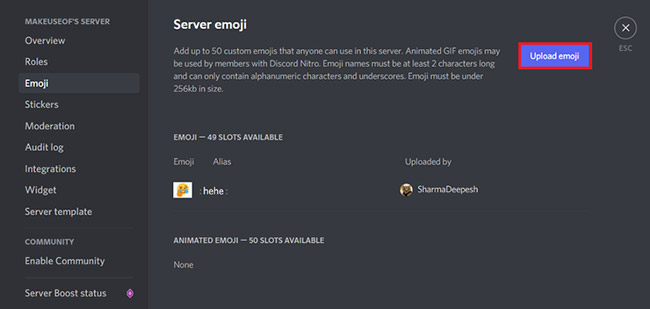
Add a custom emoji on desktop or web
- Open Discord and select the server.
- Click the server name at the top-left, then choose Server Settings.
- Select Emoji under the expression settings.
- Choose Upload Emoji.
- Select a PNG, JPG, or GIF file. Discord uses the filename as the initial emoji name.
- Edit the name if necessary, then save or finish the upload.
Depending on the Discord interface version, you may also be able to upload from the emoji picker. The Server Settings route is the most consistent place to manage names, slots, and deletions.
Add a custom emoji on Android or iPhone
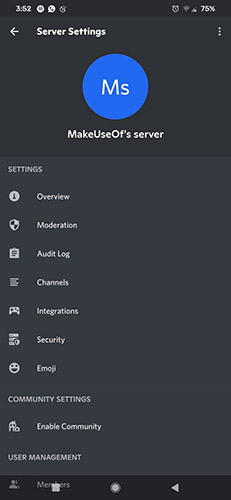
- Open the server and tap its name or menu.
- Choose Settings.
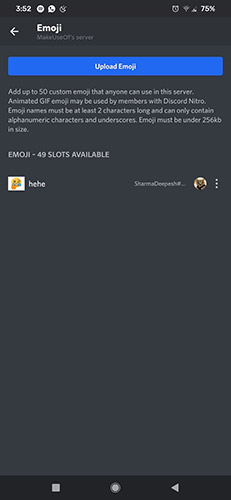
- Open Emoji.
- Tap Upload Emoji and select an image or GIF.
- Crop the file if Discord offers the option, confirm the upload, and set a clear name.
How members use the emoji
Open the emoji picker in a server channel and look for the server's section, or type the emoji name between colons, such as :party_blob:. A custom emoji uploaded to a server is available to members inside that server, subject to channel and role permissions.
Using custom emojis from one server in another server, a group chat, or a direct message generally requires Nitro or Nitro Basic and permission in the destination. Without the required subscription or permission, Discord may show only the text code or a locked emoji.
Fix common upload problems
| Problem | What to check |
|---|---|
| Upload button is missing | Ask the owner to grant Create Expressions or the older Manage Emojis and Stickers permission. |
| File is rejected | Reduce it below 256KB, use a supported image format, and remove unusual characters from the filename. |
| Emoji looks blurry | Start with a clean square source and simple shapes that remain readable at small size. |
| Animated emoji is static | Confirm that the source is an animated GIF and that the server has an available animated slot. |
| Name is invalid | Use two or more letters, numbers, or underscores; do not use spaces or punctuation. |
| Members cannot use it elsewhere | External custom emoji use depends on the member's Nitro plan and the destination server's permissions. |
Manage or remove an emoji
Return to Server Settings > Emoji, locate the item, and use its edit or delete control. Rename emojis carefully because members may already use the existing :name: in messages or bot commands. Download and keep the original artwork before deletion if you may need it again.
For Discord's current interface and plan rules, consult the official custom emoji guide. If you are improving a community rather than only its visuals, compare these Discord server management bots.
Related Articles
 How to Add a Bot to the Discord Server7 minutes read
 6 Best Bots to Improve Discord Server7 minutes read
 How to Leave the Discord Server3 minutes read
 Top 5 Best Discord Servers You Should Join5 minutes read
 How to Create the Discord Bot on the Raspberry Pi7 minutes read
 How to Add Bot to Discord Server5 minutes read
Reader Comments 0
Sign in with email or Google to join the discussion.