Table of Contents
A typography portrait combines a person's name or initials with a set of portraits clipped inside large letterforms. ChatGPT Images can generate a concept from an uploaded reference photo, but the most reliable workflow is two-stage: create the editorial portrait collage first, then add the exact name in a design editor. This avoids misspelled or distorted AI-generated text.
Before uploading a portrait
- Use a photo you own or have permission to edit.
- Ask the subject for consent if the image will be used publicly or commercially.
- Do not use the result to imply an endorsement, job title, award, or expertise the person does not have.
- Choose a clear, well-lit reference with the face unobstructed. A neutral background is easier to transform.
- Decide the final crop before generating: 1:1 for a profile image, 4:5 for a social post, or 16:9 for a banner.
1. Upload the reference photo
In ChatGPT, select the plus button and choose Add photos & files, or drag the image into the prompt area. OpenAI's image input guidance lists common supported still-image formats.
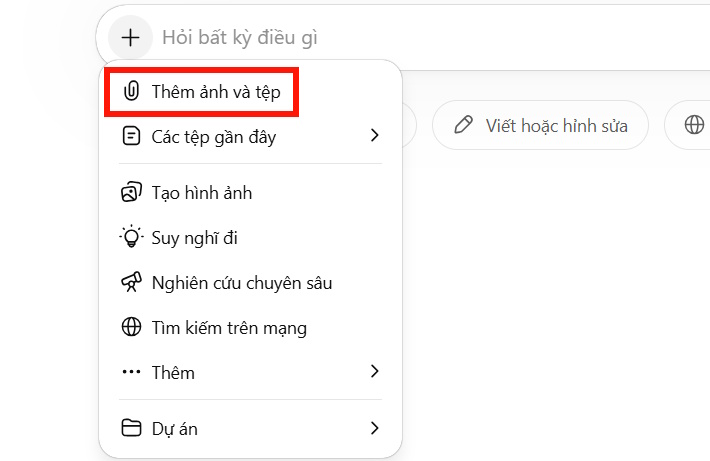
Upload a clear portrait that you are authorized to use.
2. Generate the editorial collage
Select Images or ask ChatGPT to create an image, then adapt the prompt below. Replace the bracketed details with accurate information about the subject and intended use.
Using the uploaded portrait only as an identity reference, create a polished editorial personal-brand collage.

Subject:
- Name or initials to guide the composition: [NAME OR INITIALS]
- Profession or field: [FIELD]
- Intended use: [PROFILE IMAGE / POSTER / COURSE BANNER]
- Aspect ratio: [1:1 / 4:5 / 16:9]

Composition:
- A premium black background with subtle satin texture, soft haze, and controlled studio spotlights.
- Several consistent portraits of the same adult subject: one strong close-up, one confident standing pose, one thoughtful side profile, and one natural working scene related to [FIELD].
- Modern, tailored clothing in black, muted orange, and restrained metallic gold.
- Calm, credible, approachable expression; realistic skin texture; editorial magazine lighting.
- Leave a clean central area shaped for large block initials, but do not render any words, logos, credentials, awards, or brand marks.
- Keep facial identity, hairstyle, glasses, skin tone, and age consistent across every portrait.
- Use fewer, larger portraits instead of many small faces.
- No extra people, duplicated facial features, warped hands, illegible text, or watermarks.

Output:
- High-detail, sharp editorial collage.
- Preserve room for exact typography to be added later in a design editor.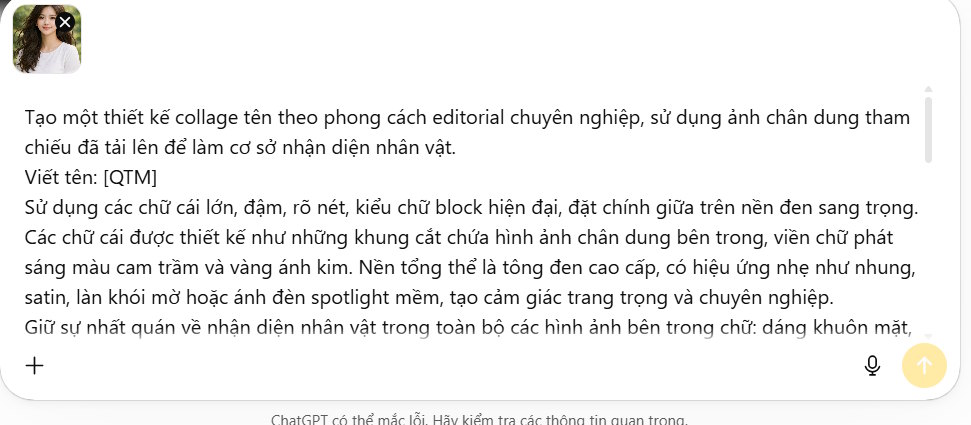
Describe the composition, profession, palette, mood, and final aspect ratio.
The “identity reference” instruction aims for visual consistency, but generated portraits can still change facial details. Compare the result with the reference and do not use a flattering but inaccurate image where truthful identification matters.
3. Refine one problem at a time
If the overall layout works, edit the current image instead of restarting with a much longer prompt. OpenAI's ChatGPT Images instructions explain how to select an area and describe an edit. Useful follow-ups include:
- “Keep the composition unchanged and make the central portrait match the reference face more closely.”
- “Remove the extra portrait in the lower-right corner and extend the black satin background.”
- “Keep all faces and clothing unchanged; increase empty space for three large initials.”
- “Reduce the orange glow and use a subtler metallic-gold rim light.”
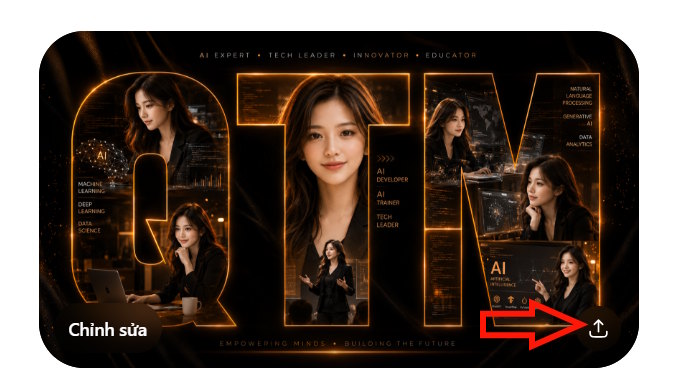
Refine identity, spacing, and lighting in separate edits.
4. Add exact typography in an editor
Import the generated collage into Canva, Photoshop, Affinity, GIMP, or another layer-based editor. Type the name or initials with a licensed bold sans-serif font. Keeping the letters as editable text provides correct spelling, consistent kerning, and reusable versions for different platforms.
- Create the exact final canvas size.
- Place the AI-generated collage as the background.
- Add the name or initials on a separate text layer.
- Use a clipping mask if portraits should appear inside the letterforms.
- Add a restrained orange or gold stroke or glow around the type.
- Check the name at thumbnail size and on a phone screen.
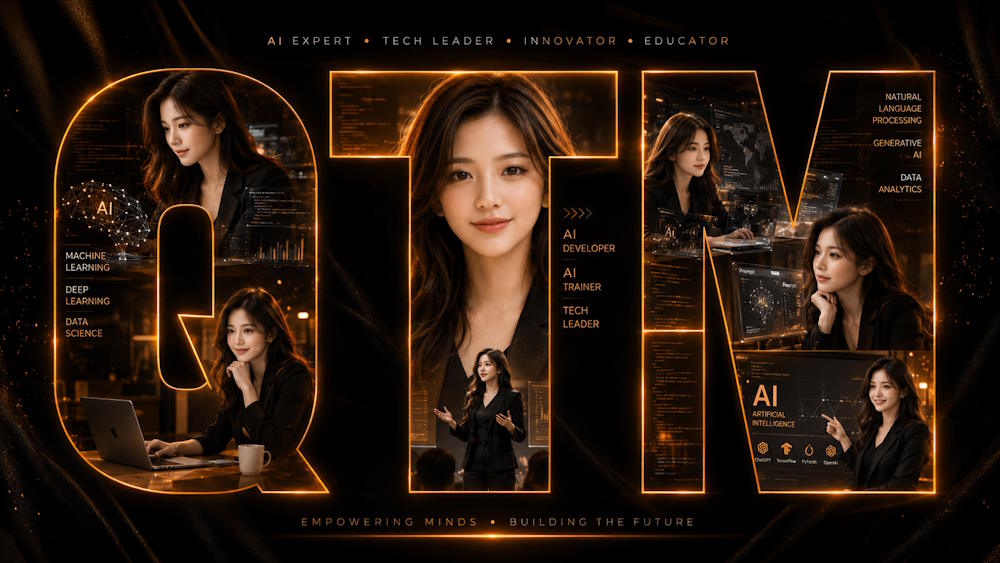
Editable typography keeps the brand name accurate and legible.
For type choices, review these Photoshop typeface examples. If working on a phone, TipsMake also lists apps for adding text to images.
5. Export the finished portrait
Download the generated background, then export the composited design from the editor. Use PNG when sharp type or transparency matters; use high-quality JPEG for a smaller photographic file. Keep an editable source file with separate image and text layers so the name, crop, and platform size can be changed later.
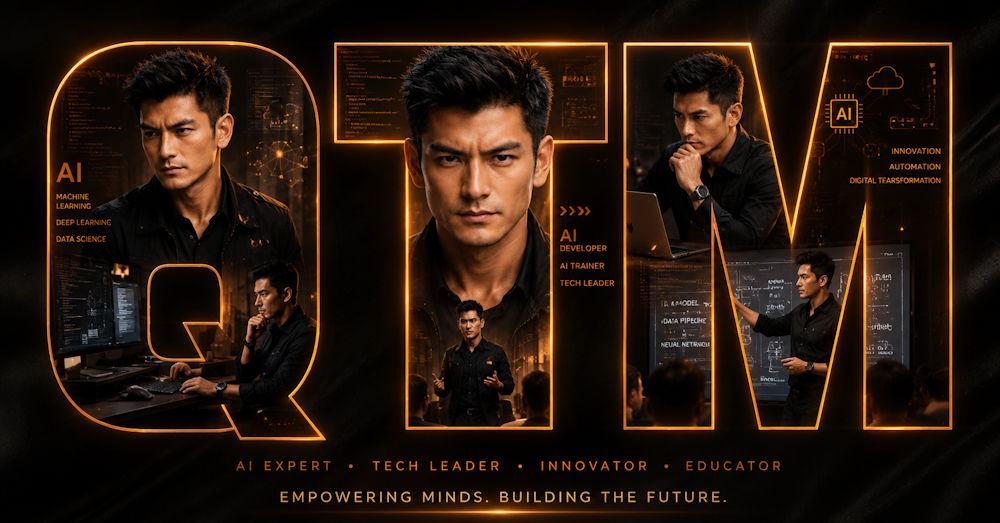
Download the generated artwork, then export the final type-correct version from the editor.
Quality checklist
- The name is spelled correctly and remains readable at the final display size.
- Every portrait depicts the same person without obvious facial or hand artifacts.
- The image does not invent credentials, logos, clients, or achievements.
- The subject approved the reference use and public presentation.
- The crop leaves safe margins for profile circles, captions, and responsive banners.
- The design still works in grayscale and with reduced glow.
AI generation is useful for the visual concept; editable typography and a human identity check turn that concept into dependable personal-brand artwork.
Related Articles
 Typography Design Tips to Make Your Poster Stand Out6 minutes read
 TOP AI Tools for Creating Professional Portrait Photos11 minutes read
 How to Take a Photo in Portrait and Portrait Lighting Mode on7 minutes read
 What Is Portrait Mode? What Is Portrait Lighting?5 minutes read
 Lesson 4: Typography in Bootstrap 512 minutes read
 Guide to Creating a Personal AI Assistant on ChatGPT5 minutes read
Reader Comments 0
Sign in with email or Google to join the discussion.