Table of Contents
This updated overview organizes the essential information about Register GiliSoft Video Editor Copyright, Edit Videos, including practical uses, key features, setup considerations, and common questions.
GiliSoft Video Editor software supports effective video editing. Video formats supported by GiliSoft Video Editor include: AVI, MPEG, SWF, MOV, WMV, H.264. Edit those video files for playback on other devices such as iPhone, iPad.

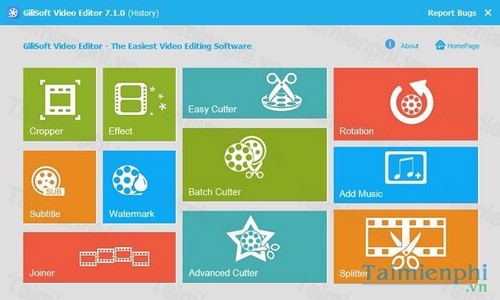
In addition to main features such as cutting and merging videos, GiliSoft Video Editor also supports rotating videos as well as adding watermarks, creating copyright signatures, and inserting colorful effects for your videos.
GiliSoft Video Editor license is worth $49.95 . Register from today September 21, 2015 - September 22, 2015 , you will receive a free license of GiliSoft Video Editor from the publisher GiliSoft
How to register GiliSoft Video Editor copyright
Step 1: Download GiliSoft Video Editor version Step 2: Install and register GiliSoft Video Editor copyright
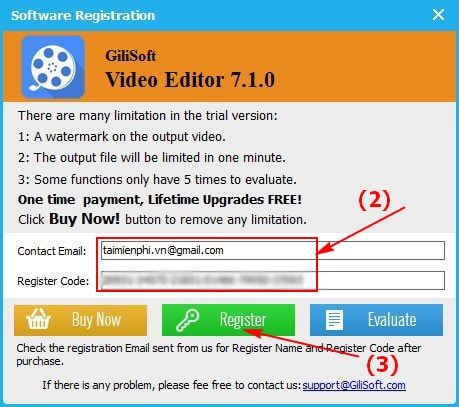
- Go here to receive the Giveaway Code - At the interface, select Register
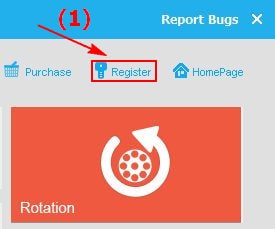
Next, enter (your) Email + Giveaway -> select Register
Main interface of GiliSoft Video Editor
Simple video editing with GiliSoft Video Editor software license. In addition, you can also refer to many other video editing software available on TipsMake such as Vegas Video Sony or VideoSpirit Pro. Among them, Vegas Video Sony supports editing many video formats with the most unique features.
Final Thoughts
Use the instructions and checks above in order, verify the result after each major step, and keep a backup whenever the process changes important files or system settings.
FAQ
What is giveaway gilisoft video editor free used for?
GiliSoft Video Editor software supports effective video editing.
Who should consider giveaway gilisoft video editor free?
It is most useful for readers who need the features, workflow, or problem-solving approach described in this guide.
What should I check before using it?
Review compatibility, current software requirements, privacy or security settings, costs, and any limitations that could affect your workflow.
Related Articles
 How to Use Video Editor on Windows 109 minutes read
 CyberLink PowerDirector 15: Archived Giveaway Guide4 minutes read
 How to Register a Video Copyright on YouTube: Content ID YouTube4 minutes read
 How to Create and Edit Videos in YouTube Video Editor: Clear Instructions20 minutes read
 7 Top AI Video Editors on Mobile: Best Options Compared9 minutes read
 Camtasia and Snagit: A Practical Guide5 minutes read
Reader Comments 0
Sign in with email or Google to join the discussion.