Table of Contents
Explore the full-page translation feature on Firefox for iPhone is now available.
Firefox's full-page translation feature works entirely on your device, not sending page addresses or content to third-party services like Google Translate, unlike some other browsers. The Firefox full-page translation feature has been rolling out since the beginning of December and is currently only available in German, French, Japanese, Spanish, and Portuguese, with more languages to be added in the near future.
When you visit a website with a language different from your device's language settings, Firefox will display a translate button to the left of the address bar. When you click that button, the browser will begin translating the webpage.

Meanwhile, Firefox for Android will also support customizable home screen icons, just like Firefox already does on iPhone and iPad.
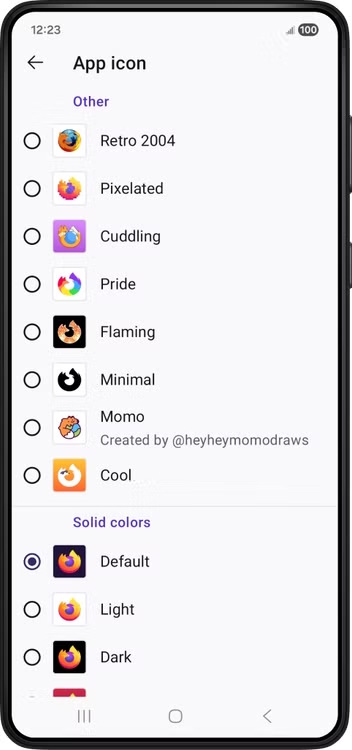
Simply go to the app settings, select Customize > App Icon, and you'll see all the icons available for you to change. Currently, the icon designs include Retro 2004 (Firefox desktop icon from 2004), Pixelated, Cuddling, Pride, Flaming, Minimal (black and white design), Cool, and Momo.
Final Thoughts
Understanding the full-page translation feature on firefox for iphone is now available makes it easier to evaluate the information and apply the most relevant recommendations. Focus on the key points above and verify details that may change over time.
FAQ
What is the full-page translation feature on firefox for iphone is now available?
Explore the full-page translation feature on Firefox for iPhone is now available.
What key points does this article cover?
The article explains the core concept, important considerations, and practical details readers should understand.
How can you use this information in practice?
Use the explanations to compare options, verify important details, and make a more informed decision. Apply the recommendations that best match your goals and situation.
Related Articles
 How to Translate Webpages and Text in Firefox10 minutes read
 Use WhatsApp's New in-App Translation Feature on iPhone: How-To Guide4 minutes read
 How to Display the Full URL in the Address Bar on Firefox3 minutes read
 Firefox 58 and New Features Help Improve Performance5 minutes read
 TOP AI Tools for Highly Accurate Translation5 minutes read
 Learn About Firefox's About Page System3 minutes read
Reader Comments 0
Sign in with email or Google to join the discussion.