Table of Contents
Use this guide to understand free im + pro app for Android users and the factors that affect it. The information is organized to make the topic easier to apply in practice.
Tipsmake. com - There are now many chat programs - Instant Messaging for Android, such as eBuddy, Meebo, IMO, IMEasy, IM +. For iPhone users, IM + is one of those The most popular application. And in the following article,. com will introduce you to the free promotion of IM + for Android.
How Free IM + Pro App for Android Users Works
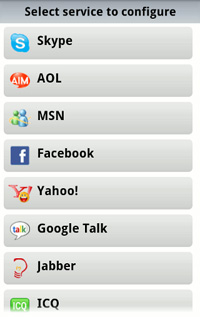
After successful installation, you need to declare or enter your IM account, protocols supported by IM + include MSN, Skype, Facebook, AOL, Gtalk, Yahoo, Jabber, ICQ and mySpace. Unlike iPhone version, currently the app does not support Twitter:
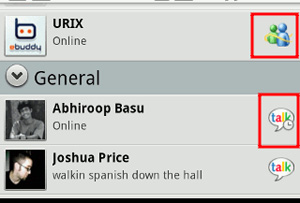
After completing the account setup step, you will see all the friends accounts listed in a single window. The icon that appears next to which account is synchronized from which protocol:
User interface:
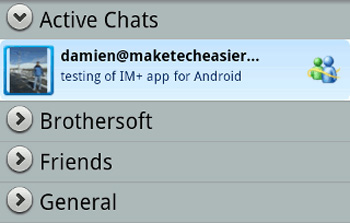
The first point that is easy to see is the extremely user-friendly and easy-to-use interface of IM +. The contact list appears in the entire screen, so there is no extra space around, besides the fairly large font and the avatar are clearly displayed. All incoming messages are displayed at the top, if the program is in an inactive state, the system will display a notification to users:
When chatting with others, conversations are sorted and distinguished by separate colors:
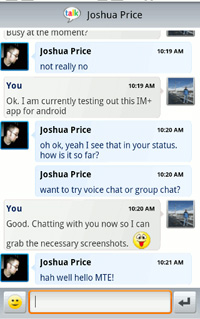
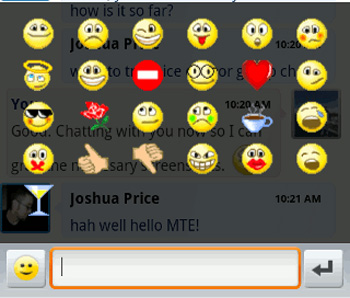
Quite diverse emoticons:
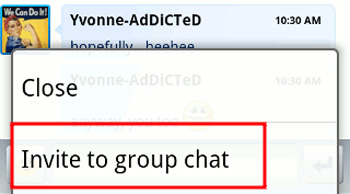
For MSN Live Messenger , you can start a private chat group. This feature is not available in most other IM applications:
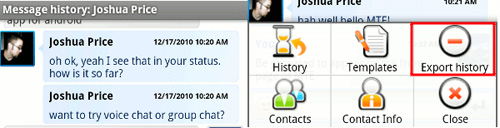
And one of the most outstanding features is the ability to view and save the log file format of History . Most mobile IM applications do not have this function, and this is the most obvious difference. With IM +, users can easily export log files from Dropbox Accounts and access from anywhere:
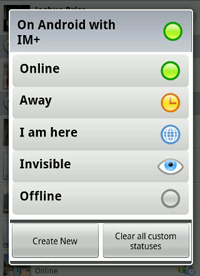
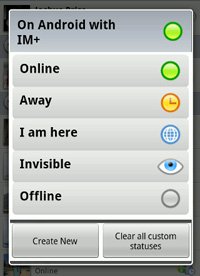
Some popular IM programs only have a few statuses like Online or Away, and with IM +, you can leave status as Online, Away, I am here, Invisible, Offline. Or create yourself:
In addition, users can create an autoresponder message template with IM +, for example I am busy now. Talk to you later:
With these outstanding features, it is clear that IM + is the best IM application for Android, and it's a pity if you haven't used it yet. Currently, IM + has 2 versions for Android in the form of Free and Pro, the same features but the Pro version will not appear advertising information, popup during use. On the occasion of the coming Christmas and New Year, the main developer of IM +, Shape Services will donate 5 free license keys for Pro version for 5 lucky people. Simply visit here, fill in the correct information and wait for the results. Promotion period will last from today to December 27, 2010. Good luck!
FAQ
What is the main benefit of free im + pro app for Android users?
The main benefit is a clearer understanding of the topic and a practical way to apply the information covered in this guide.
What should I check before using free im + pro app for Android users?
Confirm compatibility, review the required settings, protect important data, and use the latest supported version whenever possible.
What should I do if the result is different?
Repeat the steps carefully, verify permissions and version differences, and consult the product's official support documentation for changes not shown in the article.
Related Articles
 The Best Free Wi-Fi Find Apps for Android6 minutes read
 Top Best Free Android Games in 2016 That You Should Try11 minutes read
 Top Free and Discounted Android Apps (October 8, 2019)4 minutes read
 3 Super Free Microsoft Games Exclusively for Android3 minutes read
 Top Android Apps Are Free and Discounted (May 24, 2019)6 minutes read
 Fake IP for Android: 17 Best VPN Apps for Android Phones31 minutes read
Reader Comments 0
Sign in with email or Google to join the discussion.