Table of Contents
This updated guide explains how to Download Facebook HD Videos — Download High Quality Videos through clear steps, practical examples, and important checks that help prevent common errors.
Step 1: Right-click the video, select Display video URL , and then copy the displayed URL .

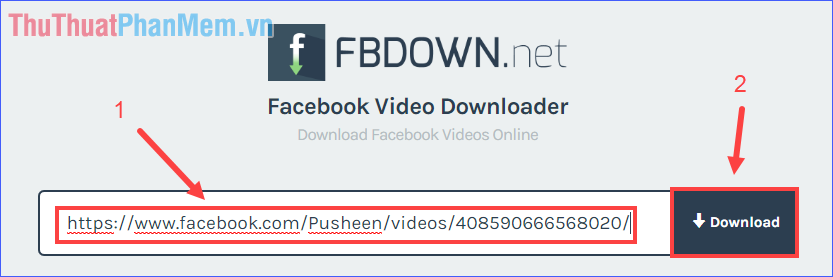
Step 2: Go to https://www. fbdown. net/ (this site is safe). Paste the video URL into the box and click Download .
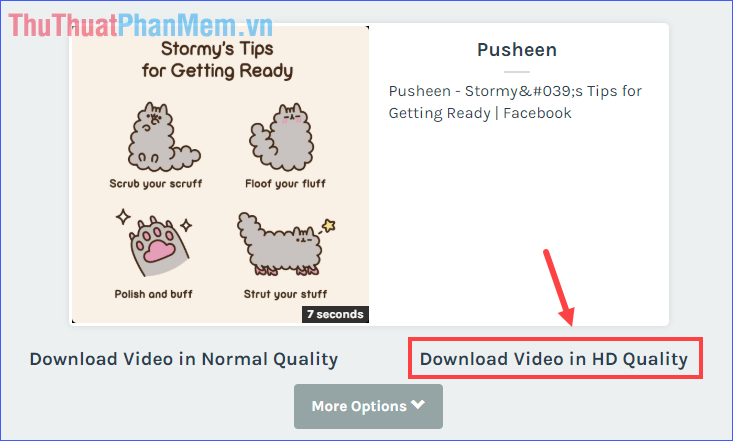
Step 3: Select Download Video in HD Quality (or you can also download with Normal quality if you may need to reduce the video size).
Step 4: click the three-dot icon in the lower right corner.

Then click Download .

Step 5: Select a folder to save the downloaded video and then click Save .

Through this tutorial, you already know how to download HD videos on Facebook. It's simple right? Wish you download lots of interesting videos from Facebook.
FAQ
What is the easiest way to Download Facebook HD Videos — Download High Quality Videos?
Start with the requirements in this guide, then follow each step in order. Check the result after every major change so problems are easier to identify.
Can beginners follow these instructions?
Yes. The process is organized into practical steps, and you can repeat any step before moving forward.
What should I check if the method does not work?
Confirm your software or device version, permissions, settings, file format, and internet connection when the task depends on online services.
Related Articles
 Add a Tool to Download High Quality YouTube and Facebook Videos5 minutes read
 The Fastest Way to Download Facebook Videos to Your Computer Without10 minutes read
 Instructions for Downloading Private Videos on Facebook3 minutes read
 How to Download the Facebook Video HD on the Computer4 minutes read
 Instructions for Downloading Facebook Videos on iOS and Android8 minutes read
 Guide to Downloading Facebook Videos to Your Computer Super Fast6 minutes read
Reader Comments 0
Sign in with email or Google to join the discussion.