Table of Contents
This guide provides a clear, practical overview of "Windows' Iconic Blue Screen of Death Error Gets a Refresh After". It organizes the most useful details, explains important considerations, and highlights the steps or choices that matter most.
- Microsoft releases Blue Screen of Death (BSOD) patch related to printer issue Patch Tuesday
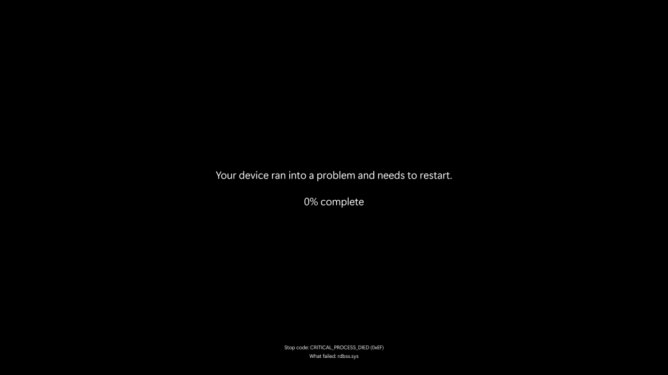
The change is in line with other updates Windows is making following last year's CrowdStrike outage, which affected 8.5 million Windows devices and took businesses, airports, broadcasters, and government services offline.
Following the CrowdStrike outage, Microsoft announced the Windows Resiliency Initiative, which aims to embed security features more deeply into Windows to reduce the likelihood of a crisis like the CrowdStrike outage.
The initiative is also trying to make unexpected reboots less disruptive. Windows is adding a quick recovery feature that will bring your PC back online if the reboot fails. Windows shared the new Black Screen of Death in a blog post, but didn't even acknowledge the big change it enabled. Windows just calls it a "simplified user interface," because a blue background with white text is obviously too complicated.
Why change the blue screen to black? Did the viral images of Times Square rendered useless by BSOD cause that much reputational damage?
We've known about this cobalt blue trouble alert for a long time. When the BSOD first appeared in Windows 1.0 in 1985, smoking on airplanes was legal; Germany was a separate country; HTML hadn't been invented yet; Mark Zuckerberg was a kid who probably hadn't yet grasped the concept of object permanence.
FAQ
What does this guide cover?
This guide explains Windows' iconic blue screen of death error gets a refresh after, including the main steps, important details, and practical considerations.
Who is this guide for?
It is designed for readers who want a clear, practical overview and a reliable process they can follow without unnecessary complexity.
What should you check before getting started?
Review the requirements, confirm that your software or device is up to date, and save any important data before changing settings.
Related Articles
 Blue Screen Death Error Has Just Passed 'Age' 203 minutes read
 Who Wrote the 'Dead Blue Screen' Message for Windows?4 minutes read
 Instructions to Fix Blue Screen Error on Computer15 minutes read
 Prevent 'Blue Screen Errors' on Windows 82 minutes read
 How to Find the Cause of Blue Screen Death and Minidump Errors?8 minutes read
 How to Fix Blue Screen Error on Windows: Practical Guide13 minutes read
Reader Comments 0
Sign in with email or Google to join the discussion.