Table of Contents
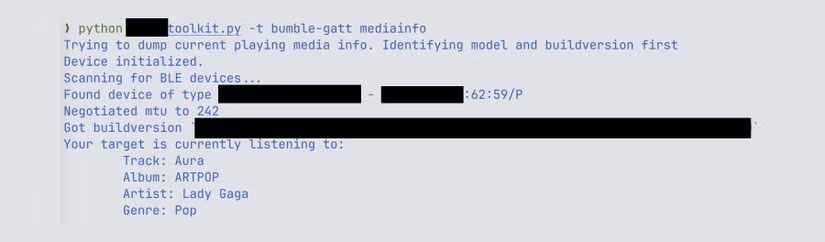
Some Bluetooth headphones, earbuds, and other audio devices using Airoha chips were affected by vulnerabilities disclosed in 2025. A nearby attacker could potentially interfere with an affected device’s connection or access audio. Check your exact model and firmware version through the manufacturer’s support page or official app.
Which devices were identified?
The original research identified examples across several brands. This table records models named at disclosure. It does not show which firmware releases fix the issues, and a brand name alone does not establish that a device is affected.
| Brand | Model or product |
|---|---|
| Beyerdynamic | Amiron 300 |
| Bose | QuietComfort Earbuds |
| EarisMax | Bluetooth Auracast Sender |
| Jabra | Elite 8 Active |
| JBL | Endurance Race 2, Live Buds 3 |
| JLab | Epic Air Sport ANC |
| Marshall | ACTON III, MAJOR V, MINOR IV, MOTIF II, STANMORE III, WOBURN III |
| MoerLabs | EchoBeatz |
| Sony | WH-CH720N, LinkBuds S, ULT Wear, WF-1000XM3, WF-1000XM4, WF-1000XM5, WF-C500, WF-C510-GFP, WH-1000XM4, WH-1000XM5, WH-1000XM6, WH-CH520, WH-XB910N, WI-C100 |
| Teufel | Tatws2 |
The Airoha product security bulletin lists CVE-2025-20700, CVE-2025-20701, and CVE-2025-20702 and says device manufacturers received patches. Owners need the firmware update published by the manufacturer of their own headphones or earbuds.
Check firmware and reduce exposure
- Find the exact model in the companion app, on the case or packaging, or on the manufacturer’s product page. Similar names can refer to different hardware generations.
- Check the firmware version and release notes in the official app or on the vendor’s support site. Install any applicable update and verify the version afterward. If the update notes are unclear, ask the manufacturer about the three CVEs.
- If you cannot confirm a fix and need to have a private conversation, switch to a wired headset or another device with a confirmed fix and turn the affected device off. Follow the manufacturer’s power-off instructions, or see the Bluetooth headphones guide for help with basic connection controls.


Reader Comments 0
Sign in with email or Google to join the discussion.