Table of Contents
Apple is testing a 'slide to stop' feature in iOS 26.1 Beta 2 that requires users to slide to turn off the alarm instead of just tapping a button.
iOS 26.1 Beta 2 Overview
Apple has just released iOS 26.1 Beta 2 for supported iPhone models. One of the most notable changes in this test update is the alarm interface, when the 'Apple' has come up with a new way to help you. not be able to ignore the alarm clock every morning.
If you've used an iPhone for years, you'll probably remember the once-popular 'slide to unlock' gesture that was later removed. Now, Apple is bringing that spirit back with the 'slide to stop' feature for alarms.
Simply put, when the alarm goes off, you'll have to slide the snooze icon from left to right instead of just tapping the 'Stop' button. The idea is to prevent accidentally snoozing the alarm while you're half asleep — something that's been known to cause people to oversleep and be late for work.
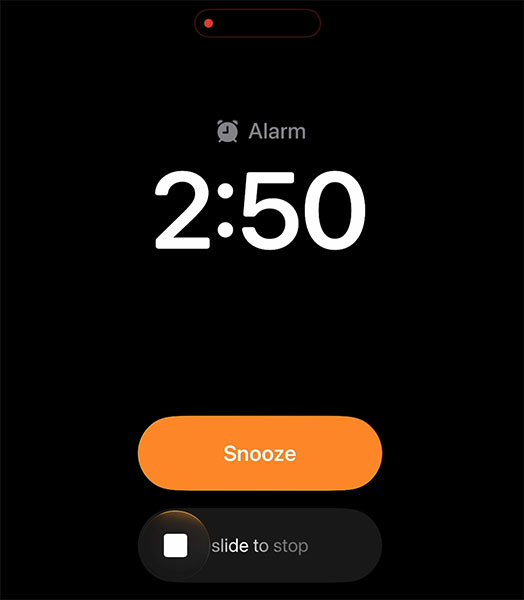
Previously, iOS 26 released in September brought a series of major changes to the interface and features, including the Phone app, Reminders and the alarm section. You can now customize the 'snooze' time, from 1 to 15 minutes, depending on personal habits.
The Snooze and Stop buttons on iOS 26 are also larger and easier to see, but are easier to accidentally tap than on iOS 18, where the small and separate 'Stop' button makes it harder for users to accidentally turn off the ringer.
With iOS 26.1 Beta 2, Apple is attempting to restore the necessary 'difficulty' to turning off the alarm, by forcing users to consciously slide their finger. It's unclear whether this change will be retained in the official release, but it's clear that Apple is serious about keeping you. from falling asleep.
FAQ
What should you know about iOS 26.1 beta 2?
In practical terms, apple is testing a 'slide to stop' feature in iOS 26.1 Beta 2 that requires users to slide to turn off the alarm instead of just tapping a button.
Why does iOS 26.1 beta 2 matter?
The article highlights that previously, iOS 26 released in September brought a series of major changes to the interface and features, including the Phone app, Reminders and the alarm section.
What is the main takeaway?
The main takeaway is that with iOS 26.1 Beta 2, Apple is attempting to restore the necessary 'difficulty' to turning off the alarm, by forcing users to consciously slide their finger.
Related Articles
 How to Set an iPhone Alarm That Only Vibrates Without Sound3 minutes read
 How to Create and Manage Alarms on Apple Watch5 minutes read
 How to Turn Off 'Feature' to Slow Down Apple Without Waiting for5 minutes read
 What to Do When the iPhone or iPad Can't Turn On?6 minutes read
 How to Turn Off Vibrations and Alarms When Charging on iPhone5 minutes read
 Instructions to Turn Off Apple Intelligence2 minutes read
Reader Comments 0
Sign in with email or Google to join the discussion.