Table of Contents
Learning how to create interesting math-style alarms on iPhone is easier when the steps are completed in the correct order. Use this guide to prepare, make the changes, and verify the result.
Even the iPhone has an alarm function or you can install an alarm app to have more support features. However, tweaking Pylarm will create a much more interesting alarm mode, that is, you must solve the problem when needed to turn off the alarm. There are many people who have difficulty waking up in the morning because they can turn off the alarm when the time is up. But with Pylarm tweaking, you must correct the new problem to turn off the alarm. And of course if you do not solve successfully, the alarm goes on. The steps below explain how to install Pylarm tweak on iPhone / iPad.
- The best alarm app on Android
- Sleep better with the Sleep Mode shortcut on iPhone, iPad
- Enable Bedtime sleep monitoring on iOS 10
- 6 best sleep monitoring and application apps on iOS
Instructions for creating iPhone alarms with Pylarm tweak
Step 1:
Users access Cydia and search for Pylarm tweaks at Source Packix, or visit the link below to install directly. Refine the settings on iOS 11 and above and jailbreak.
- Https://repo. packix. com/package/com. r0wdrunner. pylarm
Step 2:
After installation is complete, users opens Settings And then clicks Pylarm To change settings. You can enable or disable operation tweaks if needed. Allow Snooze is the option whether to allow the alarm to continue or not.
Below are 2 level adjustment bars for random problems that Pylarm tweaks set. Random problems with many different types of calculations. Adjusting difficulty level for problem at Difficulity bar . Bar Numbers range To adjust the range of numbers you want to use in Pylarm's problems.
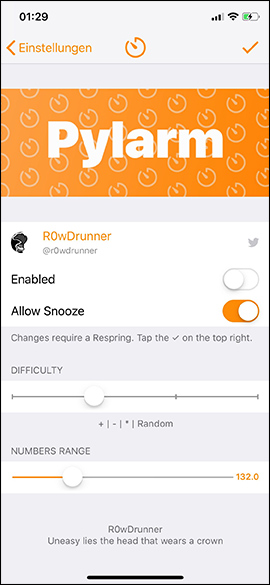
After the change is complete, click The tick icon In the top right corner to respring the device and apply new changes. When the alarm time is set on the iPhone, a problem window pops up with random calculations for us to answer. If the answer is correct, the alarm sound will turn off and the wrong answer will not stop the alarm.
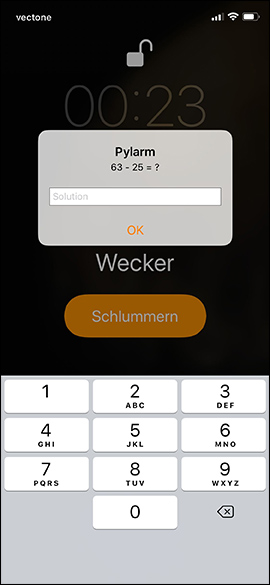
An alarm type is also quite interesting and can be effective for those who are difficult to wake up on time according to the alarm. Although there are many alarm apps for the iPhone, but you can easily turn off the app, Pylarm tweaks will interfere with the system and we can't turn off the alarm as usual.
I wish you all success!
FAQ
What should I prepare before I create interesting math-style alarms on iPhone?
Review the requirements in the guide, confirm that your device or software is compatible, and save important work before changing settings related to create interesting math-style alarms on iPhone.
Why might create interesting math-style alarms on iPhone not work as expected?
The most common causes are incompatible versions, missing permissions, incorrect settings, or an interrupted internet connection. Recheck each step and restart the app or device when appropriate.
Can beginners follow these create interesting math-style alarms on iPhone steps?
Yes. Follow the steps in order, avoid skipping confirmation screens, and compare your interface with the screenshots because labels may differ slightly between versions.
Related Articles
 How to Set an iPhone Alarm That Only Vibrates Without Sound3 minutes read
 11 Tips to Solve Math Simple but Extremely Interesting5 minutes read
 How to Create 3D Graphs Using Math Notes in iOS 262 minutes read
 How to Create and Manage Alarms on Apple Watch5 minutes read
 AI Math Scanner- Math Solution10 minutes read
 How to Write Math Expressions in Notes on iPhone3 minutes read
Reader Comments 0
Sign in with email or Google to join the discussion.