Table of Contents
A low-priced power supply is not automatically unsafe, and an expensive one is not automatically good. The costly mistakes are choosing by wattage alone, leaving no realistic upgrade margin, and underestimating cable and connector requirements. A PSU should be selected for the exact components, transient power demands, protections, warranty, electrical platform, and case—not simply the logo or 80 PLUS badge.
Mistake 1: treating the minimum wattage as a universal answer
A graphics-card vendor's recommended system power is based on a particular test configuration and assumptions about the rest of the PC. CPU choice, overclocking, drives, fans, USB devices, and the PSU's ability to deliver power on the required rails can change the result.
For example, AMD specifies a 750W minimum recommendation for both its reference Radeon RX 6800 XT and RX 9070 XT, while NVIDIA lists 850W required system power for the reference RTX 5080. Board-partner cards can have different limits and connectors, so verify the exact model rather than relying on a review of a similar card.
A sensible selection process is:
- List the exact CPU, GPU, drives, pumps, fans, and expansion cards.
- Check the GPU maker's recommended PSU and the card vendor's specification.
- Confirm the number and type of PCIe or 12V-2x6 connectors.
- Allow reasonable margin for short power spikes, component aging, and a plausible upgrade—not an arbitrary jump to the largest unit on the shelf.
- Check that the PSU physically fits the case and can operate on the local mains voltage.
Too much rated capacity generally does not force components to consume more power, but it can waste money and may place normal idle use outside the unit's most efficient range. The goal is appropriate capacity from a sound model.
Mistake 2: using efficiency certification as a quality rating
An 80 PLUS level describes measured conversion efficiency at specified loads and voltages. It does not by itself certify voltage regulation, ripple, acoustic behavior, component life, protection tuning, connector quality, or warranty service.
Before buying, look for credible testing of the exact model and revision. The model name matters because products from the same brand—or even similar names within one series—can use different internal designs.
Useful features and protections include:
- Over-current, over-voltage, under-voltage, over-power, short-circuit, and over-temperature protection where appropriate.
- A sufficiently long warranty from a manufacturer with service in your region.
- The current connectors required by the motherboard and graphics card.
- Acceptable noise at the load level your PC will normally reach.
- An input-voltage range compatible with the local electrical supply.
Do not assume a generic online “tier list” replaces a detailed review. Lists can be useful for screening, but revisions, regional versions, and incomplete test data matter.
Mistake 3: dismissing modular cables and case layout
Non-modular PSUs have every cable permanently attached. Semi-modular units keep essential motherboard cables attached and make the remaining cables removable. Fully modular units let you connect only the cables required for the build.
Modularity does not make a PSU electrically better, but it can simplify installation in small cases and reduce the bundle of unused SATA or peripheral cables.
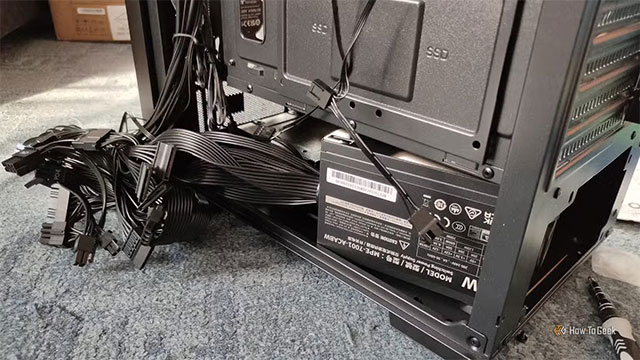
Before paying extra, inspect the case. A large PSU shroud or unused drive cage may hide fixed cables easily, while a compact case with little space behind the motherboard tray can make a non-modular unit frustrating.
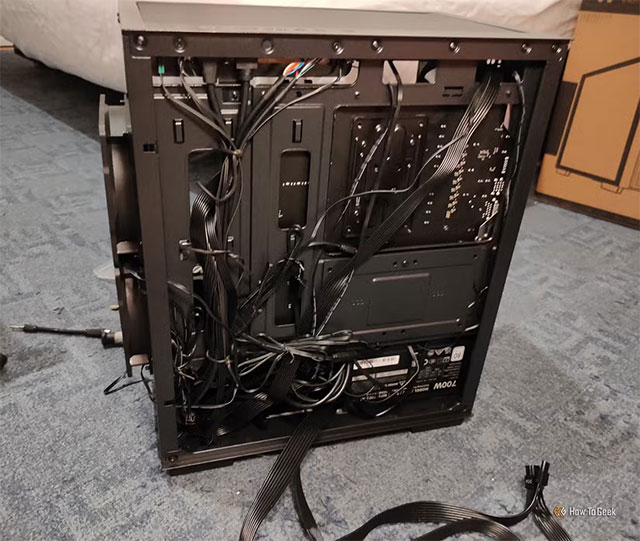
Do not crush cables against the side panel, route them through fan blades, or bend a high-current connector sharply at its plug. Ensure connectors are fully seated and follow the GPU and PSU manufacturers' cable-routing guidance.
Never assume modular PSU cables are interchangeable
The device-side ends of modular cables may look alike while using different pinouts. Reusing a cable from another model can damage the motherboard, graphics card, drives, or PSU. Use only the cables supplied with that exact unit or replacements the PSU manufacturer explicitly lists as compatible. Labels such as “CPU” and “PCIe” are also not interchangeable.
What the original build teaches
The source build paired a 700W PSU with an RX 6800 XT after assuming that card needed about 650W. AMD's reference specification actually recommends 750W for the RX 6800 XT. That does not prove every 700W system will fail, but it shows why component recommendations should be checked at the primary product page before purchase.
The fixed cable bundle also took substantial time to route and made the side panel difficult to close. In a case with limited cable space, paying for a modular model may save installation time and keep unused cables out of the airflow path.
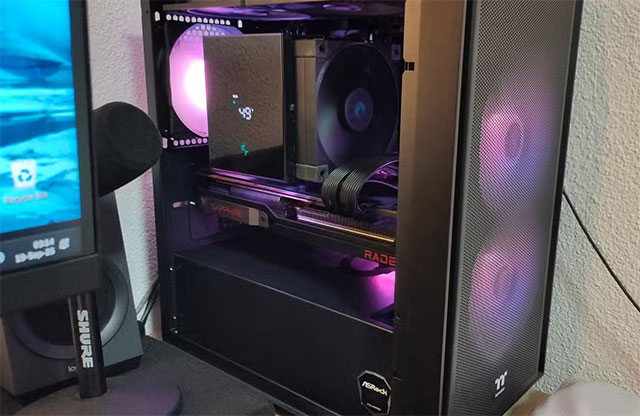
The right lesson is not that everyone needs an 850W fully modular PSU. A basic system with a modest GPU may be well served by a lower-wattage non-modular unit that has been competently designed and tested. The upgrade is worthwhile when the hardware, case, and likely future components justify it.
PSU buying checklist
- Confirm the exact GPU's recommended system power and connector layout.
- Estimate the whole system, not the graphics card alone.
- Check case PSU-length limits and room for cable bends.
- Prefer independent technical testing of the exact model and revision.
- Treat 80 PLUS as an efficiency indicator, not proof of overall quality.
- Verify protections, warranty, input voltage, fan behavior, and connector count.
- Choose modularity for installation convenience where it has practical value.
- Keep the PSU's original cables together and labeled; never mix unverified modular cables.
- Do not open a PSU enclosure. Capacitors can retain hazardous energy even after unplugging.
If you are deciding between a complete system and selecting parts yourself, this guide to prebuilt versus custom PCs explains the broader trade-offs. After assembly, follow a systematic new-computer setup checklist rather than powering an unverified build immediately.
Related Articles
 5 Things to Know When Buying Computer Power Supplies9 minutes read
 4 Things to Note Before Choosing to Buy a PSU Power Supply7 minutes read
 How to Check a Power Supply8 minutes read
 How to Test a PC Power Supply: Step-by-Step Guide8 minutes read
 Why Many People Regret Buying iPad Air6 minutes read
 Computer Power Source: More Important Than You Think34 minutes read
Reader Comments 0
Sign in with email or Google to join the discussion.