Table of Contents
Good Pokémon GO progress comes from consistent catching, careful resource use and choosing the right Pokémon for each battle. The following tips focus on actions that remain useful even as events, spawn pools and reward systems change.
1. Play in safe, active public areas
Parks, pedestrian areas and other public places with several PokéStops can provide more items and encounter opportunities than an isolated location. Spawns are influenced by several game systems, however, so a real-world habitat does not guarantee a matching Pokémon type.
Plan a walk before opening the game, remain aware of traffic and private property, and stop moving before interacting with the screen. Do not enter unsafe or restricted areas to reach a Pokémon.

2. Use Nearby information and local coordination
The Nearby or Sightings area can help identify Pokémon around PokéStops or in the surrounding area. Availability varies with location and the current interface. Local groups can also share information about raids and event spawns, but respect group rules and never share sensitive location details unnecessarily.
When one wild Pokémon appears for several Trainers, each person normally receives an individual encounter and catch attempt. Its displayed details may not be identical for every account, particularly at lower Trainer levels.

3. Improve the quality of each throw
For a better chance of catching a Pokémon, use an appropriate Poké Ball, aim for Nice, Great or Excellent throws and practice Curveballs. Berries can help when a target is difficult, moves frequently or is especially valuable. Wait for a predictable attack animation instead of throwing repeatedly without timing.
4. Choose whether to use AR
Augmented reality places a Pokémon over the camera view. It can be entertaining, but it also uses the camera and may make the target harder to keep centered. Turning AR off provides a more stable catch screen and may reduce battery use on some devices. Use whichever mode is comfortable and safe for the setting.
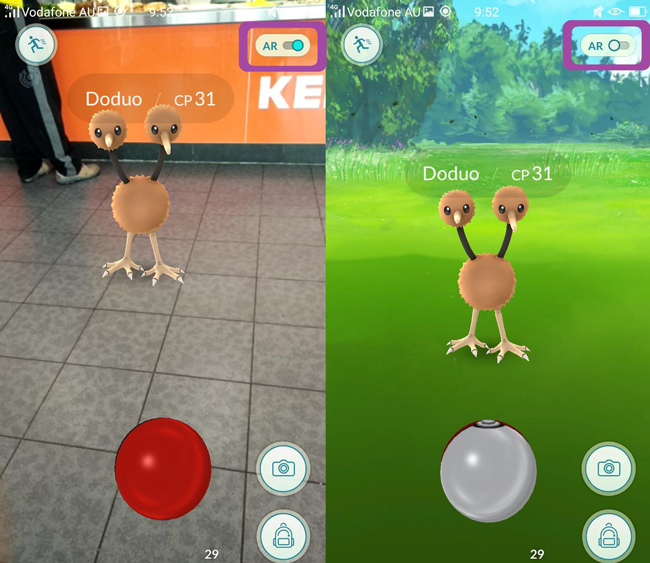
5. Handle freezing and loading problems methodically
If the game stops responding, first wait briefly to see whether the action completes. Then check the connection, close and reopen the app, and install any available game or operating-system update. Persistent problems may require clearing temporary app data on supported devices or reinstalling after confirming that the account login method is known.
Server or event congestion can cause temporary errors, so repeated rapid taps are unlikely to help. Consult the official known-issues page when the same problem affects multiple features.
6. Spend Stardust and Candy with a purpose
Do not power up a Pokémon only because it currently has the highest CP in storage. Consider its species, moves, appraisal, intended raid role or PvP league, and the full upgrade cost. Save enough Stardust for trades, second Charged Attacks and future team changes.

7. Hatch Eggs through normal walking
Place an Egg in an Incubator and walk the distance shown on its details page. Adventure Sync can record eligible walking while the game is closed when device permissions are enabled. Pacing a small room may add little distance because location and activity systems need enough movement to record it reliably.
Fast travel may not count, and playing while driving is unsafe. Make Egg progress part of a normal walk instead.
8. Learn type effectiveness
Type matchups often matter more than raw CP. Build teams whose attacks are super effective against the opponent and whose own types resist incoming damage. A Pokémon's Fast and Charged Attacks may have different types from the Pokémon itself, so inspect the moves instead of choosing by appearance alone.
9. Build teams for a specific battle format
Raid, Gym, Team GO Rocket and GO Battle League teams have different needs. Raid teams emphasize damage against a known boss, while PvP teams also need shields, energy management, coverage and league-specific CP limits. Save named teams for common opponents so you are not selecting six Pokémon at the last moment.
10. Manage storage before an event
Clear enough Pokémon storage and Item Bag space before a Community Day, raid session or other busy event. Transfer unwanted Pokémon carefully, tag candidates you want to review later and keep a supply of the balls, healing items and Berries your plan requires.
A short preparation check prevents avoidable interruptions: confirm battery level, available storage, Incubator status and the event's actual start and end times. Then focus on the activity that supports your current goal rather than trying to complete every feature at once.
Related Articles
 How to Own the 'Pokémon' in Pokémon GO?6 minutes read
 How to Play Pokémon GO: Complete Guide17 minutes read
 What Will Happen if Pokemon Is Real3 minutes read
 Pokémon GO - Trick to Evolve Eevee into Any Kind of Pokémon5 minutes read
 What Will You Do When There Are Multiple Pokémon in Pokémon GO?5 minutes read
 PokéMon Champions Beginner's Guide4 minutes read
Reader Comments 0
Sign in with email or Google to join the discussion.