Table of Contents
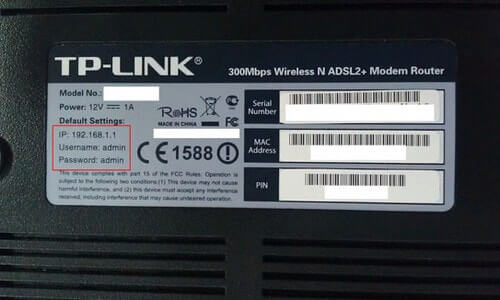
For most current TP-Link Wi-Fi routers, connect to the router and open https://tplinkwifi.net/ or http://192.168.0.1. Older or customized networks may use 192.168.1.1. TP-Link modem routers, range extenders, Deco systems, and other product families use different local domains, so choose the address for the device type.
TP-Link login addresses by device
| Device type | Official local domain | Common default IP |
|---|---|---|
| Standard Wi-Fi router | tplinkwifi.net | 192.168.0.1 or 192.168.1.1 |
| DSL or cable modem router | tplinkmodem.net | 192.168.1.1 |
| Range extender | tplinkrepeater.net | 192.168.0.254 before configuration |
| Deco mesh | tplinkdeco.net | 192.168.68.1 on many installations |
| Powerline Wi-Fi device | tplinkplc.net | Check the main router's client list |
| Mobile Wi-Fi | tplinkmifi.net | Model-specific |
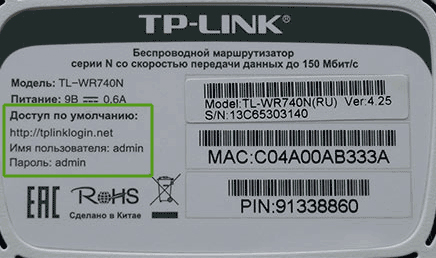
tplinklogin.net was discontinued in 2015 and should not be presented as the current router-login address. Use the product's official local domain, the IP printed on its label, or the actual default gateway shown by your device.
How to sign in to a TP-Link router
- Connect the computer or phone to the TP-Link network. An Ethernet connection is safest when changing Wi-Fi settings.
- Turn off mobile data or a VPN temporarily if it sends the browser outside the local network.
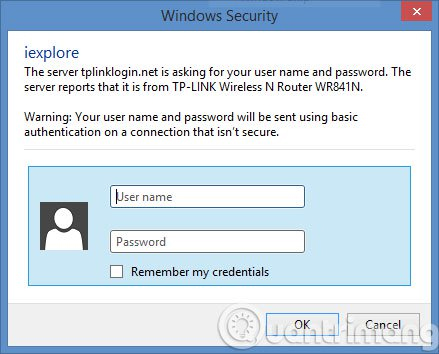
- Type
https://tplinkwifi.net/or the router's IP directly in the browser address bar—not in a search box. - Enter the current local administrator password.
Newer TP-Link routers ask the owner to create an admin password during initial setup. Some older models used admin for both username and password, but that is not a universal credential and should not be guessed repeatedly. The Wi-Fi password and router administrator password are separate unless the owner deliberately made them the same.
Change the Wi-Fi name or password
After signing in, the menu path depends on the model and firmware. Common paths include:
- Basic > Wireless
- Advanced > Wireless > Wireless Settings
- Wireless > Wireless Security on older models
- Select the 2.4GHz, 5GHz, or 6GHz network to edit. Smart Connect may use one name and password for several bands.
- Change Network Name (SSID) and/or Wireless Password.
- Use WPA3-Personal where all required clients support it, or WPA2-Personal with AES.
- Select Save.
- Reconnect wireless devices with the new details.
Change the administrator password separately
On many current routers, open Advanced > System > Administration. Enter the current local password, set a new unique administrator password, and save it. This protects the configuration page; it does not change the Wi-Fi password.
Compatible models can also be managed in the TP-Link Tether app. Connect the phone to the TP-Link network, open Tether, select the device, and look under More > System for password or administration controls.
If tplinkwifi.net does not open
- Confirm that the device is connected to the correct TP-Link router rather than a guest network, another access point, or mobile data.
- Enter the address in the URL bar and include
http://orhttps://. - Try the actual default gateway instead of a saved domain shortcut.
- Disconnect VPN, proxy, or third-party DNS filtering temporarily.
- Try a private browser window or another browser.
- Use Ethernet and disconnect from other networks while making changes.
A browser privacy warning can appear because the router uses a locally issued or self-signed certificate. Continue only when you deliberately entered the correct local TP-Link address while connected to your own router. Never enter the administrator password into a search-result page or an unrelated public website.
If several TP-Link devices share the network
A local domain may resolve to a different TP-Link unit than the one you intend to manage. Find the target device's current IP in the main router's DHCP client list, connect directly to the target by Ethernet, or use the appropriate TP-Link app. Range extenders often receive a new address after setup, so 192.168.0.254 may no longer reach them.
If you forgot the admin password
- Try password recovery or a linked TP-Link ID if the model supports it.
- Check whether the device is already accessible through Tether.
- For ISP-supplied equipment, contact the ISP before resetting it.
- Use a factory reset only as a last resort. It erases Internet, Wi-Fi, parental-control, and other custom settings, so the router must be configured again.
TP-Link's current router login instructions cover the standard web interface, while its local domain list distinguishes routers, modem routers, extenders, and powerline devices. TipsMake also explains how to find the default gateway, set up a TP-Link Wi-Fi 6 router, and change Wi-Fi passwords on common routers.
Related Articles
 Common Tp Link Modem Login Addresses3 minutes read
 How to Change Modem Login Password and Vigor Draytek Router4 minutes read
 Change Wi-Fi Password: How to Change Vnpt Wi-Fi Password5 minutes read
 How to Change Wi-Fi Password, Change Wi-Fi Pass Vnpt, Fpt, Tenda7 minutes read
 How to Change the Tp-link Wi-Fi Password?3 minutes read
 How to Change Your TP-Link Wi-Fi Password on a Computer7 minutes read
Reader Comments 0
Sign in with email or Google to join the discussion.