Table of Contents
This guide provides a clear, practical overview of tips that netflix users should know, with useful context, important details, and straightforward takeaways for everyday readers.
But have you taken full advantage of the benefits available on Netflix? Here are tips you may not know about using Netflix, to help you improve your experience using this service.
1. Use Netflix secret codes
If you often find it difficult to find new content to watch and Netflix always suggests movies you don't find interesting, try using Netflix's secret codes. There are hundreds of personal codes you can use to find hidden categories that cannot be found in the main menu.

For example, you can find the comedy genre on the Netflix menu, but To specifically look for the dark comedy genre, code 869 will help.
2. Download the movie for offline viewing
If you are going on a long trip, download a few of your favorite movies to your device, you can watch on the go without a network connection.
You can download Netflix content for offline viewing on any platform like Android, iOS, Windows 10, and Amazon Fire OS.
3. Use a VPN to watch Netflix content in other countries
Due to the licensing reasons in each country and region, the content on Netflix in other countries also varies. This is a pretty big minus point. However, you can still watch everything on Netflix no matter where you are.

The way to view all that content is to install a VPN on your device and use it anytime to access the Netflix library of another country. The tool is very easy to use, however, Netflix has blocked most free VPNs, so you should use the paid version to avoid any trouble.
4. Set up a separate profile for others who share an account
If you're not the only one using a Netflix account, it's best to set up a different profile for each person to access. Each account can set up up to 5 profiles, you will not have to pay any extra fees.
Creating a separate profile helps separate everyone's interests. It's especially convenient if you have kids or share them with friends. By creating a separate profile for your child, you won't need to see Peppa Pig in your recommendations when you really want to watch a spine-chilling horror movie.
You can also set a PIN for your Netflix profile to prevent your kids from opening the profile and viewing something they aren't allowed to.
5. Use keyboard shortcuts
To tune in Netflix while watching a movie, you can use the keyboard shortcuts. By using them, you can quickly pause, play, rewind or increase the volume while watching.
Here are some useful keyboard shortcuts:
- Space key : Play or pause
- Key F / Esc : Open, exit full-screen mode
- Arrow keys left / right : Fast forward, rewind 10 seconds
- Up / down arrow keys : Increase / decrease the volume
- S key : Skip the introduction
6. Watch movies online with friends
Netflix Party Chrome extension is a tool that helps people watch Netflix content together. You can talk face-to-face with people while watching a movie.
To be able to use Netflix Party, everyone must have their own Netflix account. Each Netflix Party group can accommodate up to 50 people, this is quite a large number.
7. Customize subtitle display
If you're not comfortable with Netflix's default subtitles, you can customize them to your liking. You can choose the right font, size, color, and shadow level.
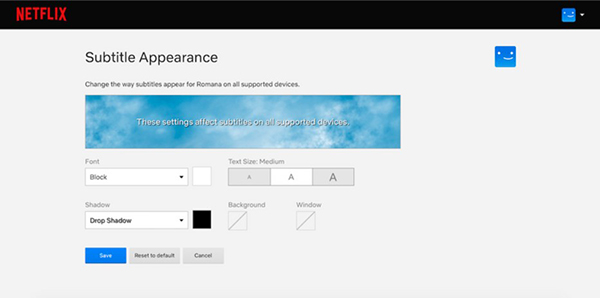
On the Netflix website, follow these steps:
- Click the Netflix profile picture and go to Account .
- Select your profile to open settings and click Change next to Subtitle appearance .
- After making the necessary changes, select Save .
8. Delete selected view history
You can completely delete your watch history on Netflix. To do this, click on the account's picture in the drop-down menu, go to Account> Your profile> Viewing activity . Select to delete the content you want from your viewing history.
9. Delete content from Continue Watching
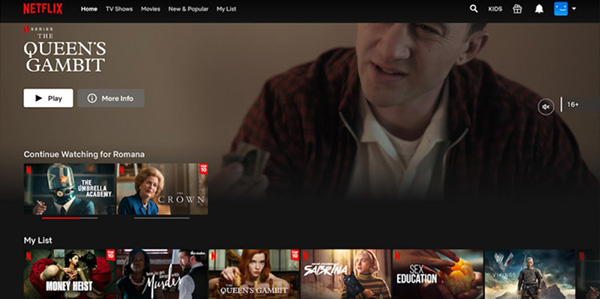
The movies you are watching unfinished will always appear in the Continue Watching section horizontally. However, there are a lot of movies you left unfinished because it really isn't as appealing as you might think. You can completely delete the unfinished movies by following these steps:
- Open Netflix and look for Continue Watching .
- Click the three ellipses next to the movie you want to delete.
- Select Remove From Row .
- Confirm by pressing OK .
Key Takeaways
Use the information above as a practical reference for tips that netflix users should know. Review each step carefully, confirm any requirements, and choose the option that best fits your situation.
FAQ
What does this guide explain about Tips That Netflix Users Should Know?
It explains the main concepts, practical considerations, and useful steps related to tips that netflix users should know without requiring advanced knowledge.
Who can benefit from learning about Tips That Netflix Users Should Know?
This information is useful for readers who want a clear overview, practical guidance, and reliable steps related to tips that netflix users should know.
What should I check before applying this information?
Review the requirements, confirm that your device, software, or situation matches the instructions, and back up important data before making major changes.
Related Articles
 Download Netflix 6.96.725.05 minutes read
 How to Fix Netflix Errors That Don't Work on Windows 106 minutes read
 Tips to Sign Out of Netflix Account on Smart TV4 minutes read
 How to View Hidden Categories on Netflix?6 minutes read
 How to Secure Your Netflix Account?: Step-by-Step Guide5 minutes read
 How to Expand the Netflix Movie Repository in Vietnam?3 minutes read
Reader Comments 0
Sign in with email or Google to join the discussion.