Table of Contents
This guide provides a clear, practical overview of "Tips to Open the Most Recent Photo on iPhone Very Quickly". It organizes the most useful details, explains important considerations, and highlights the steps or choices that matter most.
How to open most recent photo on iPhone
It's simple, just press and hold the Photos icon on your iPhone . Now, you'll see a menu of options for the Photos app. Tap Most Recent in the menu that appears.
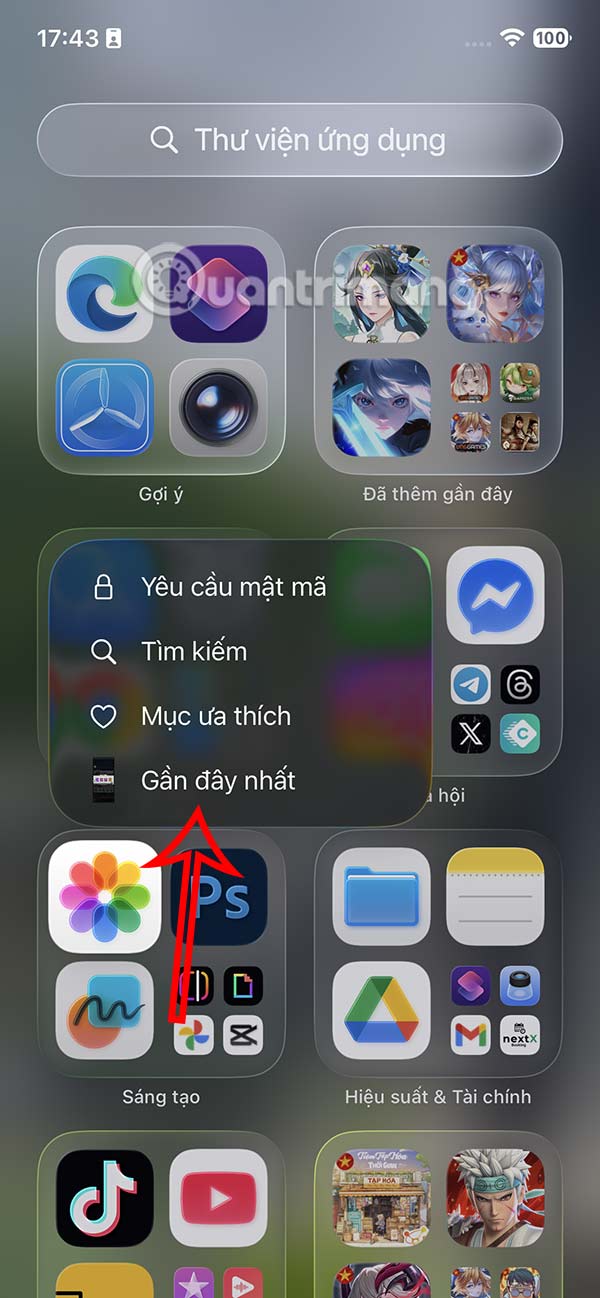
You will immediately see the most recently opened, newest photos on your iPhone photo album without having to perform many searches like before, or having to try to remember which photo was the most recently opened.

FAQ
How to open most recent photo on iPhone?
It's simple, just press and hold the Photos icon on your iPhone. Now, you'll see a menu of options for the Photos app. Tap Most Recent in the menu that appears.
What does this guide cover?
This guide explains tips to open the most recent photo on iPhone very quickly, including the main steps, important details, and practical considerations.
Who is this guide for?
It is designed for readers who want a clear, practical overview and a reliable process they can follow without unnecessary complexity.
Related Articles
 The Fastest Way to Open Multitasking on iPhone X4 minutes read
 Best photo editing formulas for iPhone6 minutes read
 Useful Shortcuts on iPhone with 3D Touch Without Your Knowledge7 minutes read
 How to Open Photo Albums in the Messaging Application on iPhone5 minutes read
 Complete the Photos App on iPhone / iPad - Part 4: Edit Photos13 minutes read
 How to Turn Off Recent Tap to Call on iPhone: Step-by-Step Guide3 minutes read
Reader Comments 0
Sign in with email or Google to join the discussion.