Table of Contents
Jenny Mod is an unofficial, adult-oriented Minecraft modification built around interactive companion characters. It is not made, reviewed, distributed, or supported by Mojang or Microsoft, and it is not appropriate for children. Anyone researching it should be especially cautious because search results include unofficial mirrors, repackaged files, misleading “mobile” downloads, and copied compatibility claims.
This article does not link to a download or provide installation instructions. There is no safe basis for recommending an unverified executable mod file, and the mod's explicit content is outside the age-appropriate experience promoted by official Minecraft services.
What Jenny Mod adds
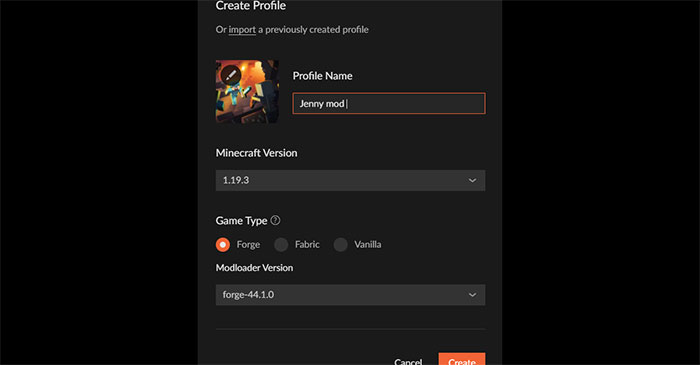
The mod is commonly described as adding Jenny and other companion NPCs with dialogue, following behavior, items, animations, and adult interactions. Online descriptions often disagree about the character roster, supported Minecraft releases, required mod loader, and available features. Those details should not be treated as facts unless they are documented for the exact file being evaluated.
The original article claimed support across Minecraft Java Edition 1.16.5 through 1.20.6 and also referred to MCPE, Bedrock, APK files, Forge, and CurseForge. Those claims are internally inconsistent. A Java .jar mod cannot simply be installed in Bedrock Edition, Pocket Edition, or a console, and a third-party Android APK presented as the same mod is a separate program with its own risks.
Why this mod requires extra caution
| Issue | What it means | Safer response |
|---|---|---|
| Adult content | The mod includes material that is not suitable for children and is not part of Minecraft's normal age-rated experience. | Do not install it on a child's device, family profile, school computer, shared server, or public community. |
| Unofficial distribution | Mojang does not vet or support Java mods, and mirror sites can replace a file without notice. | Do not download when the original publisher, license, file history, and exact version cannot be verified. |
| Executable code | A Java mod can run code with the permissions of the Java/Minecraft process; it is not merely a texture pack. | Reject files that request disabled security software, unrelated installers, browser extensions, passwords, or elevated privileges. |
| Conflicting compatibility claims | A file for the wrong game, loader, or Java version may crash or corrupt a world. | Use a separate game profile and a copied world only after the exact dependency list is known. |
| Fake mobile ports | “Jenny Mod APK” and “MCPE Jenny Mod” downloads are not interchangeable with a Java Edition mod. | Avoid sideloaded apps or add-ons that impersonate a Java mod or ask for unrelated permissions. |
| Multiplayer and platform rules | Adult material can violate server rules, platform policies, or Minecraft usage guidelines. | Do not upload or expose the content on shared services without confirming all applicable rules and adult consent. |
Antivirus scanning is useful but not a guarantee
Scanning a file with current security software can detect known malware, but a clean result does not prove that a mod is safe. New or uncommon malicious code may not yet be recognized, and a legitimate mod can still read files, make network requests, or damage game data through a bug.
File size is also not a trustworthy verification method. Two different files can have the same size. A cryptographic hash is more useful only when the original developer publishes the expected hash through an authenticated channel; a hash shown on the same untrusted mirror does not establish provenance.
Warning signs include:
- a password-protected archive with instructions to disable antivirus protection;
- an installer instead of the expected mod file;
- a request for a Microsoft, Minecraft, Discord, or email password;
- an APK advertised as an “official” mobile edition;
- several chained download buttons, notification requests, or unrelated browser extensions;
- no version history, issue tracker, license, author identity, or reproducible source;
- claims that the file is “100% safe” without evidence.
Compatibility cannot be inferred from the filename
A Minecraft Java mod normally targets a particular Minecraft release and loader, such as Forge, Fabric, or NeoForge. A filename containing “1.20” or “latest” does not prove compatibility. Installing a mismatched file can prevent the game from starting.
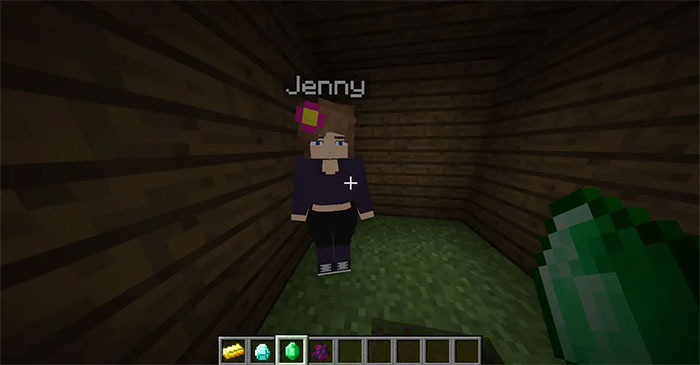
If an adult user nevertheless evaluates an unofficial mod, the minimum technical information should include:
- the exact Minecraft Java Edition version;
- the exact mod-loader name and version;
- required libraries or companion mods;
- a changelog tied to the downloaded file;
- a clear license and original distribution channel;
- recent reports from identifiable users or maintainers.
If those details are missing or contradict one another, do not install the file. Minecraft Support explicitly warns that Java modding is not officially supported, can be complex, and may make the game malfunction or become unplayable.
Protect worlds and accounts
- Back up the complete world folder before adding or removing any mod.
- Use a separate Minecraft installation and a new test world, not a valuable save.
- Keep Java, the operating system, the launcher, and security software updated.
- Do not run the game or installer as an administrator merely because a download page says to do so.
- Do not reuse account passwords in launchers or utilities. Prefer the official Minecraft Launcher and Microsoft sign-in flow.
- Keep adult modifications away from shared family accounts, synced folders, public servers, recordings, and school or workplace devices.
How to remove a problematic mod
If Minecraft stopped working immediately after an unofficial mod was added, close the game and launcher. Move the suspect file out of the profile's mods folder without opening it, then start the same game profile again. If the world depends on modded content, do not save over the only copy; restore a pre-installation backup instead.
If the file used a separate installer, requested elevated privileges, triggered a security warning, or caused unusual network or account activity, removing the .jar may not be sufficient. Disconnect the affected device if compromise is suspected, run a full scan with current security software, review startup applications and browser extensions, and change relevant passwords from a known-clean device. Revoke active Microsoft account sessions where appropriate.
Advice for parents and server owners
Minecraft's built-in communication and family settings do not inspect the contents of third-party Java mods. A child can therefore be exposed to adult mod content even when ordinary chat protections are enabled. Review the actual game profile, launcher installations, mods folder, downloaded files, and servers—not just the in-game settings.
Server owners should publish clear rules about client and server mods and enforce age-appropriate content. Mojang's usage guidelines require servers, entitlements, and advertising to be suitable for audiences of all ages; a private single-player modification should not be assumed acceptable on a shared Minecraft service.
Bottom line
Jenny Mod is not a normal companion add-on and should not be presented as a harmless or officially supported Minecraft feature. Its adult content makes it unsuitable for minors, and the fragmented unofficial distribution makes broad claims such as “safe if downloaded from a reputable site” impossible to substantiate. When provenance or compatibility cannot be verified, the safest decision is not to install it and to choose a well-documented, age-appropriate companion or NPC mod from a maintained community project instead.
Related Articles
 How to Download and Install Jenny Mod in Minecraft10 minutes read
 How to Download and Install Jenny Mod in Minecraft on Phone and4 minutes read
 Command to Die Without Losing Items in Minecraft7 minutes read
 How to Make Things in Minecraft Games6 minutes read
 What's New in Minecraft 1.21.3: What You Need to Know6 minutes read
 Minecraft: Top 5 Things to Avoid in Minecraft Hardcore4 minutes read
Reader Comments 0
Sign in with email or Google to join the discussion.