Table of Contents
3DP Chip is software that helps update computer drivers, making it easy for users to find and install the latest driver versions.
Updating drivers improves hardware performance and fixes system errors. 3DP Chip is the optimal solution for quickly finding and installing drivers, even when your computer is not connected to the internet.
Table of Contents:
1. Update drivers when the computer is connected to the internet .
2. When the computer is not connected to the internet .
nstructions for updating drivers using 3DP Chip for your computer
Step 1: First, you need to download and install 3DP Chip on your computer.
- You can download the latest version of 3DP Chip here.
- Installation: It's quite simple; you can follow the instructions.
Step 2: Launch the program with the following interface:
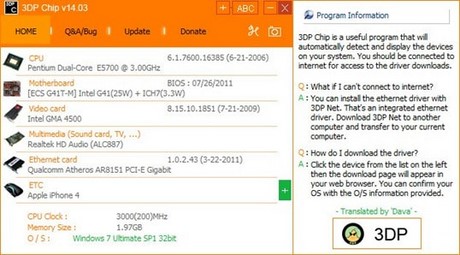
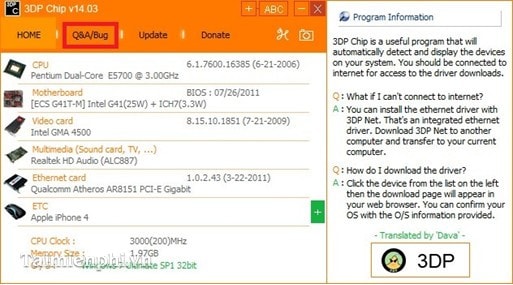
- The program will scan your computer system and list the built-in hardware devices and information about your operating system and computer memory usage below: O/S, Memory Size, CPU Clock, .
Update drivers using 3DP Chip when the computer is connected to the internet
To download drivers for a specific hardware component, click on the hardware information, select the appropriate operating system (XP, Win 7, Win 8, etc.), and choose the appropriate operating system (32-bit or 64-bit).
For example: To download the video card driver , click on the video card information on the main screen interface.
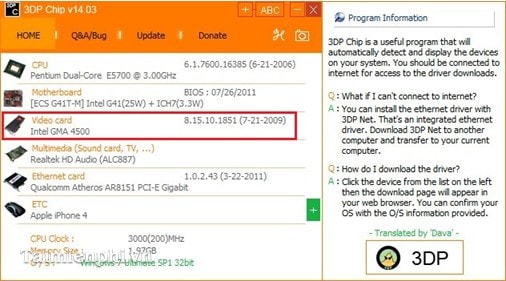
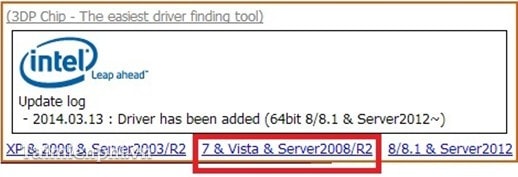
The program will connect to your web browser and display driver information. Select the operating system installed on your computer; in this example, my computer's operating system is Windows 7.
Next, select your computer's operating system version:
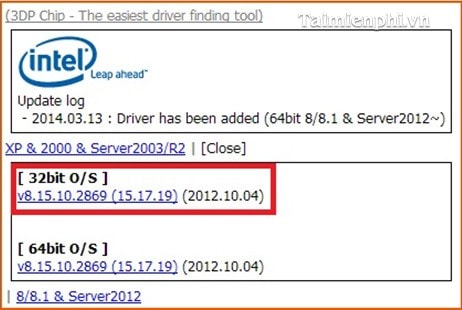
- Finally, wait for the driver to download and then install it.
Update drivers using 3DP Chip when the computer is not connected to the internet
- You can copy the download links for the drivers and download them later: Click on the ' Q&A/Bug ' section.
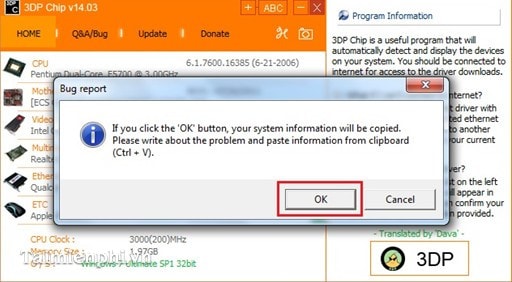
- Select OK :
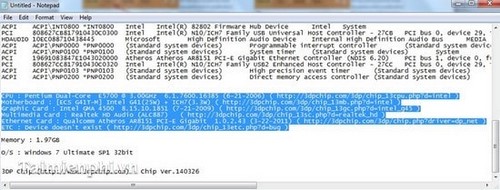
- Then open Word or Notepad and press PASTE (Ctrl + V) .
3DP Chip software helps users automatically download and install drivers for hardware devices such as graphics cards, sound cards, and motherboards. Additionally, updating to the latest drivers will help the computer run more stably, reducing blue screen errors, sound issues, or lag when playing games.
Related Articles
 How to Use 3DP Chip to Update or Install Missing Drivers for the Computer5 minutes read
 Install the Latest Driver with 3dp Chip4 minutes read
 How to Disassemble an Acer Aspire ES1-532G Laptop7 minutes read
 How to Automatically Download Drivers for Your Computer Using 3DP Chip3 minutes read
 How to Update Genuine Automatic Drivers for Dell Laptops5 minutes read
 Click: How to Find and Update Drivers11 minutes read
Reader Comments 0
Sign in with email or Google to join the discussion.