Table of Contents
This guide provides a clear, practical overview of tail command in Linux, with useful context, important details, and straightforward takeaways for everyday readers.
Tail Command Syntax in Linux
tail [OPTION]. [FILE].Consider two files, state.txt and capital.txt , containing all the names of India's respective states and capitals.
$ cat state.txt Andhra Pradesh Arunachal Pradesh Assam Bihar Chhattisgarh Goa Gujarat Haryana Himachal Pradesh Jammu and Kashmir Jharkhand Karnataka Kerala Madhya Pradesh Maharashtra Manipur Meghalaya Mizoram Nagaland Odisha Punjab Rajasthan Sikkim Tamil Nadu Telangana Tripura Uttar Pradesh Uttarakhand West BengalWithout any options, only the last 10 lines of the specified file are displayed. For example:
$ tail state.txt Odisha Punjab Rajasthan Sikkim Tamil Nadu Telangana Tripura Uttar Pradesh Uttarakhand West BengalTail Command Options in Linux
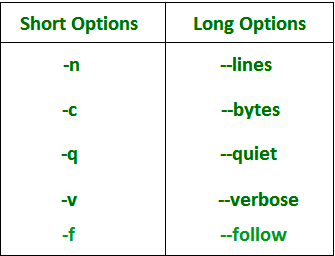
1. -n num
Prints the last 'num' lines instead of the last 10. "num" is required to be specified in the command, otherwise it will display an error. This command can also be written without the 'n' character, but the '-' is required.
$ tail -n 3 state.txt Uttar Pradesh Uttarakhand West Bengal OR $ tail -3 state.txt Uttar Pradesh Uttarakhand West BengalThe tail command also comes with a '+' option not included in the head command. With this option, the tail command will print data starting from the specified number of lines of the file instead of the last lines in the file. For the command: tail + n name_file , data will start printing from line number 'n' until the end of the specified file.
$ tail +25 state.txt Telangana Tripura Uttar Pradesh Uttarakhand West Bengal2. -c num
Prints the last 'num' bytes from the specified file. The new line counts as a single character, so if the tail prints a new line, it counts as one byte. In this option, it is imperative to write -c followed by a positive or negative num depending on the requirement. With + num , it displays all data after omitting num bytes from the beginning of the specified file and with -num it shows the last num bytes from the specified file.
Note : Without a positive or negative sign before num, the command will display the last num byte from the specified file.
With negative num $ tail -c -6 state.txt Bengal OR $ tail -c 6 state.txt Bengal With positive num $ tail -c +263 state.txt Nadu Telangana Tripura Uttar Pradesh Uttarakhand3. -q
It is used if there is more than 1 file. Because of this command, the filename is no longer preceded by data from each file.
Without using -q option $ tail state.txt capital.txt state.txt Odisha Punjab Rajasthan Sikkim Tamil Nadu Telangana Tripura Uttar Pradesh Uttarakhand West Bengal capital.txt Dispur Patna Raipur Panaji Gandhinagar Chandigarh Shimla Srinagar Ranchi With using -q option $ tail -q state.txt capital.txt Odisha Punjab Rajasthan Sikkim Tamil Nadu Telangana Tripura Uttar Pradesh Uttarakhand West BengalDispur Patna Raipur Panaji Gandhinagar Chandigarh Shimla Srinagar Ranchi Bengaluru4. -f
This option is mainly used by system administrators to monitor the development of log files written by multiple Unix programs while they are running. This option displays the last 10 lines of the file and will update as new lines are added.
As new rows are recorded in the log, the console will update the new rows. The prompt does not return even after the job ends, so the interrupt key must be used to cancel the command. In general, applications log error messages to log files. You can use the -f option to check for error messages as they appear in the log file.
$ tail -f logfile5. -v
By using this option, the filename is always preceded by the data from the specified file.
$ tail -v state.txt ==> state.txt <== Odisha Punjab Rajasthan Sikkim Tamil Nadu Telangana Tripura Uttar Pradesh Uttarakhand West Bengal6. –version
This option is used to display the tail version currently running on your system.
$ tail --version tail (GNU coreutils) 8.26 Packaged by Cygwin (8.26-1) Copyright (C) 2016 Free Software Foundation, Inc. License GPLv3+: GNU GPL version 3 or later . This is free software: you are free to change and redistribute it. There is NO WARRANTY, to the extent permitted by law. Written by Paul Rubin, David MacKenzie, Ian Lance Taylor, and Jim Meyering.- The dd command in Linux
Tail command applications
1. How to use tail with pipe (|)
The tail command can be combined with many other Unix commands. In the following example, the output of the tail command is given as input to the sort command with the -r option to sort the last 7 states coming from the state.txt file in reverse order.
$ tail -n 7 state.txt Sikkim Tamil Nadu Telangana Tripura Uttar Pradesh Uttarakhand West Bengal $ tail -n 7 state.txt | sort -r West Bengal Uttarakhand Uttar Pradesh Tripura Telangana Tamil Nadu SikkimIt can also be hooked up to one or more filters for additional processing. Like in the following example, we are using the cat, head, tail command and its output is stored in the file name list.txt with > .
$ cat state.txt | head -n 20 | tail -n 5 > list.txt $ cat list.txt Manipur Meghalaya Mizoram Nagaland OdishaWhat's going on in this command, try to discover it. The cat command first provides all the data that is in the state.txt file and then pipe converts all the output from the cat command to the head command . The head command supplies all of the data from the head (line 1) to line 20 and passes all output from the head command to the tail command . Now, the tail command gives the last 5 lines of data, and the output passes the file name list.txt via the directive operator.
2. Print the lines between lines M and N
For this purpose, you will have to use the head, tail, and pipe (|) commands. The command is: head -M file_name | tail - (MN) , since the first line is M and the tail command cuts the lines in the range M through N, starting at the end. Assuming that from state.txt file, you have to print lines 10 through 20.
$ head -n 20 state.txt | tail -10 Jharkhand Karnataka Kerala Madhya Pradesh Maharashtra Manipur Meghalaya Mizoram Nagaland OdishaKey Takeaways
Use the information above as a practical reference for tail command in Linux. Review each step carefully, confirm any requirements, and choose the option that best fits your situation.
FAQ
What does this guide explain about Tail Command in Linux?
It explains the main concepts, practical considerations, and useful steps related to tail command in Linux without requiring advanced knowledge.
Who can benefit from learning about Tail Command in Linux?
This information is useful for readers who want a clear overview, practical guidance, and reliable steps related to tail command in Linux.
What should I check before applying this information?
Review the requirements, confirm that your device, software, or situation matches the instructions, and back up important data before making major changes.
Related Articles
 How to Use the Which Command in Linux8 minutes read
 Linux Command: 20+ Essential Linux Security Commands9 minutes read
 Funny Command: 14 Interesting Linux Commands in Terminal8 minutes read
 How to Use the Stat Command on Linux7 minutes read
 Basic Linux Commands Everyone Needs to Know29 minutes read
 18 Interesting Linux Commands in Terminal11 minutes read
Reader Comments 0
Sign in with email or Google to join the discussion.