Table of Contents
This step-by-step guide explains how to speed up graphics cards for old laptops. It covers the required setup, the main actions, and the checks that help prevent common problems.
The IBM ThinkPad T40 and T41 laptops are still popular with consumers because of their durability Photo: Sina. Com
1. Download the necessary software: Start by downloading the latest Catalyst driver from ATI's website here. Note to select the correct operating system on your computer. If you still find your graphics card in the list, you are still supported. If not, you download the product of the same type. Next, download Microsoft XML Core Services 4. 0 here. Perform installation after downloading MSXML 4. 0. To finish, download the DH Driver Modder driver editing software here. Extract ZIP file to a separate folder. 2. Steps to proceed: With Windows Vista, you need to turn off user checking (User Account Control - UAC) and restart the computer. Although this is Vista's security feature, users complain and often turn it off. However, you can turn it back on after the driver editing process is complete. You then run the Catalyst Driver file downloaded from the ATI site. Follow the process according to the instructions on the screen, when the software fills the file to the hard drive, ask if it is installed on the system again, then stop the installation (Cancel). At that time, the entire driver package is in the folder (folder) in the form: C: ATISUPPORT8-2_vista32_dd_ccc_wdm_enu_xxxxxDriver (where the number xxxxx is the driver version).
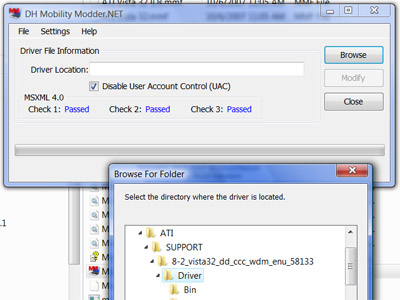 DH Driver Modder ( Screenshot ).
Run DH Driver Modder software. Select the Browse button to select the folder containing the new Catalyst Driver files to be extracted. Then select Modify button to proceed to edit the necessary files. When the editing process is finished, exit the DH Driver Modder software. Switch to the folder containing the Catalyst Driver installer (C: ATISUPPORT8-2_vista32_dd_ccc_wdm_enu_xxxxxDriver), select the Setup. EXE file to run. When installed, Windows will warn this driver is not certified. You only need to accept the installation. When the installation process finishes, restart your computer and enjoy the performance tweaking utility with your graphics card.
FAQ
What should I check before following these steps?
Confirm device and software compatibility, save important data, and make sure you have the required permissions, files, and account access.
Why might the process not work?
Common causes include outdated software, missing permissions, incompatible hardware, an unstable connection, or completing a step in the wrong order.
Can I undo the changes if necessary?
That depends on the tool or setting. Use built-in restore options when available, keep a backup, and record the original configuration first.
Related Articles
 List of the Best Graphics Cards According to the Price Segment14 minutes read
 5 Laptops Can Replace Desktop Computers6 minutes read
 HP Laptops Are 'Cheap' Because of NVIDIA Graphics Cards3 minutes read
 How to Speed up Onboard Graphics Card on Window7 minutes read
 Choosing a Computer Graphics Card7 minutes read
 How to Distinguish Between High-performance Cards7 minutes read
Reader Comments 0
Sign in with email or Google to join the discussion.