Table of Contents
The safest way to locate Pokémon is to use Pokémon GO's own Nearby or Sightings view, then combine it with events, Incense, Lure Modules and a safe walking route. The community maps listed in early versions of this article were launch-era services and should not be assumed to provide current, authorized spawn data.
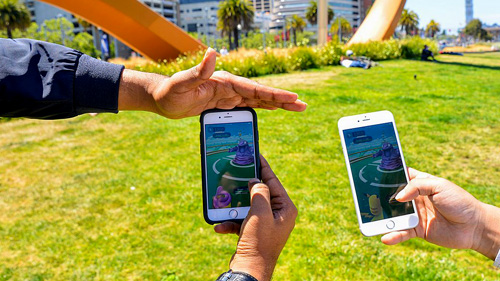
Use the Nearby view
Open the Nearby panel from the map to see available Pokémon information. When a Pokémon is associated with a PokéStop, select it to view the relevant Photo Disc and follow the in-game map indicator. If the Pokémon disappears from Nearby, its encounter may have ended or the game may have refreshed the area.
In areas without enough PokéStops, the game may show a less precise Sightings-style list. This indicates that a species is in the surrounding area but may not identify an exact point.
Check events and seasonal spawns
Community Days, Spotlight Hours, themed events and seasons can make particular species or types easier to find. Read the in-game event details for the local start time, habitat information and whether the Pokémon is in the wild, raids, Research or Eggs.
A species described as rare in a 2016 map may be common during a later event, while another may be unavailable in the wild. Current event information is more useful than a permanent “rare Pokémon location” list.
Use Incense and Lure Modules
Incense attracts encounters to the Trainer for a limited time. Movement and the specific Incense or event may influence results. A Lure Module is placed on a PokéStop and attracts Pokémon for nearby players; special Lures can feature particular themes and support selected evolutions.
Neither item guarantees one named species unless the event or item description explicitly says so. Use them where you can remain safely and legally.
Look beyond wild spawns
If a species is not appearing nearby, check other encounter sources:
- Field, Special and Timed Research rewards.
- Raid and Max Battle rotations.
- Team GO Rocket encounters.
- GO Battle League rewards.
- Egg hatch pools.
- Routes, Daily Adventure Incense or other feature-specific encounters.
- Trades with another Trainer.
Availability changes, and some Pokémon are regional or limited to particular events. Confirm the source before spending a Raid Pass, Incubator or other limited item.
Why old crowd-sourced spawn maps are unreliable
The following screenshots show early websites that collected or scanned reports of Pokémon locations. Services such as Pokecrew and local Google Maps were created around the game's launch and may be offline, inaccurate or based on data collection methods no longer supported.
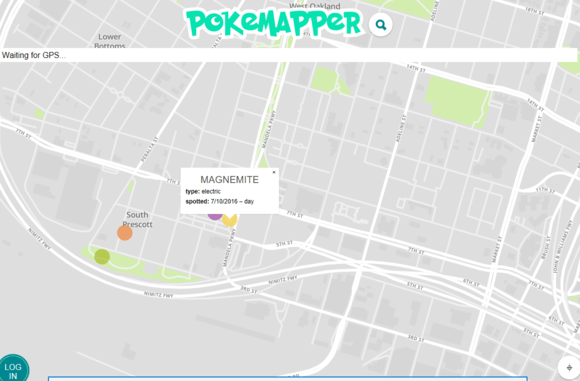
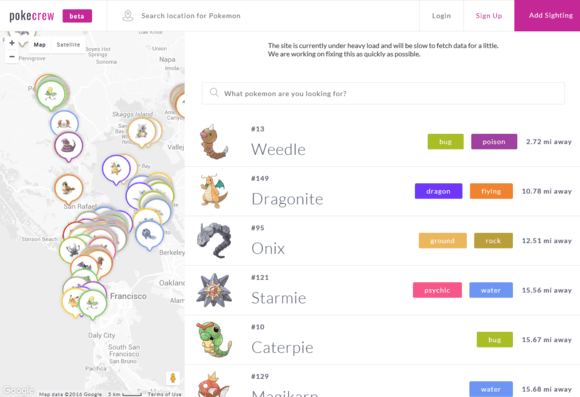
Do not give an unofficial map your Pokémon GO password, verification code or account token. Avoid tools that automate scanning, spoof location or require modified game software. A community map based on manual reports may still be outdated by the time you arrive.
How to search for a specific Pokémon
- Check the current event and season announcements.
- Review Nearby whenever you enter an active area.
- Look at raid, Research and Egg pools if the species is not a normal wild spawn.
- Use a trusted local community to coordinate public raids or share manual sightings.
- Consider a legitimate trade when the species is regional or no longer available.
Location safety comes first
- Do not play while driving or cross a road while looking at the screen.
- Respect private property, opening hours and restricted areas.
- Do not approach water, rail lines, construction or isolated locations for a spawn.
- Meet unfamiliar players in public and avoid sharing a home address or routine.
- Remember that a displayed PokéStop does not guarantee public access.
A nearby indicator is an invitation to check the map, not to ignore the real environment. If the route is unsafe or inaccessible, let the encounter go and use another legitimate source later.
Related Articles
 How to Find Nearby Pokémon from Home4 minutes read
 How to Own the 'Pokémon' in Pokémon GO?6 minutes read
 How to Use GoChat in Pokémon GO5 minutes read
 What Will You Do When There Are Multiple Pokémon in Pokémon GO?5 minutes read
 Pokémon Systems When Fighting in Pokémon GO13 minutes read
 10 Tips to Become a Better Pokémon GO Trainer6 minutes read
Reader Comments 0
Sign in with email or Google to join the discussion.