Table of Contents
Recover Photos and Data with Transcend Card Reader is easier to understand when the core ideas are paired with practical examples. The sections below explain the topic clearly, highlight useful steps, and point out details that can prevent common errors.
Previous files and images that you delete on a digital camera memory card can be recovered quickly thanks to P8's Photo Recovery Tool. That's Transcend's versatile USB P8 card reader .
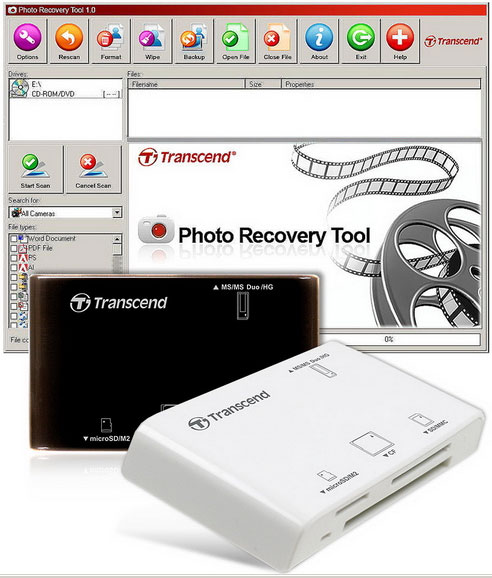
This extremely handy software has a user-friendly interface, easy to use, allowing you to find very deep inside the memory card to find traces of recoverable files. In addition to restoring deleted photos, Photo Recovery Tool also recovers documents, videos, spreadsheets, music and other digital file formats. The USB P8 memory card reader is compatible with many high-speed Ultra DMA data transfer modes, ensuring the best compatibility and fastest speed, especially with Transcend's CompactFlash Ultra-Speed 300X memory card. P8 works with almost all popular memory card formats, including CF, SD, SDHC, MMC, MMCplus, RS-MMC, MMCmobile, microSD, microSDHC and Memory Stick. In addition, it also supports miniSD, miniSDHC and MMCmicro with the adapter. Currently the product has 2 black and white versions.
FAQ
What is Recover Photos and Data with Transcend Card Reader?
Previous files and images that you delete on a digital camera memory card can be recovered quickly thanks to P8's Photo Recovery Tool.
Why is Recover Photos and Data with Transcend Card Reader important?
A clear understanding of Recover Photos and Data with Transcend Card Reader helps you make informed decisions, avoid common mistakes, and use the relevant tools or techniques more effectively.
How should beginners approach Recover Photos and Data with Transcend Card Reader?
Start with the fundamental concepts, follow the examples step by step, and test each change in a safe environment before applying it to important systems or data.
Related Articles
 How to Remove Write Protection on a Transcend Microsd Card8 minutes read
 How to Recover Photos from SD Memory Card: Practical Guide10 minutes read
 How to Recover Data from Memory Cards: Step-by-Step Guide6 minutes read
 10 Quality Memory Card Readers Used by Many People7 minutes read
 How to Repair a Corrupted Memory Card: Step-by-Step Guide10 minutes read
 How Professional Companies Recover Data on Memory Cards3 minutes read
Reader Comments 0
Sign in with email or Google to join the discussion.