Table of Contents
The sections below explain invite any data recovery - software that helps recover lost data on in a clear and practical way. Review the key details, examples, and considerations before applying the information.
Outstanding features of Any Data Recovery:
- Support over 550 different file types on Mac.
How Invite Any Data Recovery - Software That Helps Recover Lost Data on Works
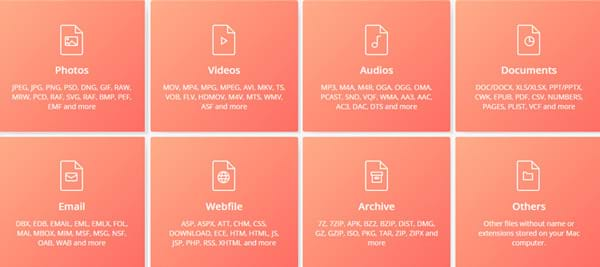
- Support data recovery due to many reasons such as hardware errors, software errors, virus attacks, sudden power outages, users accidentally delete.
- Support multiple devices.
- Allows preview in real time.
- 100% safe and easy to use with just 3 easy steps.

Developer Tenorshare has a one-month free donation program using Any Data Recovery on the occasion of the upcoming Christmas. If you need to use it, please register quickly before the promotion period ends.
Instructions for getting a free month of using Any Data Recovery
Step 1: Visit the link below and click LIMITED-TIME FREE.
- Any Data Recovery for Mac - Best Mac Data Recovery Software

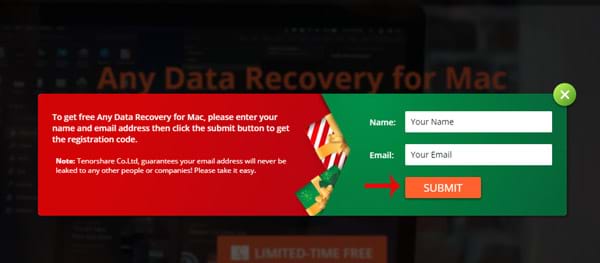
Step 2: Enter your name and email to receive the activation code, download link to install package.
Step 3: Download and install Any Data Recovery.
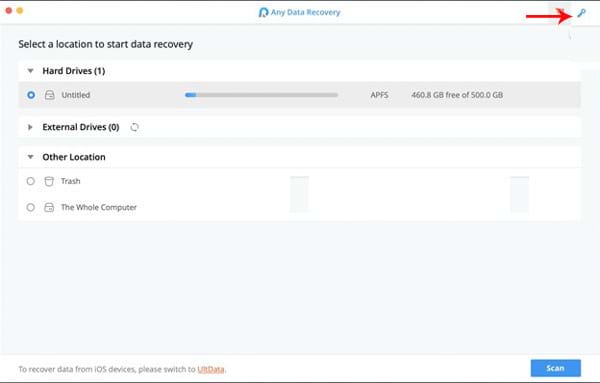
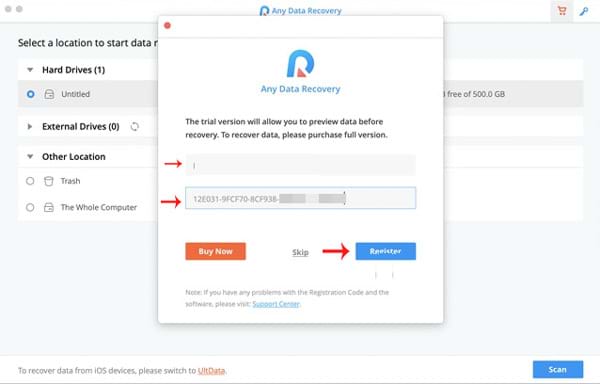
Step 4: Launch the app -> click the lock icon -> enter the email and activation code received in step 2 -> click the Register button to confirm it is done.
- 6-month offers for Avira Phantom VPN Pro (multi-platform) cost $ 54, free
- Invite to download WallPix, application download wallpaper worth 162,000 VND, being free
- Download Weather Forecast Pro, the 83,000 VND real-time weather forecast, which is free
FAQ
What is the main benefit of invite any data recovery - software that helps recover lost data on?
The main benefit is a clearer understanding of the topic and a practical way to apply the information covered in this guide.
What should I check before using invite any data recovery - software that helps recover lost data on?
Confirm compatibility, review the required settings, protect important data, and use the latest supported version whenever possible.
What should I do if the result is different?
Repeat the steps carefully, verify permissions and version differences, and consult the product's official support documentation for changes not shown in the article.
Related Articles
 Invite to Download Iboysoft Data Recovery Professional, the Lost4 minutes read
 Download Omni Recover 2, the iPhone Data Recovery Software for $4 minutes read
 SSD Hard Drive: Recover Lost Data on SSD7 minutes read
 Recover Lost Data Using Handy Recovery Software3 minutes read
 Instructions to Recover Lost Data Using Recover My Files Software2 minutes read
 Free License Aiseesoft Data Recovery Data Recovery Software9 minutes read
Reader Comments 0
Sign in with email or Google to join the discussion.