Table of Contents
Unfortunately, OpenAI doesn't leave much of a clue as to why your account was blocked. So what should you do to unblock ChatGPT?
Getting blocked from your ChatGPT account is frustrating, especially when OpenAI has just released powerful updates that you've been dying to try out. Instead of seeing the familiar chat window, you get the dreaded message: "Sorry, you've been blocked."
Unfortunately, OpenAI doesn't leave much of a clue as to why your account was blocked. So, what should you do to unblock ChatGPT? Find out the answer in This guide!
Why was your OpenAI account blocked?
Your ChatGPT account may be blocked for one or more reasons.
Multiple logins
If you can't log in to your ChatGPT account after multiple attempts, OpenAI may have restricted your access. This helps prevent unauthorized users from trying to use your account. However, you will also be locked out if you enter the wrong password too many times.
Tip : If your account is blocked after several consecutive login attempts, reset your password and try logging in again.
Using a blocked VPN
There is nothing wrong with accessing ChatGPT using a VPN. However, some VPNs are used by hackers to conduct illegal activities. OpenAI filters the IP addresses that use its service. If you connect to a suspicious VPN, your access to ChatGPT will be blocked.
Create an account for another user
You can create multiple accounts for yourself, but please ensure they comply with OpenAI's terms of use. However, OpenAI warns users not to share their login credentials with others. As the account owner, you are responsible for the proper use of your account.
To use ChatGPT on behalf of another person or entity, you must also have the authority to accept OpenAI's Terms of Use on their behalf.
Engage in behavior that poses a risk to other users
ChatGPT is a great tool for experimenting with new ideas – writing code, composing song lyrics, completing assignments, etc. However, the platform prohibits behavior that puts other users at risk. For example, ChatGPT blocks users when it detects attempts to create illegal, fraudulent, or abusive content. Unlike accidental mistakes like forgetting a password, it is difficult to recover a banned account if you violate ChatGPT's terms of use.
Blocked by third-party organizations
Some organizations may impose restrictions on ChatGPT. For example, schools may disallow access to ChatGPT to prevent cheating on assignments and tests. Similarly, some companies block ChatGPT in the workplace to prevent sensitive information from being used to train AI chatbots.
Misconfigured firewalls and antivirus software
Sometimes ChatGPT displays the message "Sorry, you're blocked" because your firewall or antivirus software is interrupting the connection. If this is the case, simply close the application and ChatGPT will be unblocked again.
Countries that ban ChatGPT
Some countries have blocked ChatGPT for political reasons and concerns about the unregulated use of AI. In these countries, you cannot access ChatGPT due to restrictions imposed by your Internet Service Provider (ISP):
- Russia
- China
- Chosen
- Cuba
- Iran
- Syria
- IDEA
This list may not be exhaustive, as regulations may vary in some countries and territories.
How to unblock ChatGPT account
Can you unblock your ChatGPT account? It depends on the reason and severity of your account being restricted. You will need to try a few methods before you can restore access to ChatGPT.
Reset password
A simple password reset can restore your account if the restriction is due to a failed login. Here's how to reset your ChatGPT password:
- Visit Chat.openai.com
- Click Log in .
- Enter your email address and click Continue.
- Click Forgot Password?
- Confirm your email address and click Continue.
- Click Begin Puzzle To complete the puzzle to verify you're not a bot.
- Check your email for password reset instructions.
You will then be able to log in to ChatGPT with your new password.
Contact OpenAI support
If resetting your password doesn't unlock ChatGPT, you may have violated OpenAI's terms and conditions - either intentionally or unintentionally. Instead of guessing why, contact OpenAI's support team to clarify the issue. To do so, follow these steps.
- Visit help.openai.com
- Click the chat icon in the bottom right corner.
- Select Messages > Send us a message .
- A bot will guide you through a series of questions. Once you've exhausted all your options, click Provide Feedback > General Feedback .
- Notice that your account has been locked and request clarification.
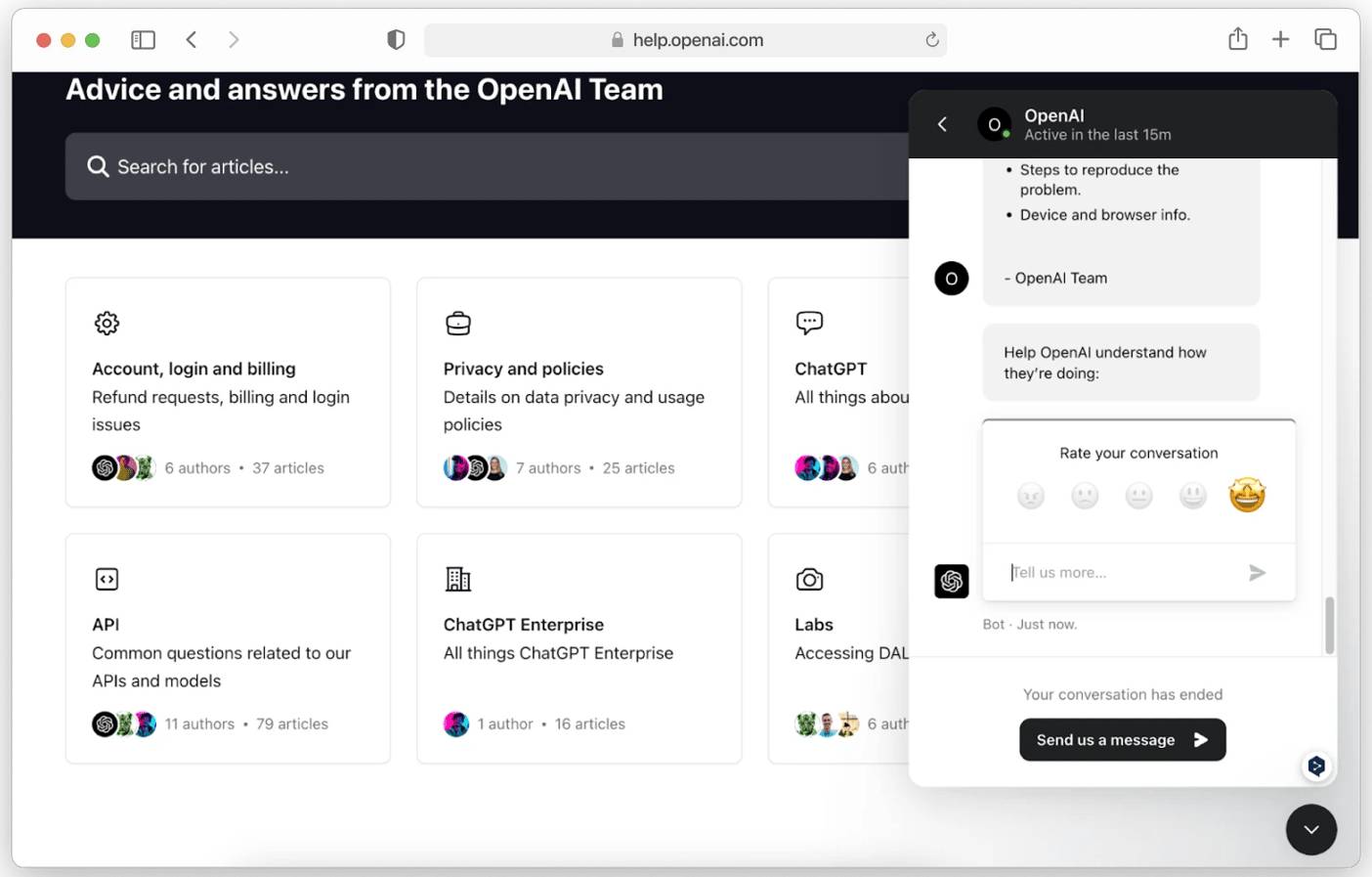
The problem with this method is that you may have to wait a few days before OpenAI support responds. Try the other steps below if you can't wait to unlock ChatGPT.
Update your browser
Browser issues, such as incompatible plugins, can prevent you from accessing ChatGPT. To make sure your browser isn't the culprit blocking ChatGPT, try the following:
- Use an updated version of Safari, Firefox, or Chrome when accessing ChatGPT.
- Try enabling incognito mode to prevent incompatible plugins from blocking access.
- Clear your browser cache to remove malicious cookies that may block your ChatGPT account.
Change DNS
If you're restricted by your ISP, changing your DNS may restore your access to ChatGPT. Here's how to change your DNS on your Mac.
- Click the Apple Menu and select System Settings .
- Click Network And select the Network Interface you use on the tab.
- Click Details > DNS .
- Click the + Button and add Google DNS servers as follows:
- 8.8.8.8
- 8.8.4.4
- 2001:4860:4860::8888
- 2001:4860:4860::8844
- Click OK > Apply .
- Log in to your ChatGPT account.
Use a proxy server
Another way to bypass ChatGPT blocks imposed by your school, company, or ISP is to use a proxy server. Proxy servers hide your IP address so you can bypass restrictions targeted at specific IP addresses.
You can use a proxy server from a proxy provider. There are free services, but paid services usually offer better speed, reliability, and security. Once you sign up, the provider will provide you with the server's address and port number. Note that the server must be located in a location where ChatGPT is allowed.
Here's how to connect to a proxy server on your Mac.
- Click the Apple icon > System Settings .
- Select Network And WiFi you are connected to.
- Select Proxies On the tab.
- Select protocol (HTTP/HTTPS) and enter proxy server details.
ChatGPT will then be available.
Use a VPN
Currently, proxy servers cannot unblock ChatGPT if you are restricted by measures that target both your IP and web traffic. For example, proxy servers are not enough to bypass internet censorship in countries like China.
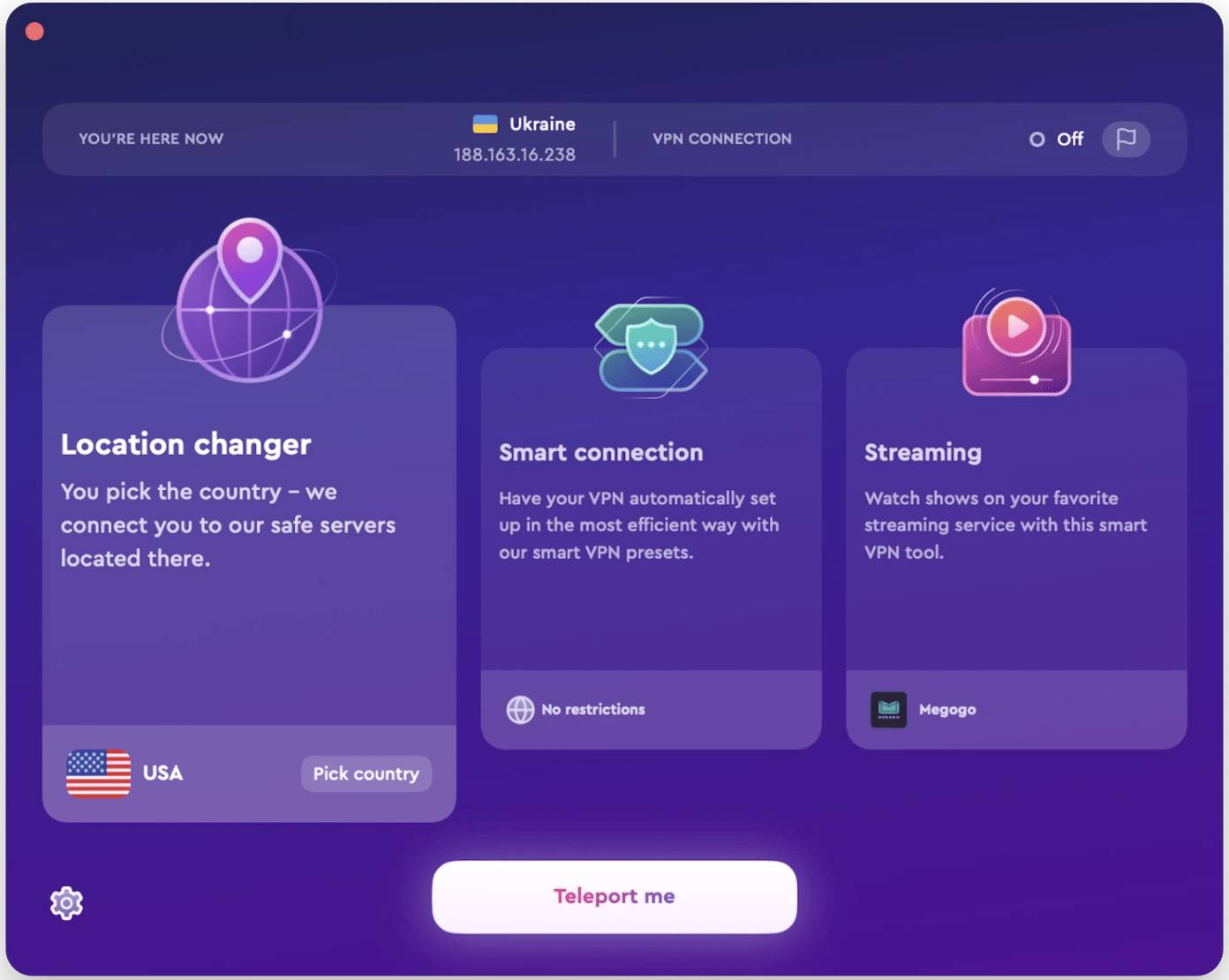
To access the chatbot, use ClearVPN or another reputable VPN service. In addition to changing your IP address, VPNs also encrypt your connection to bypass censorship firewalls, allowing you to access ChatGPT from anywhere.
Here's how to use ClearVPN to unblock ChatGPT.
- Install ClearVPN from Setapp and open the app.
- Select Location Changer .
- Select a country that supports ChatGPT.
- Open and log in to ChatGPT.
FAQ
Why Your ChatGPT Account Is Blocked: Causes and Solutions?
In practical terms, unfortunately, OpenAI doesn't leave much of a clue as to why your account was blocked. So what should you do to unblock ChatGPT.
What factors are most important?
The article highlights that your ChatGPT account may be blocked for one or more reasons.
What is the main takeaway?
The main takeaway is that multiple logins If you can't log in to your ChatGPT account after multiple attempts, OpenAI may have restricted your access.
Related Articles
 Why Has Your ChatGPT Account Suddenly Been Age-restricted: Key Reasons Explained7 minutes read
 Why Are Hackers Targeting Chatgpt Accounts?6 minutes read
 How to Register ChatGPT, Register Chat GPT Easiest, Most Detailed3 minutes read
 The Reasons Why You Are Banned in PUBG and PUBG Mobile7 minutes read
 6 Reasons to Use Claude Instead of ChatGPT7 minutes read
 Reasons Why Many People Uninstall ChatGPT Atlas: Explained8 minutes read
Reader Comments 0
Sign in with email or Google to join the discussion.