Table of Contents
Understanding quickly download the iPhone 50usd data recovery application that is is easier when the main points are organized clearly. This guide brings together the essential details and practical considerations.
If you need a solution to recover all kinds of lost data or accidentally delete from iOS devices, Stellar Phoenix Data Recovery for iPhone is a great choice. In addition to making it easy to retrieve messages, contacts, call logs, attachments, it also helps you recover notes, reminders, calendar and bookmarks in Safari deleted from iPhone.
How Quickly Download the iPhone 50USD Data Recovery Application That Is Works
Stellar Phoenix Data Recovery for iPhone supports iPhone X, 8 Plus, 8 and iOS 11. x, 10. x, 9. x, 8. x, 7. x, 6. x. versions. To own free data recovery application with license key, follow the instructions below.
Step 1 : Go to Giveawayoftheday promotion page and click Download now Button.
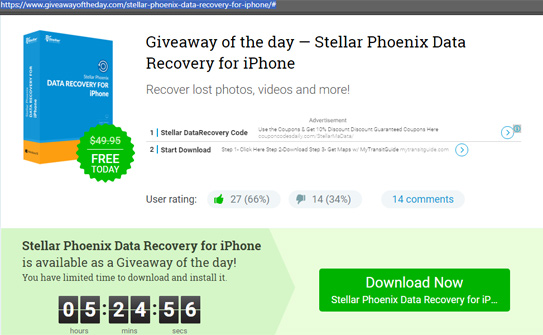
In the new window that appears, enter the email address in the Enter email address Here box To get the download address.

Step 2 : Install the app on the computer. Once completed, you visit here to register.

Step 3 : Open the email you registered to confirm, in the next email after confirmation you will receive the license key.
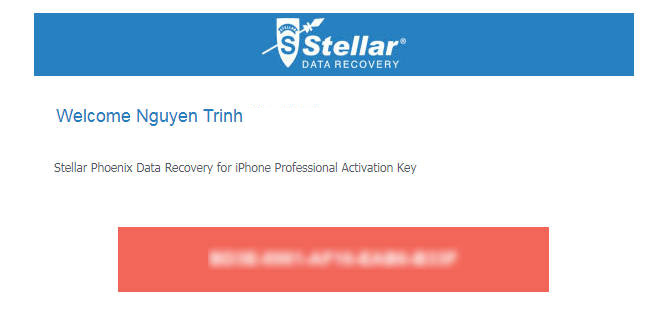
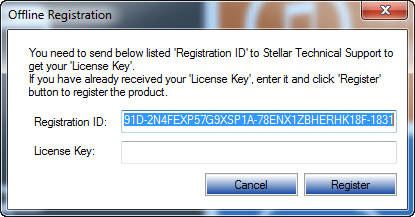
Step 4 : Run the app, click the three tiles in the upper left corner -> select Activation -> select I have a registration key -> select Offline key -> Enter the license key you received and click the Register Button is done.
- 9 best free Wi-Fi playback software in 2017 and download link
- Fast download HitFilm Express 2017 (149 USD) great video editing software is being free for a short time
- 10 apps that cost $ 26 are being free for iOS in a short time
- Download two PDF editing applications worth over 700 thousand free on Windows 10
FAQ
What is the main benefit of quickly download the iPhone 50usd data recovery application that is?
The main benefit is a clearer understanding of the topic and a practical way to apply the information covered in this guide.
What should I check before using quickly download the iPhone 50usd data recovery application that is?
Confirm compatibility, review the required settings, protect important data, and use the latest supported version whenever possible.
What should I do if the result is different?
Repeat the steps carefully, verify permissions and version differences, and consult the product's official support documentation for changes not shown in the article.
Related Articles
 Windows File Recovery: Microsoft's Free Data Recovery Application6 minutes read
 Invite to Download Iboysoft Data Recovery Professional, the Lost4 minutes read
 Tips to Recovery Data on iPhone, iPad, Ipod12 minutes read
 Download Omni Recover 2, the iPhone Data Recovery Software for $4 minutes read
 Effective Data Recovery Software on Computers16 minutes read
 Invite to Download Wallpix, Application Download Wallpaper Worth4 minutes read
Reader Comments 0
Sign in with email or Google to join the discussion.