Table of Contents
This article explores quickly receive softmaker office 2016 free license key (69.95 usd) with straightforward explanations and useful context. It also highlights common questions and important details to consider.
SoftMaker Office 2016 is compatible with all data formats of Microsoft Office and OpenOffice in many different languages, including four outstanding applications: TextMaker (Word document writing), PlanMaker (creating Excel spreadsheet), Presentations (PowerPoint presentation creation) and Thunderbird mail browser.
How Quickly Receive Softmaker Office 2016 Free License Key (69.95 USD) Works
If you have a need, please follow the instructions below to get the free license key of this office toolkit.
Step 1 : Download the correct version to install on your computer. Link to download SoftMaker Office software 2016.
Step 2 : Visit the softmaker. de page to register for free SoftMaker Office 2016 license. Here, you fill in the information about your name, country, email address.
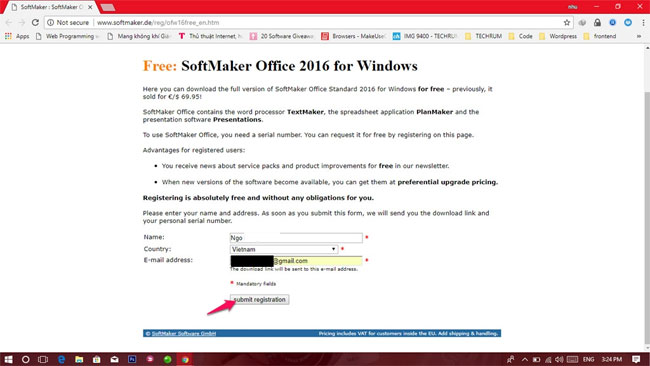
Step 3 : Open the email registered above to receive the license code.

Step 4 : Open one of the following three applications:
- TextMaker: Replace Word.
- PlanMaker: Replace Excel.
- Presentations: Replace PowerPoint.
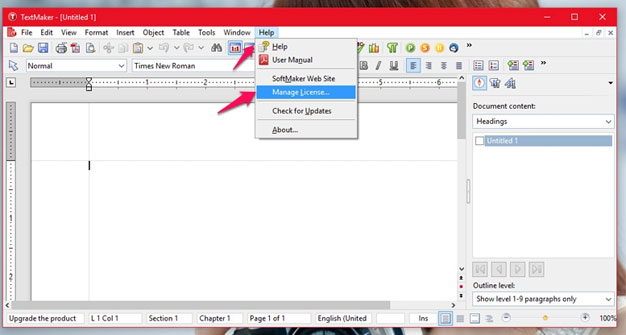
Then click Help On the toolbar -> select Manage License To enter the app License Key.
- 9 best free Wi-Fi playback software in 2017 and download link
- Quickly download 6 games that are free for a short time
- Quickly download the iPhone 50USD data recovery application that is free for a short time
- Top 15 free remote computer control tools
FAQ
What is the main benefit of quickly receive softmaker office 2016 free license key (69.95 usd)?
The main benefit is a clearer understanding of the topic and a practical way to apply the information covered in this guide.
What should I check before using quickly receive softmaker office 2016 free license key (69.95 usd)?
Confirm compatibility, review the required settings, protect important data, and use the latest supported version whenever possible.
What should I do if the result is different?
Repeat the steps carefully, verify permissions and version differences, and consult the product's official support documentation for changes not shown in the article.
Related Articles
 Download the $ 14.99 Softmaker Office NX Home Office Suite, Free of4 minutes read
 Free WPS Office 2016 License, Are You Ready? - Expired4 minutes read
 7 Good Choices Replace Microsoft Office10 minutes read
 Invite Neat Office Experience -- the $$ 199.99 Office Suite for3 minutes read
 How to Activate Office 2016 with a Product Key4 minutes read
 minutes read
Reader Comments 0
Sign in with email or Google to join the discussion.