Table of Contents
Use PeakWatch to train smarter, recover faster, sleep better, and feel healthier. Read the key facts, context, and practical takeaways.
Use PeakWatch to train smarter, recover faster, sleep better, and feel healthier.
What Is PeakWatch?
PeakWatch is an app that analyzes health data from HealthKit—heart rate, HRV, RHR, sleep, breathing—to show your recovery progress, exertion level, and personalized training recommendations.
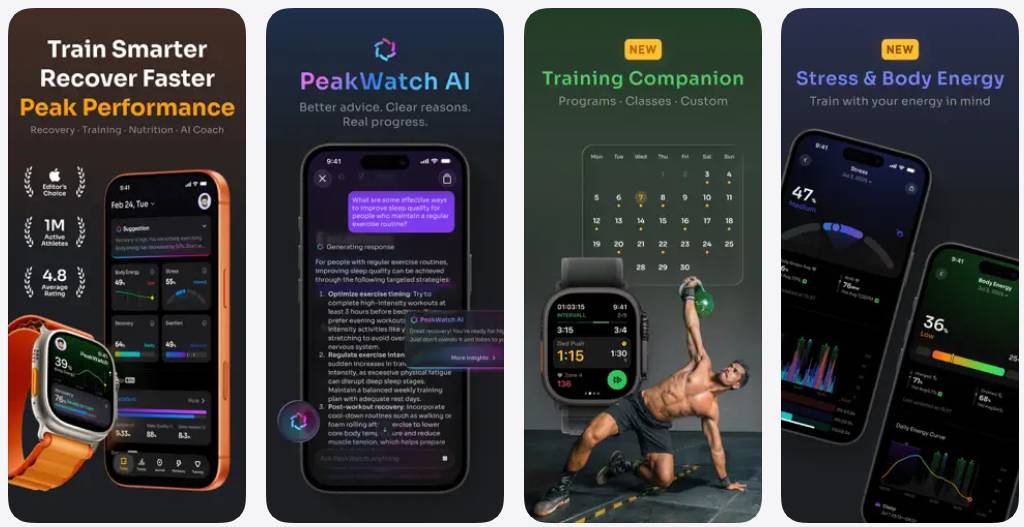
Key Features of PeakWatch
Artificial Intelligence (AI) Is Now Available in PeakWatch
Do you have questions about your recovery process, sleep quality, exertion levels, or recent performance? Just ask. Your data now comes with explanations, insights, and context.
Body Energy
A unique metric that combines Recovery, Sleep, Stress, and Pressure to track your accumulated energy levels throughout the day.
Stress
Understanding stress levels and the changes throughout the day, along with your body's energy.
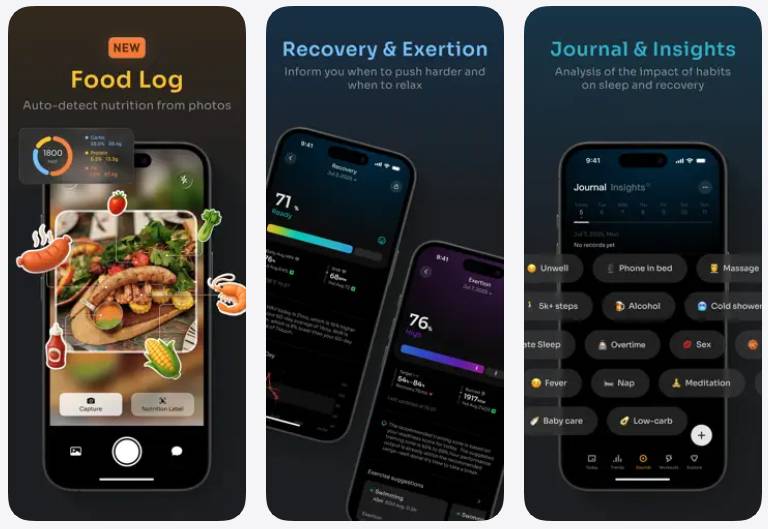
Recover
By analyzing your HRV and RHR, PeakWatch calculates your recovery state to guide you on whether you should train intensely or rest.
Intensity and Exercise
By analyzing continuous heart rate data, PeakWatch calculates cardiovascular load and suggests a target exercise range based on your recovery status. This helps prevent overtraining and injury while ensuring optimal results.
Food Diary
- You take a photo, then AI analyzes the calories and nutrients.
- Track macros, balance energy intake, and monitor daily consumption.
Discover Your Next Challenge
The all-new Explore tab brings a fresh energy boost to your workouts. Access over 100 curated workouts across HIIT, Hybrid, HYROX, and Strength modes – each expertly designed to suit your needs.
Create Your Own Exercises
Easily create your own custom workouts (AMRAP, EMOM, Interval, Open Gym, For Time), and share them with friends.
Balance Long-term Training
Explore dynamic charts displaying short-term and long-term exercise loads, helping you assess recovery, cardiovascular load, energy expenditure, heart rate recovery, and cardiovascular health.
Training Analysis
Delve into each exercise with color-coded heart rate zones, effort scores, aerobic and anaerobic insights, cardiovascular fitness, and the impact of exercise on HRV.
Journal: Focus on What Matters
PeakWatch reads your training history to extract different events and analyze how these events affect your recovery and sleep. You can also add events by selecting from the available event library or creating your own.
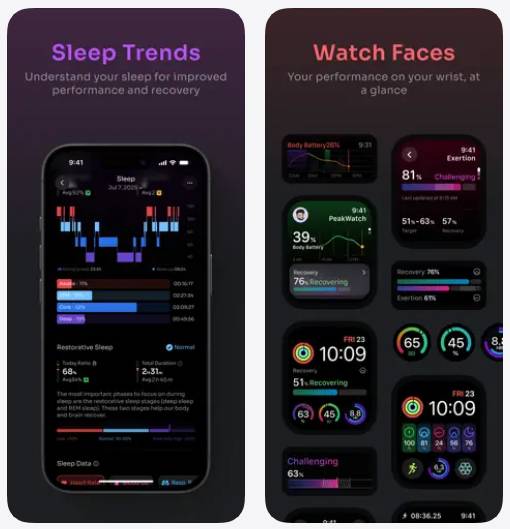
Detailed Information About Sleep Trends
Improve performance with a better understanding of your sleep. Track sleep stages, restorative sleep, sleep deprivation, consistency, HRV, heart rate, respiratory rate, and blood oxygen levels, all visually displayed in detailed charts.
Multiple Watch Face Options
Get a quick overview of your body's condition on your Apple Watch.
PeakWatch reads data from HealthKit. All health data is stored and processed locally on the device. PeakWatch is free to use, with the option to upgrade to PeakWatch PRO for advanced features (subscription automatically renews).
You can turn off auto-renewal in your Apple ID account settings. PRO subscription purchases will be charged to your Apple ID at the time of purchase confirmation. Subscriptions will automatically renew monthly or annually unless canceled at least 24 hours before the end of the current term. If canceled, the subscription remains active until the end of the current term, and any unused portion will not be refunded.
FAQ
What is the main point of peakwatch - ai personal trainer and rehabilitation?
Use PeakWatch to train smarter, recover faster, sleep better, and feel healthier. Read the key facts, context, and practical takeaways.
Why is this development important?
Key takeaway: Use PeakWatch to train smarter, recover faster, sleep better, and feel healthier.
What are the key takeaways?
Use PeakWatch to train smarter, recover faster, sleep better, and feel healthier.
Related Articles
 How to Type with 10 Fingers Using Typing Trainer5 minutes read
 AI Trainer - the Profession of the Future in the Era of Technology7 minutes read
 Robot Equipment to Improve Balance and Walking for Parkinson Patients5 minutes read
 Experience Training AI with Ninja Game, Do You Want to Try?3 minutes read
 10 Tips to Become a Better Pokémon GO Trainer6 minutes read
 How Valuable Is the User's Personal Data?4 minutes read
Reader Comments 0
Sign in with email or Google to join the discussion.